
Bluetooth Headphones don't work with After Effects CS6
Hi there, so, to let's pre-face this with the situation of my laptop's built in speakers.
About 4 years ago, my headphone plug got jammed and snapped in my laptop, so there is a small bit of an earphone jack inside the jack port. This disabled my built-in digital output, assumedly because the computer thought I always had my earphones plugged in. So, I've been going audioless for 4 years and using school computer for all my projects involving audio.
Fast-forward to today: my built-in output still won't work, but I got the idea of using Bluetooth headphones and BAM! They work! With everything except After Effects...
Yeah, when I try to use them in After Effects, I get nothing.
I did try changing the audio hardware by selecting my headphones...

But it doesn't work because once I try to use the RAM preview, it gives me this...
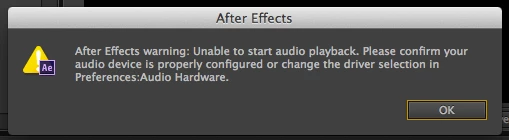
I have a Macbook Pro OS X Version 10.7.5
I am using After Effects CS6 and Skullcandy Hesh 2 wireless bluetooth headphones
When I am using them, I am sure to have the outout and sound effect default as my headphones.
So, what do I do?
 AdChoices