
Answered
Bounding Box Hide the Gap
In this Left & Right grip should hold the box, Bounding Box hides the gap between grip & box. Is there any way to switch off the grip Bounding Box temporarily?
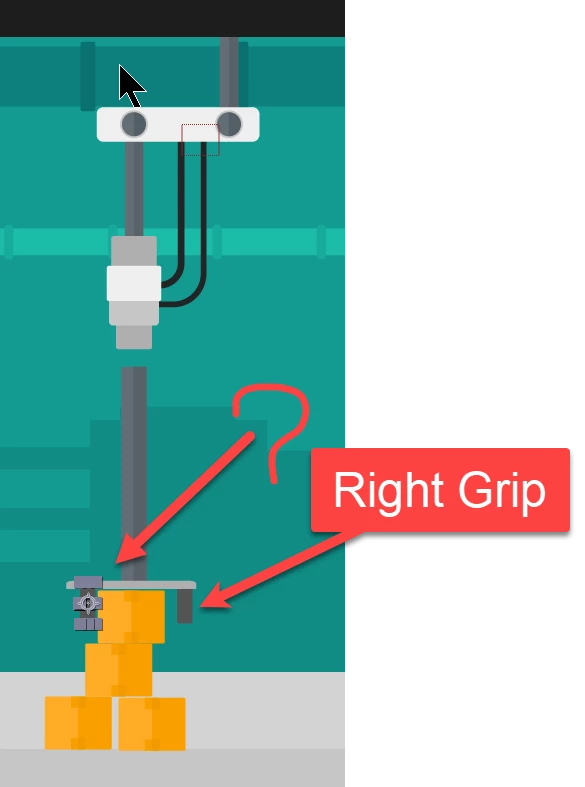

In this Left & Right grip should hold the box, Bounding Box hides the gap between grip & box. Is there any way to switch off the grip Bounding Box temporarily?
It did not work because tool is inactive. But I did in a different way: zoom in & proceed.
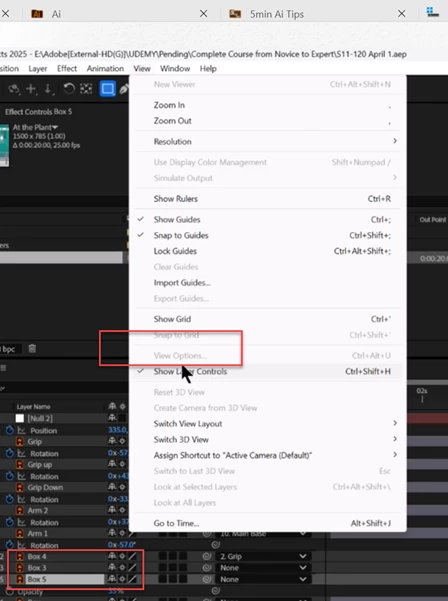

You need to highlight the Composition Panel. In the screenshot, the Timeline panel is highlighted. Click anywhere in the Composition panel to highlight it.
Let me know if that works.
Thanks,
Nishu
Already have an account? Login
Enter your E-mail address. We'll send you an e-mail with instructions to reset your password.
 AdChoices