
Inspiring
April 29, 2024
Question

Calculation of the angle of the text and its transparency, under the influence of the animator

  • April 29, 2024
  • 3 replies
  • 1861 views

Hi, I want to calculate the angle of a text layer and its transparency when an animator acts on it. I would like to do this dynamically, using a script or expressions.


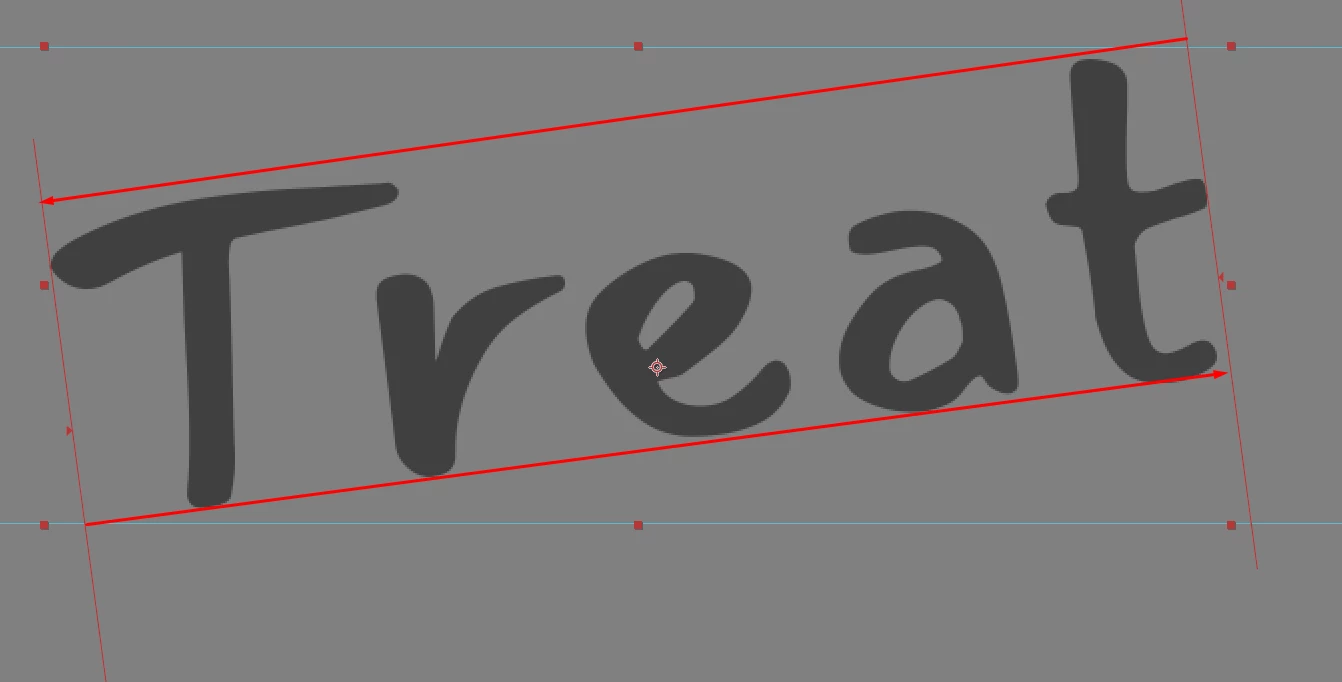
The bounding box calculation is not suitable because the animator does not change the angle of the layer. Its points are not movable.

I understand that there is no direct way, but perhaps someone has ideas on this matter?


This topic has been closed for replies.

3 replies

Mylenium
Legend
April 30, 2024

I think you misunderstand the problem. The data is not exposed anywhere and one would need to re-calculate it for every letter, word or whatever including the influences and cumulative values of each animator. This has nothing to do with the bounding box nor do the values necessarily linearly add up. You may be able to figure things out for a single animator, but as soon as you add a second one e.g. to add soem randomness to a fixed value, things get infinitely more complicated.


Mylenium

Community Expert
April 30, 2024

If you want to retrieve the angle of the text you must act on the data that is making the text move. If pressing the 'u' key twice does not reveal a rotation property that matches the angle of the text, you will have to retrieve all of the data from every animator that is acting on the text layer. As Mylenium said, combining everything that influences the layer in the proper order to calculate the angle is going to get complicated because of the render order. 

The only other way you could generate the angle would be to use sourceRectAtTime() to get the size of the text box and combine that with any scale factors acting on the size of the text before any animation takes place, and then calculate the angle of the hypotenuse and compare the change from the original box size to the current bounding box size. That would be a lot more code than I'm willing to fiddle with for an answer to a forum post. Dan Elberts could probably do it, but it would take me a lot of trial and error to get it working if I had a copy of your project files showing the problem.


Sharing the expression in your Expression Selector or better yet, sharing a simplified comp that shows the problem, we may be able to help you figure it out. 


It would also help if we knew how you were going to use the angle information. What do you want to drive with that value?  

Community Expert
May 1, 2024

Animators don't change the corners of the Bounding Box; they can resize it, but they don't rotate it. Therefore it is impossible to obtain the angle.


This expression will give you the angle of the text layer based only on the size of the frame around the text. I didn't go so far as to give you positive and negative rotation and calculate angles above 90º, but it should be possible. 

ref = thisComp.layer(index + 1);
sW = ref.sourceRectAtTime(inPoint).width;
sH = ref.sourceRectAtTime(inPoint).height;
cur = ref.sourceRectAtTime();
curSize = [cur.height, cur.width];
x = curSize[0];
y = curSize[1];
t = x - y;
strt = sH - sW;
end = sW - sH;
angl = linear(t, strt, end, 0, 90);
v = angl.toFixed(2);
v + "º"

The calculations assume that the text layer is horizontal at the start of the animation. If not, the workaround would probably require a recursive expression that looks for the timeline's minimum and maximum x and y values. If the comp is more than a couple of seconds long, the recursive searching for values could drastically increase render time. 


Again, how are you going to use this generated value? I just used it to control a text layer that is accurate to 2 decimal points.


I would bet if we could see your project, someone would be able to figure out how to generate that angle value accurately.


Mylenium
Legend
April 30, 2024

That's probably a hopeless case. In order to know how each animator affects a letter or word you would need to figure in the fall-offs and associated settings, potential other factors and of course for the rendered glyphs themselves you would need to account for baseline shift, em box size, spacing etc. to figure out where a pixel of the text or for that matter even a line is and derive any further info from it to calculate an angle. Rinse and repeat for any other property you need to calculate the effective value of. I can see no easy way to do it. You would have to re-create everything inside of the expressions and this could end up with a hundred lines of extra code and things being very slow.


Mylenium

HarchenkoAuthor
Inspiring
April 30, 2024

I don't need to know how each animator affects, I need to get the angle of the layer taking into account these effects.

If there are many animators working on a layer, I don't need a lot of code to calculate its size in pixels, because there is a Bounding Box.

I'm guessing there is some kind of mathematical solution to do this.

After effects itself calculates the angle of the animators, I marked the points for this on the screenshot, but there is no API way to get their data


Community Expert
April 29, 2024

A text animator will not rotate the entire line. You need to animate the Layer/Transform/Rotation property to rotate an entire word or line. This expression ties the Transform/Rotation property to the Transform/Opacity property, and you'll start seeing the layer when it rotates from -30º to horizontal:


r = transform.rotation;
linear(r, -30, 0, 0, 100);


If you want to tie the Layer/Animator/Rotation property to the layer Transorm/Opacity property to the text defined in the Advanced section of the Range Selector/Range options, add Opacity to the Layer/Animator and apply this expression to Layer/Animator 1/Opacity:


t = text.animator("Animator 1").selector("Range Selector 1").start
linear(t, 0, 100, 0, 100)


HarchenkoAuthor
Inspiring
April 29, 2024

Hi, I appreciate your response. But it has nothing to do with my question

Community Expert
April 29, 2024

Those expressions will calculate the angle and make a move. If you want the angle from a layer's Animator's rotation property and also reveal the opacity value, add a text layer and add this expression to the source text. 


ref = thisComp.layer(index +1);
r = ref.rotation;
Arot = -ref.text.animator("Animator 1").selector("Range Selector 1").start *.01 * ref.text.animator("Animator 1").property.rotation;
tA = Arot.toFixed(2);
OPas = ref.opacity;
"Text Layter Properties" + "\r" +
"Rotation: " + r + "º" + "\r" +
"Animator Rotation: " + tA + "º" + "\r" +
"Opacity: " + OPas + "%";


You get this:

You could also base the calculations on time and corner points of the text layer by using sourceRectAtTime(), setting different time values, and calculating the positions of the top-left corner vs the height and width over time.


It would help if you told us what you were trying to do.