Participant
August 15, 2017
Answered

Can After Effects take advantage of my gpu? (ATI Mobility Radeon 530v)

  • August 15, 2017
  • 1 reply
  • 17831 views

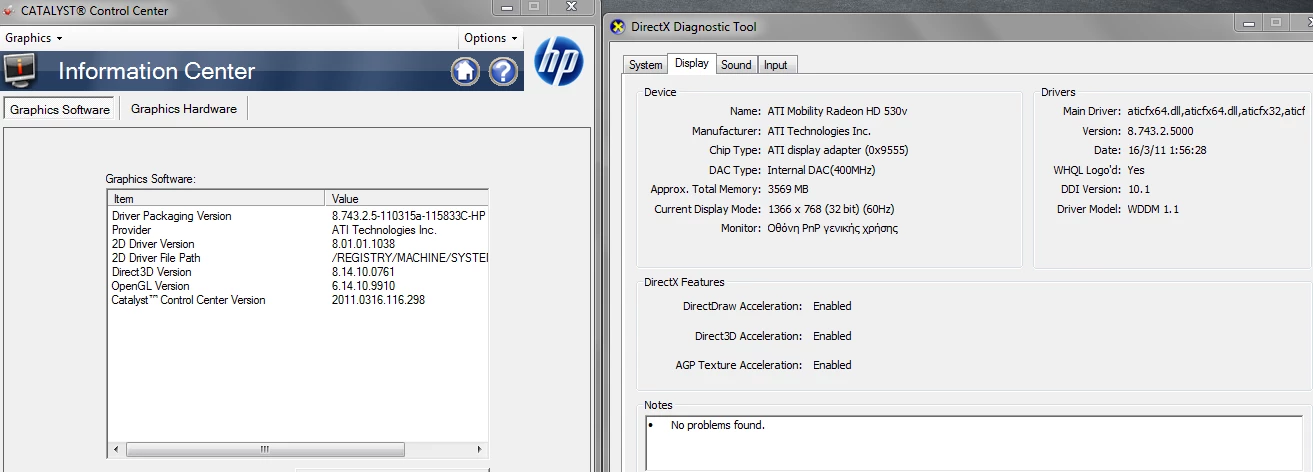
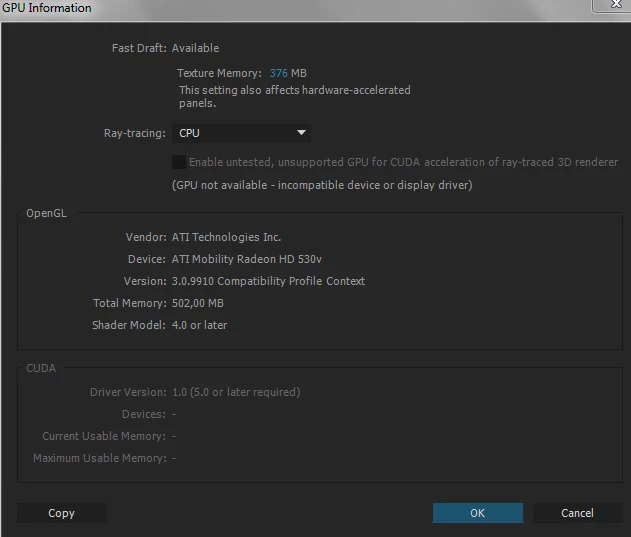
Here are the exact model of the gpu and the current drivers it runs with. As you can see After Effects cannot take advantage of it currently.

Some additional information of my sytem are:

  • Winowns 7 Ultimate 64 bit
  • After Effects cc 2015.0
This topic has been closed for replies.
Correct answer Szalam

After Effects can't use AMD GPUs to accelerate the ray-traced renderer as you are showing in your screenshot, but that feature is irrelevant to what you are doing. It just makes 3d geometry out of layers in AE. It has nothing to do with any of the effects you say you use.

Also, the ray-traced renderer is considered an obsolete feature. If you want to make 3d geometry out of AE layers, it is recommended to use the C4D renderer instead (again though, this has nothing to do with what you say you're doing, so in your case, continuing to use the classic renderer is ideal).

Anyway, for both reasons (irrelevant/obsolete), I wouldn't worry about it.

Recent versions of AE can use AMD GPUs (and NVIDIA ones) to accelerate some of the native effects, but the setting for making sure the GPU is working for them is in an entirely different spot (it's in Project Settings). Each release of AE brings more and more to the GPU. Currently, Fractal Noise, Gaussian Blur, Fast Box Blur, Lumetri Color, Sharpen, Brightness and Contrast, Find Edges, Glow, Hue/Saturation, Invert, and Tint can be GPU-accelerated.

Honestly, the things you are talking about using in AE, you can do in Premiere Pro. It's probably faster there.

1 reply

Mylenium
Legend
August 15, 2017

No and no. CUDA only runs on nVidia Hardware. It's a moot point, though. Your hardware is rather week to begin, the 3D raytracer is deprecated and beyond that very little stuff in AE is actually GPU-accelerated.

Mylenium

SilakosAuthor
Participant
August 15, 2017

Well as this: AMD vs Nvidia for Video Rendering - Adobe Premiere and Media Encoder - YouTube  video explains there is not a significant difference between nvidia and amd in terms of perforamce. But there is a huge difference if you are not using a gpu vs using one.

The effects I primarily use are:

  • levels
  • detail preserving upscale
  • fast blur
  • a lot of time remapping
  • darken blending mode

I plan on buying this laptop next: Inspiron 15 7000 Gaming Laptop - Intel i7 Quad-Core | Dell United States

Szalam
Community Expert
SzalamCommunity ExpertCorrect answer
Community Expert
August 17, 2017

After Effects can't use AMD GPUs to accelerate the ray-traced renderer as you are showing in your screenshot, but that feature is irrelevant to what you are doing. It just makes 3d geometry out of layers in AE. It has nothing to do with any of the effects you say you use.

Also, the ray-traced renderer is considered an obsolete feature. If you want to make 3d geometry out of AE layers, it is recommended to use the C4D renderer instead (again though, this has nothing to do with what you say you're doing, so in your case, continuing to use the classic renderer is ideal).

Anyway, for both reasons (irrelevant/obsolete), I wouldn't worry about it.

Recent versions of AE can use AMD GPUs (and NVIDIA ones) to accelerate some of the native effects, but the setting for making sure the GPU is working for them is in an entirely different spot (it's in Project Settings). Each release of AE brings more and more to the GPU. Currently, Fractal Noise, Gaussian Blur, Fast Box Blur, Lumetri Color, Sharpen, Brightness and Contrast, Find Edges, Glow, Hue/Saturation, Invert, and Tint can be GPU-accelerated.

Honestly, the things you are talking about using in AE, you can do in Premiere Pro. It's probably faster there.