
Exit
  • Global community
    • Language:
      • Deutsch
      • English
      • Español
      • Français
      • Português
  • 日本語コミュニティ
  • 한국 커뮤니티
0

Can You Flip a Mocha Tracking Matte?

Explorer ,
Dec 25, 2020 Dec 25, 2020

I see tools in Mocha to rotate, translate, etc, a tracking spline. But can I flip it horizontally?


I have a video clip imported to AE. I had to flip it horizontally. After that, I applied a tracking matte and rendered the clip. When I re-imported into my project the now horizontally-flipped clip, I tried to copy the original tracking matte, but it now is flipped from the clip. Flipping the clip again then copying the matte still leaves the matte on the opposite side.


Do I have to re-do the matte from scratch?


Thanks.
TOPICS
How to
1.6K
Translate
Report
Community guidelines
Be kind and respectful, give credit to the original source of content, and search for duplicates before posting. Learn more
community guidelines

correct answers 1 Correct answer

Community Expert , Dec 25, 2020 Dec 25, 2020

It's a good idea to add do any transform changes to the footage you want to track in mocha, add any color correction necessary to create a good track, add any masking needed, then pre-compose before you track in Mocha. If you have tracked the original footage and you want to avoid running the tracking or doing the roto work again you can always apply the mask to a solid or a shape layer and use that as a track matte. I almost always use comp sized shape layers with masks from mocha if I need to

...
Translate
Community Expert ,
Dec 25, 2020 Dec 25, 2020
LATEST

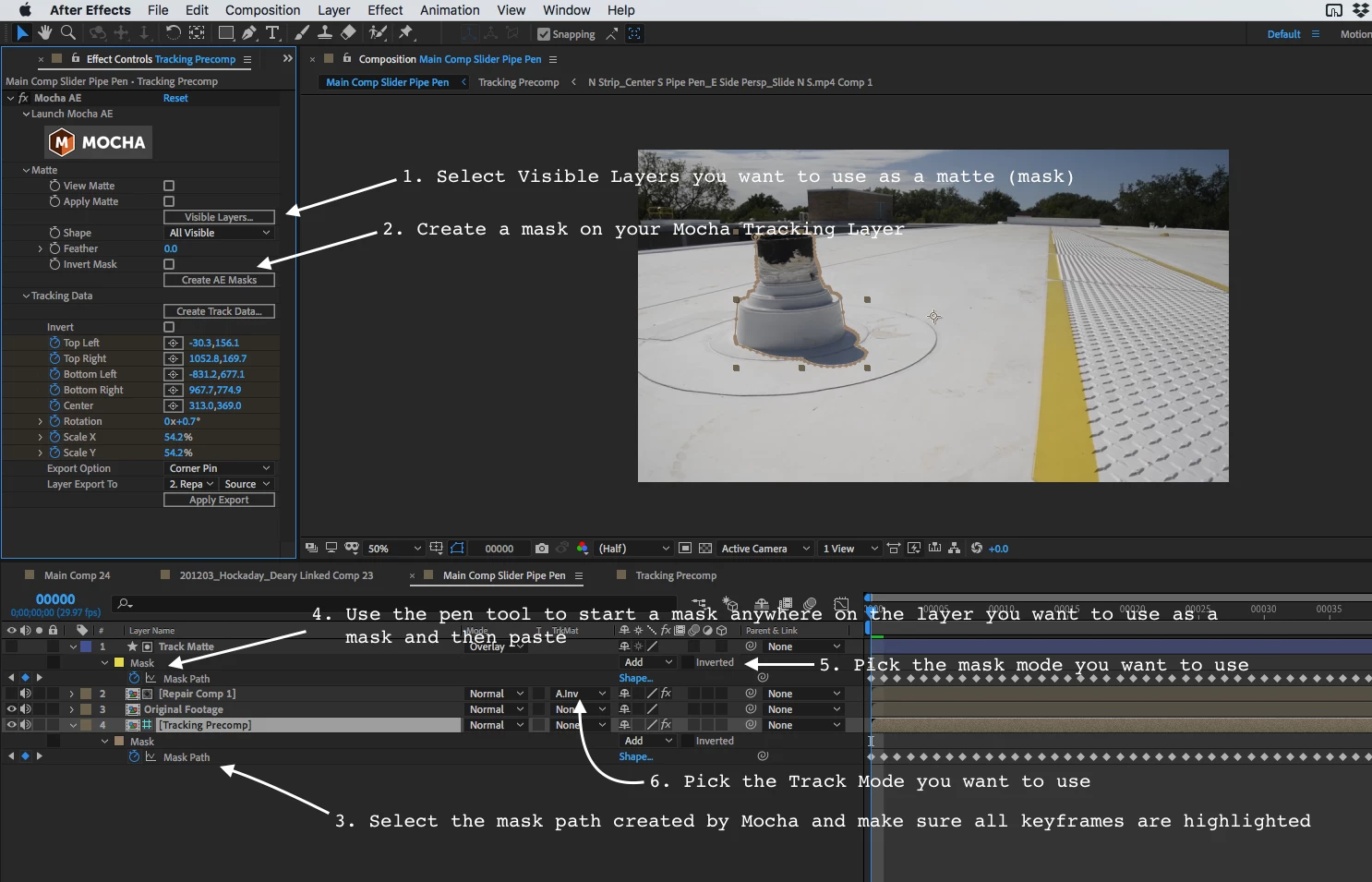
It's a good idea to add do any transform changes to the footage you want to track in mocha, add any color correction necessary to create a good track, add any masking needed, then pre-compose before you track in Mocha. If you have tracked the original footage and you want to avoid running the tracking or doing the roto work again you can always apply the mask to a solid or a shape layer and use that as a track matte. I almost always use comp sized shape layers with masks from mocha if I need to do roto work or masking with Mocha. Here's the basic workflow:

Screenshot_2020-12-25 16.07.03_zeylde.png

If you scaled your footage to 100, -100 then all you have to do to flip the track matte is scale the Track Matte layer to the same value. I left out Copy the mask keyframes in Step 3 but you probably already figured that out.

Translate
Report
Community guidelines
Be kind and respectful, give credit to the original source of content, and search for duplicates before posting. Learn more
community guidelines