
melbendi
Inspiring
March 4, 2024
Question

Cannot launch AE 2024 even in Safe Mode

  • March 4, 2024
  • 2 replies
  • 1599 views

I'm running Windows 11 Pro, Intel i9-14900K, 96 GB RAM, Nvidia RTX 4080 Super GPU.  AE was working as it should this morning, but now I'm getting the following errors messages when I try to launch it.  I already tried uninstalling AE, then cleaned the registry, rebooted and then reinstalled AE, but still the same.  Just before this problem started, I tried to install the VanceAI Desktop App and had installation problem with it.  Does anyone know what the CEP suite is or how I can fix this?  Thank you!
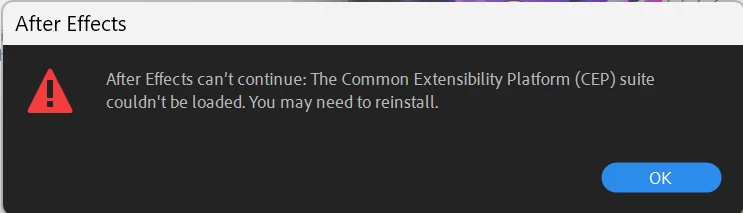
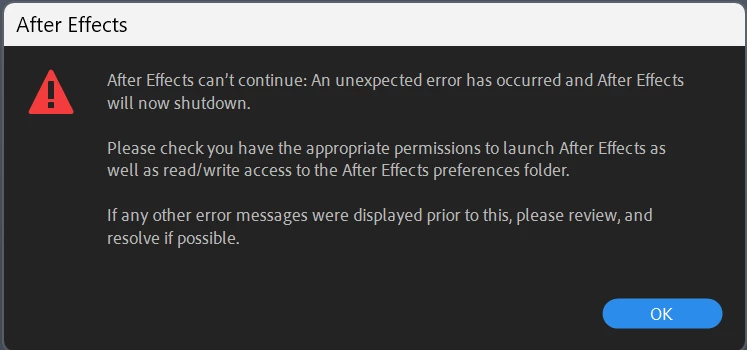
This topic has been closed for replies.

2 replies

Legend
March 5, 2024
melbendi
melbendiAuthor
Inspiring
March 5, 2024

Thanks, Airweb, I considered that, but now it's changed again. After running AE as Administrator then quitting, it's back to launching again normally, except that it's gone back to giving the same error message it has since I first installed AE on this new computer.  Below is the error message.  The directory it's looking for doesn't exist on Windows 11.  It's now called Public Documents, so I don't know if this is a problem AE has on Windows 11 overall. I don't know what I can do to get rid of this error message now.  I don't why AE thinks it needs this folder it's looking for. I looked through the Preferences to see if that folder is indicated anywhere and it isn't.  Why would it think it needs to use a shared Documents folder?  I never had any issues like this on Windows 10.

Legend
March 5, 2024

Document folder is used for libraries and presets.


In After Effects, what happens if you go to Animation -> Apply Animation Preset?

In my case, it opens the Documents\Adobe\After Effects (Beta)\User Presets folder.


melbendi
melbendiAuthor
Inspiring
March 4, 2024

I found I can use AE if I launch as Administrator, so at least I have a work-around but  not a solution.  Fixing the permissions might solve this error, but I don't know what folder to fix the permissions on.  I located the Preferences files by using the link button in the Preferences Startup and Repair tab, but it was set to Full Control already.  Any suggestions welcome. Thanks!