
January 30, 2012
Answered

Change color OR Change to color?

  • January 30, 2012
  • 1 reply
  • 57338 views

Using After Effects  CS5 windows.

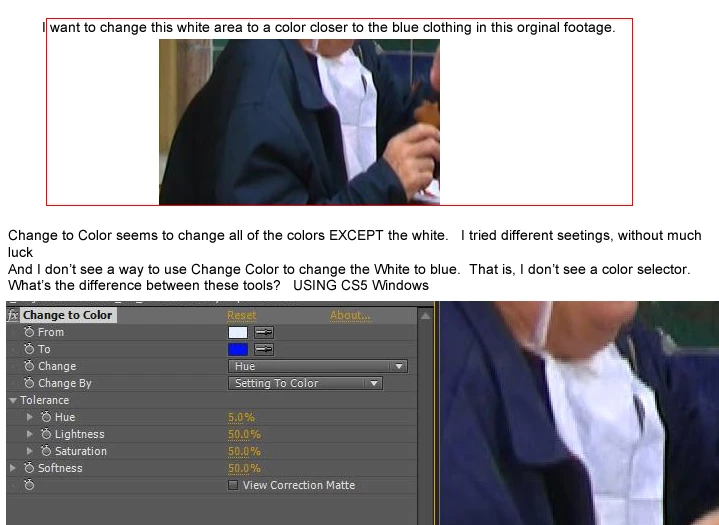
I am trying to change this white area to a color more matching the surrounding blue clothing.

Am not sure what would be the best tool to do this

Change to Color or Change Color.   

But Change Color doesn't seem to have a place to change the color TO.  At least I don't see a color picker to change the color to....  And I don't see a slider that will let me choose a color to change it too. (I'm sure it's staring at me in the face.)

In Change to Color, even though I use the eye dropper on the white area, and select the blue of the clothing as its replacement, I can't get just the white area to change to blue. (I even tried changing it to red, without any luck.)

Is white harder to change to a color than just changing a "real" color (I see these tutorials about chaning red roses to blue roses and it seems to work fine in the tutorials.  But I'm having no luck with this white area.

Any suggestions?


Thanks!

Rowby

.
This topic has been closed for replies.
Correct answer Mylenium

Am not sure what would be the best tool to do this

Change to Color or Change Color.

Neither.

  1. Duplicate the layer
  2. Effects --> Channel --> Shift Channels Alpha from Luminance
  3. Effects --> Color Correction --> Levels
  4. Effects --> Color Correction --> Tint
  5. Layer blending mode Color, Overlay or Multiply
  6. Tweak parameters, perhaps add some blur

Mylenium

1 reply

Mylenium
MyleniumCorrect answer
Legend
January 30, 2012

Am not sure what would be the best tool to do this

Change to Color or Change Color.

Neither.

  1. Duplicate the layer
  2. Effects --> Channel --> Shift Channels Alpha from Luminance
  3. Effects --> Color Correction --> Levels
  4. Effects --> Color Correction --> Tint
  5. Layer blending mode Color, Overlay or Multiply
  6. Tweak parameters, perhaps add some blur

Mylenium

January 30, 2012

Hi

I was able to follow your initial steps (1,2,3,4 -- but when I got to Layer blending mode  I went to: 

Layer > Blending Mode >  -- None of the drop downs specifically are called Color, Overlay or Multiply

Here's a link to a youtube screen capture....

http://www.youtube.com/watch?v=ZJtNLLRiFy4&feature=youtu.be 

Thanks..

Dave_LaRonde
Inspiring
January 30, 2012

It's not something you do in the effect controls.  It's in the layer's controls in the timeline, located in the Modes panel.