
Known Participant
February 11, 2023
Answered

Change text font on a layer?

  • February 11, 2023
  • 2 replies
  • 2504 views

Hi,


Questions don't get worse then this. How to change the text properties of a layer that was already placed?


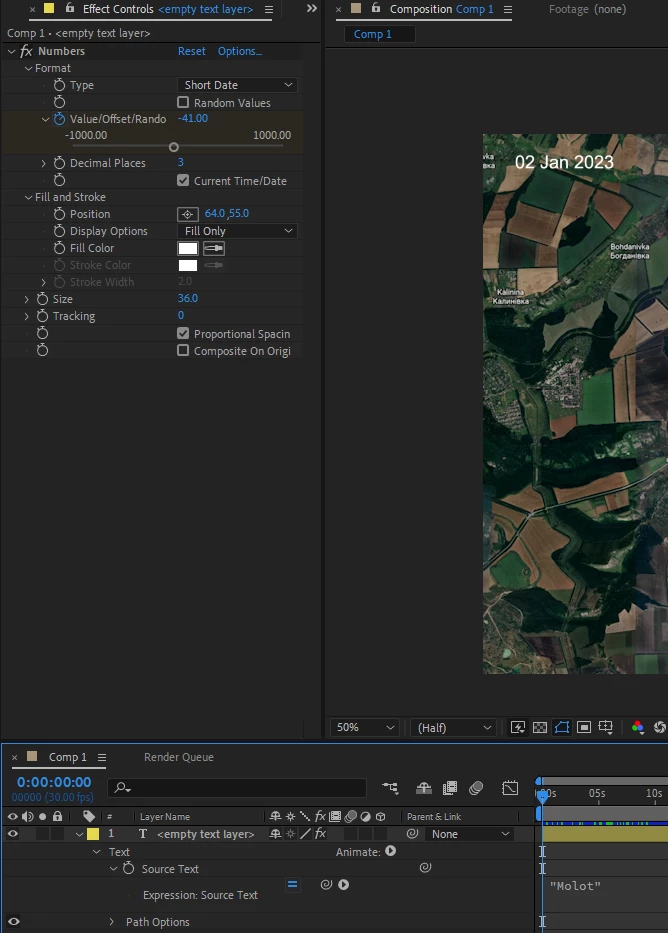
I've used all my acquired PC skills to figure out how to do it, but nothing does it. I select the layer in all kinds of ways and change the text fonts in the menu that shows on the right, it doesn't actually change it. I've tried using the button for expressions on the source text which drops a menu for fonts, and it actually inserts "fontname" in the code, it does not change it.


How in the Gods name can I change the font? Thank you! 🙂


This topic has been closed for replies.
Correct answer Mylenium

Double-click the text layer or hit Ctrl+T to invoke the text tool and enter text edit mode, then change the text settings on the character and paragraph panels. For your numbers effect the font is changed under the"Options" link.


Mylenium 

2 replies

Mylenium
MyleniumCorrect answer
Legend
February 12, 2023

Double-click the text layer or hit Ctrl+T to invoke the text tool and enter text edit mode, then change the text settings on the character and paragraph panels. For your numbers effect the font is changed under the"Options" link.


Mylenium 

Known Participant
February 13, 2023

Thank you!

Participating Frequently
February 11, 2023

Hi. First select the text layer, then change the font in the Character Panel.