
Participant
November 6, 2023
Answered

Changing the order of images at specific seconds

  • November 6, 2023
  • 2 replies
  • 607 views

Hi everybody,


  • I have to make a video for a horse race between 8 horses. At the bottom of the video when the race starts there are 8 png with number of each horse with the order they start. I would like to make a script that I could choose what images to use as the number of each horse. Then if for example at the 10th second the order changes I would like to have a panel that I will put the second of the change and the new order . For example at sec 0 the order is 1,2,3,4,5,6,7,8 but at second 10 the order is 8,7,5,6,4,3,1. So if possible I would like everytime the order changes I would have the ability to enter the second of the change and the order of the images. At the final video I will have the horses running and the images of the numbers that show at the lower part will always show the order of the horses at the current time . Is this possible to be done? Thanks in advance 
This topic has been closed for replies.
Correct answer Mathias Moehl

Attached you find a sample project.

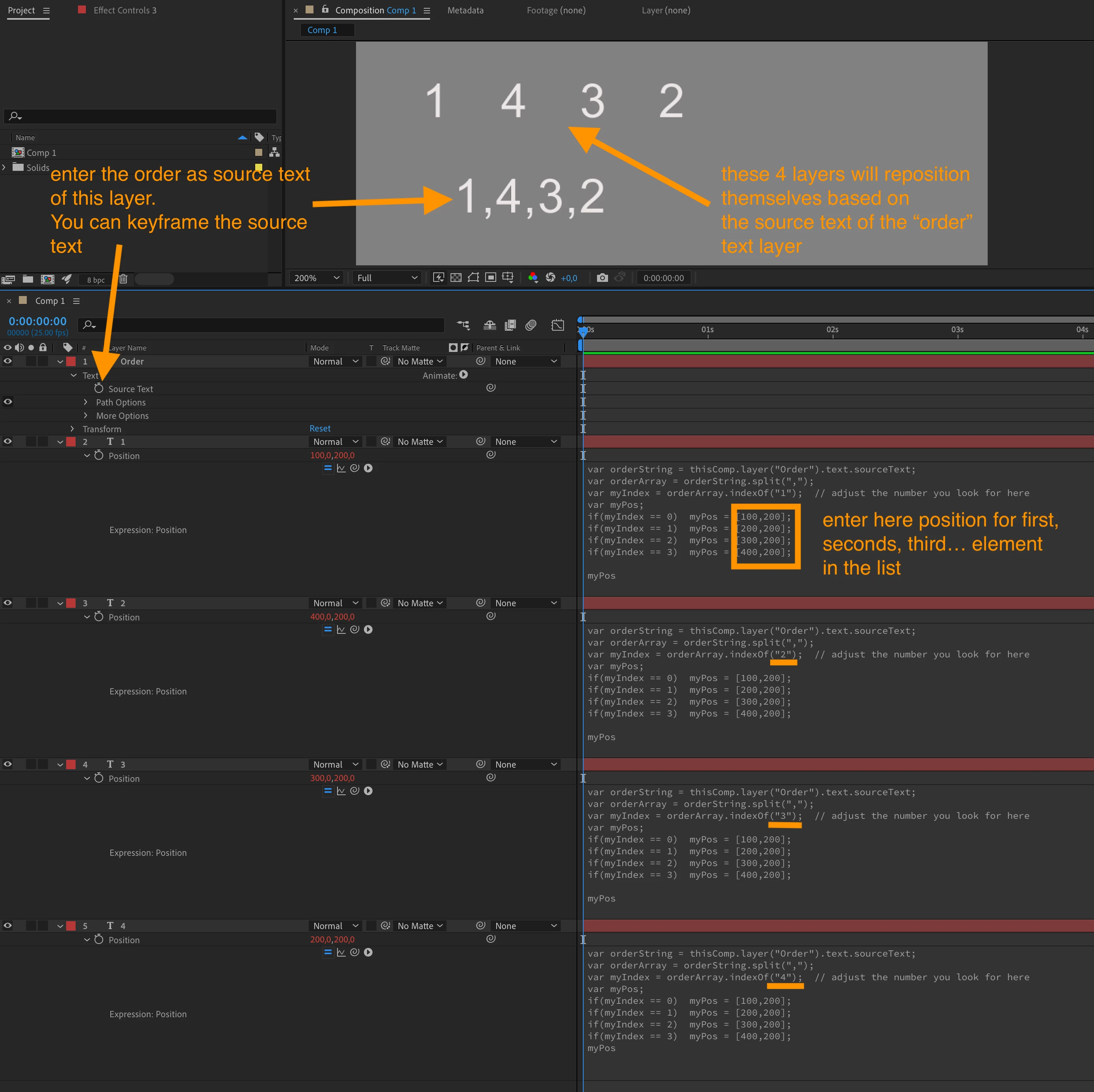
It contains 4 layers for showing the numbers 1 to 4. An extra text layer "order" contains your order information like "4,1,3,2". Based on what you enter as order text, the other four layers position themselves automatically. The example uses text layers for the individual numbers, but you can apply the expressions to the position if image layers, too.


2 replies

Mathias Moehl
Community Expert
Mathias MoehlCommunity ExpertCorrect answer
Community Expert
November 7, 2023

Attached you find a sample project.

It contains 4 layers for showing the numbers 1 to 4. An extra text layer "order" contains your order information like "4,1,3,2". Based on what you enter as order text, the other four layers position themselves automatically. The example uses text layers for the individual numbers, but you can apply the expressions to the position if image layers, too.


Mathias Möhl - Developer of tools like BeatEdit and Automation Blocks for Premiere Pro and After Effects
Participant
November 7, 2023

I can't find words to thank you enough. You are a life saver!!!!

Mathias Moehl
Community Expert
Community Expert
November 7, 2023

thank you 🙂
Extra tip:

Make sure to have no spaces in your "1,4,3,2" lists. Also, if you want to save some time entering the values, you can skip the commas and enter the values like "1432". All you need to change for this is to replace the split(",") by split("") in the expressions.
Of course this will only work with up to 9 horses.

Mathias Möhl - Developer of tools like BeatEdit and Automation Blocks for Premiere Pro and After Effects
Community Expert
November 6, 2023

I don't have time to work out the expressions for you, but I would set it up this way.


The layers containing the numbers would be 3D layers with an expression that scales the layers as they move in Z space so they always stay the same size. I could also use an expression tied to each number with a slider for each horse to indicate their position. When a layer moved down, it would move away from the camera to go behind the other layers; when it moved up, the layer would move toward the camera so that it was in front of the other layers. The movement would only have to be a couple of pixels.


To make the layers change position, I would set up an expression to look at the position of all the sliders and arrange the layers from top to bottom automatically using Java Math. Animating the Y value and keeping all layers in the proper order would be a simple comparison between values. The layers moving up would always be in front of the layers that move down.  


If I get some free time later, I'll try figuring out the expressions. I have done similar things with animation for exchanging values of stocks or even homes. You might be lucky and have Dan Ebberts jump in and show you an expression-based workflow.