
TimSx
Inspiring
September 6, 2017
Answered

character fade in text animation with smooth shape starts too early

  • September 6, 2017
  • 1 reply
  • 2868 views

Hey everyone!

I am interested in how this text animation was made:

https://streamable.com/zj329

I applied text animator and changed opacity, blur and set Shape to the smooth. I animate start from 0 to 100%. For some reason, at 0% of animation, there is already a few letters showing. Take a look:
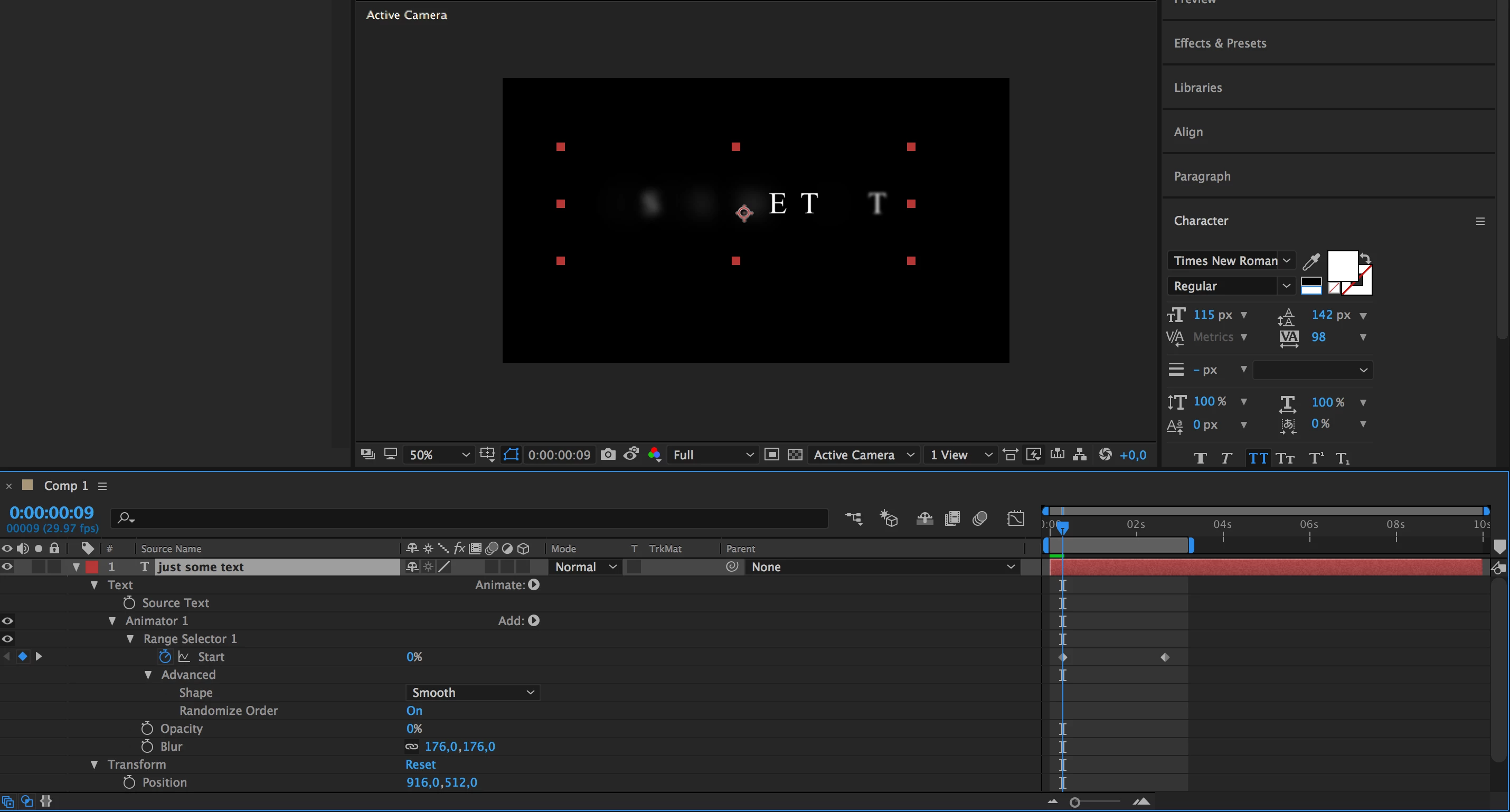
How can this be corrected?

    This topic has been closed for replies.
    Correct answer ExoticKhalid

    Hi Tim,

    I think when you set the Shape setting to Smooth, the animation goes from 100% to 0% and then back to 100%. So you wanna set your offset to -100% and animate to 100%. But that mean text won't fade in as shown in the example.

    If you want it exactly like the example you should set the shape to Ramp up or simply set it to square and and change the ease settings.

    Hope that answers your question.

    1 reply

    ExoticKhalidCorrect answer
    Inspiring
    September 6, 2017

    Hi Tim,

    I think when you set the Shape setting to Smooth, the animation goes from 100% to 0% and then back to 100%. So you wanna set your offset to -100% and animate to 100%. But that mean text won't fade in as shown in the example.

    If you want it exactly like the example you should set the shape to Ramp up or simply set it to square and and change the ease settings.

    Hope that answers your question.

    TimSx
    TimSxAuthor
    Inspiring
    September 6, 2017

    hey exotickhalid! Thanks for stopping by.

    If I choose ramp up, the issue remains. At 0% of animation, almost half of the text is already drawn.

    Square has some other limitations. It literally just draws 1 letter at a time. This makes animation jerky and not at all as smooth as the one shown above.

    Community Expert
    September 6, 2017

    ooohhh. It works as expected now. Thank you!

    Sorry for being stupid I find text animator very unintuitive.


    Spend a few minutes reading the resources available when you type text animator in the search help field. You'll get a better understanding.