matteeah
Inspiring
January 8, 2023
Answered

Cineware Add-on Installed but not recognised by AE - Mac M1

  • January 8, 2023
  • 2 replies
  • 3705 views

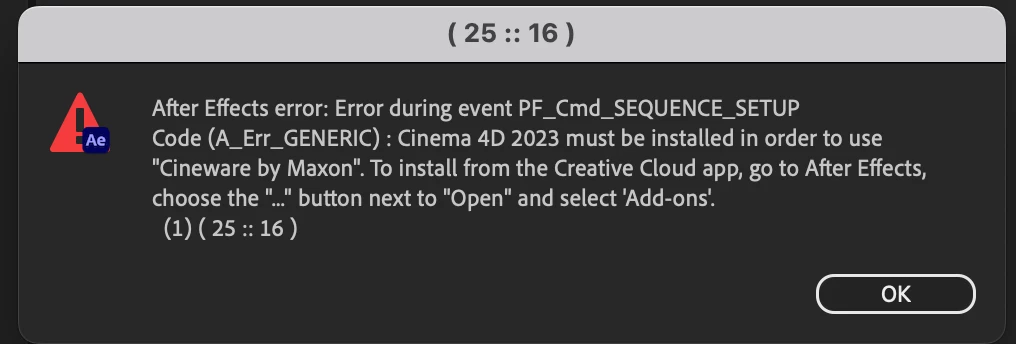
I've freshly installed all Adobe, including the Cinema 4D add-on but for some reason, I get this error pop-up when clicking on "Cineware" through the effects:



This topic has been closed for replies.
Correct answer matteeah

OK, it works now:

  • Uninstalled everything
  • Reinstalled it (along with the add-on)
  • Import > File > (previously created) 'Untitled.c4d' 
  • Drag & drop the C4D file into the timeline
  • Click on Cineware Options
  • Changed path to my Cinema 4D R26
  • Quit After Effects and reopen
  • Edit > Purge All
  • File > New > Maxon Cinema 4D File

It finally works and I can operate live edits with my own Cinema 4D R26!
I would like to delete the 'Cinema 4D 2023' in the Applications folder that is generated by the add-on but I am sure it will break everything, so just keep both.

2 replies

matteeah
matteeahAuthorCorrect answer
Inspiring
January 31, 2023

OK, it works now:

  • Uninstalled everything
  • Reinstalled it (along with the add-on)
  • Import > File > (previously created) 'Untitled.c4d' 
  • Drag & drop the C4D file into the timeline
  • Click on Cineware Options
  • Changed path to my Cinema 4D R26
  • Quit After Effects and reopen
  • Edit > Purge All
  • File > New > Maxon Cinema 4D File

It finally works and I can operate live edits with my own Cinema 4D R26!
I would like to delete the 'Cinema 4D 2023' in the Applications folder that is generated by the add-on but I am sure it will break everything, so just keep both.

Inspiring
January 31, 2023

Glad you got it! Deleting Cinema 2023 likely won't break anything, but it will get reinstalled by After Effects each time there's an update. This is how it was with R25 until it was finally updated to 2023. I kept forgetting that AE was installing it and every couple months I would see it and think "huh, I thought I already uninstalled it." On the next AE update...it came back. 

matteeah
matteeahAuthor
Inspiring
January 31, 2023

Oh well, that makes me feel better at leaving a Cinema 4D ghost in my applications folder at least! 
Thanks for the support David 🙂 

Inspiring
January 9, 2023

If you follow the steps in the error dialog and go to the "Add-ons" section, does Cineware show as "Added" with a green checkmark on the left or do you see something else?

matteeah
matteeahAuthor
Inspiring
January 9, 2023

I wish I could see something else but unfortunately, it says it's added.


Inspiring
January 9, 2023

Interesting. And just to confirm, the original error messag was from AE 2023, not the public beta, right? If it was, then it would be worth checking if that showed as "Added," as well, although I don't think that should make a difference.


I know you said you freshly installed the apps, but in this case, I would try uninstalling After Effects, clearing your preferences when given the option, then reinstalling and making sure that, of course, you install C4D when given the option.