

TROYSPOELMA
Participant
January 8, 2020
解決済み

CINEWARE - no Cinema 4D installation was found

  • January 8, 2020
  • 返信数 3.
  • 25103 ビュー

I am trying to bring in a camera tracked composition into my initial After Effects project but when I import it, an error pops up and says "After Effects: AEGP Plugin CINEWARE SceneLayer: No Cinema 4D installation was found. ( 5027 :: 12)". Does anyone know why it is saying this and how to fix it? Thanks.


All the best,
解決に役立った回答 hammizaa

Hey hi,

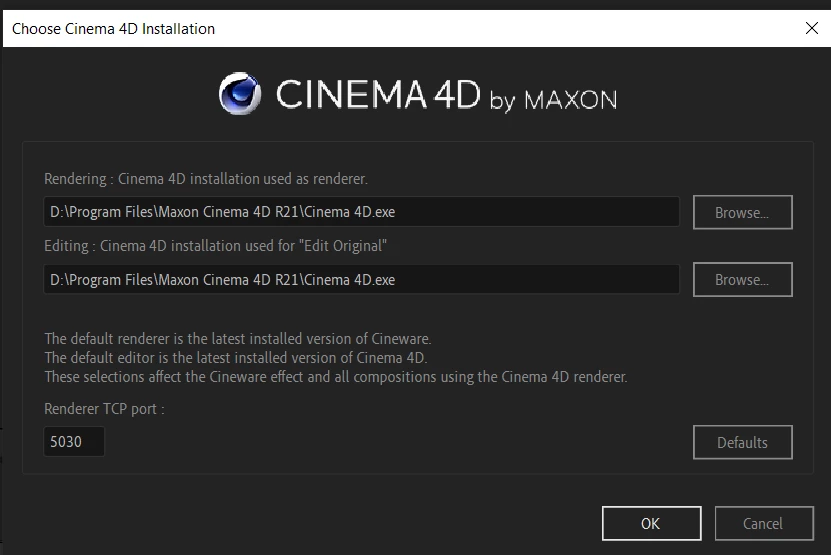
I was getting the same issue. So after putting some effort on it I have found my solution for ( 5027 :: 12). That was due to the dynamic link problem between After Effects and Cineam 4D. Here are some steps which I followed:

  1.  Make sure you have updated version for both or atleat above the 2017 version.
  2.  In my case the problem was After Effects was not finding the Cinema 4d because I'd installed in other drive as comapre to default settings.
  3. So the solution for my problem is to change the directory of cineware plugin like the attach screenshot.

  4. Hope it will work for you guys...
  5. And if it did not work change the port setting from 5030 to 5027...May be it will work for you guys.


返信数 3

hammizaa
hammizaa解決!
Participant
February 23, 2021

Hey hi,

I was getting the same issue. So after putting some effort on it I have found my solution for ( 5027 :: 12). That was due to the dynamic link problem between After Effects and Cineam 4D. Here are some steps which I followed:

  1.  Make sure you have updated version for both or atleat above the 2017 version.
  2.  In my case the problem was After Effects was not finding the Cinema 4d because I'd installed in other drive as comapre to default settings.
  3. So the solution for my problem is to change the directory of cineware plugin like the attach screenshot.

  4. Hope it will work for you guys...
  5. And if it did not work change the port setting from 5030 to 5027...May be it will work for you guys.


Participant
June 7, 2021

I cannot find the Maxon Cinema 4D R21 .exe file after accidentally uninstalling it, I stopped it midway though from the task manager. Yet the cinema 4d file is deleted. Please help


Participant
May 2, 2020

Yeah I'm having this problem also I just updated and everything. Which version did u go back to?

ToolfarmJP
Community Expert
Community Expert
January 9, 2020

Would you please check the plug-in path installed?


https://helpx.adobe.com/after-effects/using/c4d.html

TROYSPOELMA
TROYSPOELMA作成者
Participant
January 9, 2020

Already done, no issue there.

ToolfarmJP
Community Expert
Community Expert
January 10, 2020

Do you still get the same warning even if you install a full version of Cinema 4D?


https://www.maxon.net/en-us/try/