Inspiring
August 6, 2018
Answered

Color Pallet AE 2018

  • August 6, 2018
  • 1 reply
  • 1091 views

Hello,

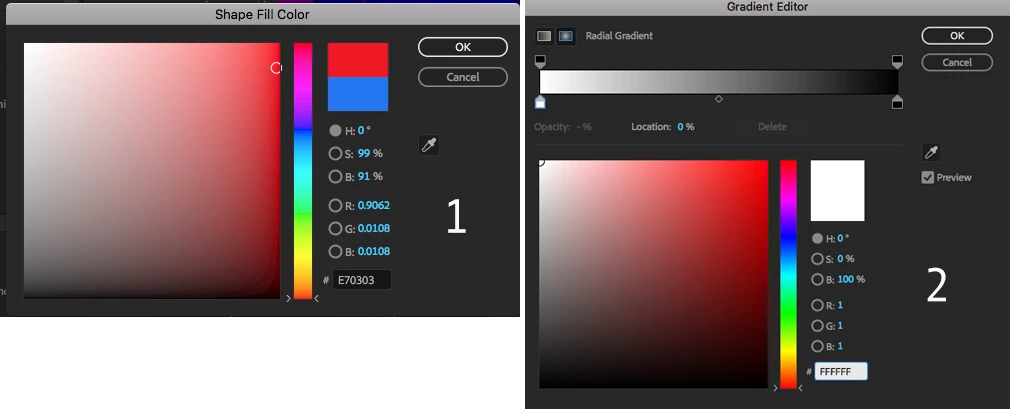
For some reason I am getting two different types of color pallets.

I am not confertble with pallet (1).

Is it possible to change to pallet (2) for every color selector through out the all AE ?

Thank You

    This topic has been closed for replies.
    Correct answer Kyle Hamrick

    #2 is the gradient color selector, so will only be available when you're creating gradients. Those are otherwise the same color picker.

    1 reply

    Kyle Hamrick
    Community Expert
    Kyle HamrickCommunity ExpertCorrect answer
    Community Expert
    August 6, 2018

    #2 is the gradient color selector, so will only be available when you're creating gradients. Those are otherwise the same color picker.

    Inspiring
    August 6, 2018

    Thank you Kyle, I hoped that there was a way to change it.    :-(

    Creative signature
    Szalam
    Community Expert
    Community Expert
    August 6, 2018

    Thanks Kyle,

    I did try system colorpicker. Unfortunately it is not the one.

    I have no idea why Adobe would do this change....

    When we select colours for the gradient , we select one colour at a time

    anyway.

    I really prefer old colour picker not only for grads but for every colour

    selection through out AE.

    On Mon, Aug 6, 2018 at 2:43 PM, Kyle Hamrick <forums_noreply@adobe.com>


    I'm very confused as to your issue. Those are both the exact same color picker.

    The only difference is that one is for when you're working on a gradient. When working on a gradient, you would want to be able to color all the knots from one interface rather than jumping in and out, right?