

PulseMotion
Participating Frequently
April 10, 2025
Beantwortet

Contact shadow in 3d object?

  • April 10, 2025
  • 1 Antwort
  • 287 Ansichten

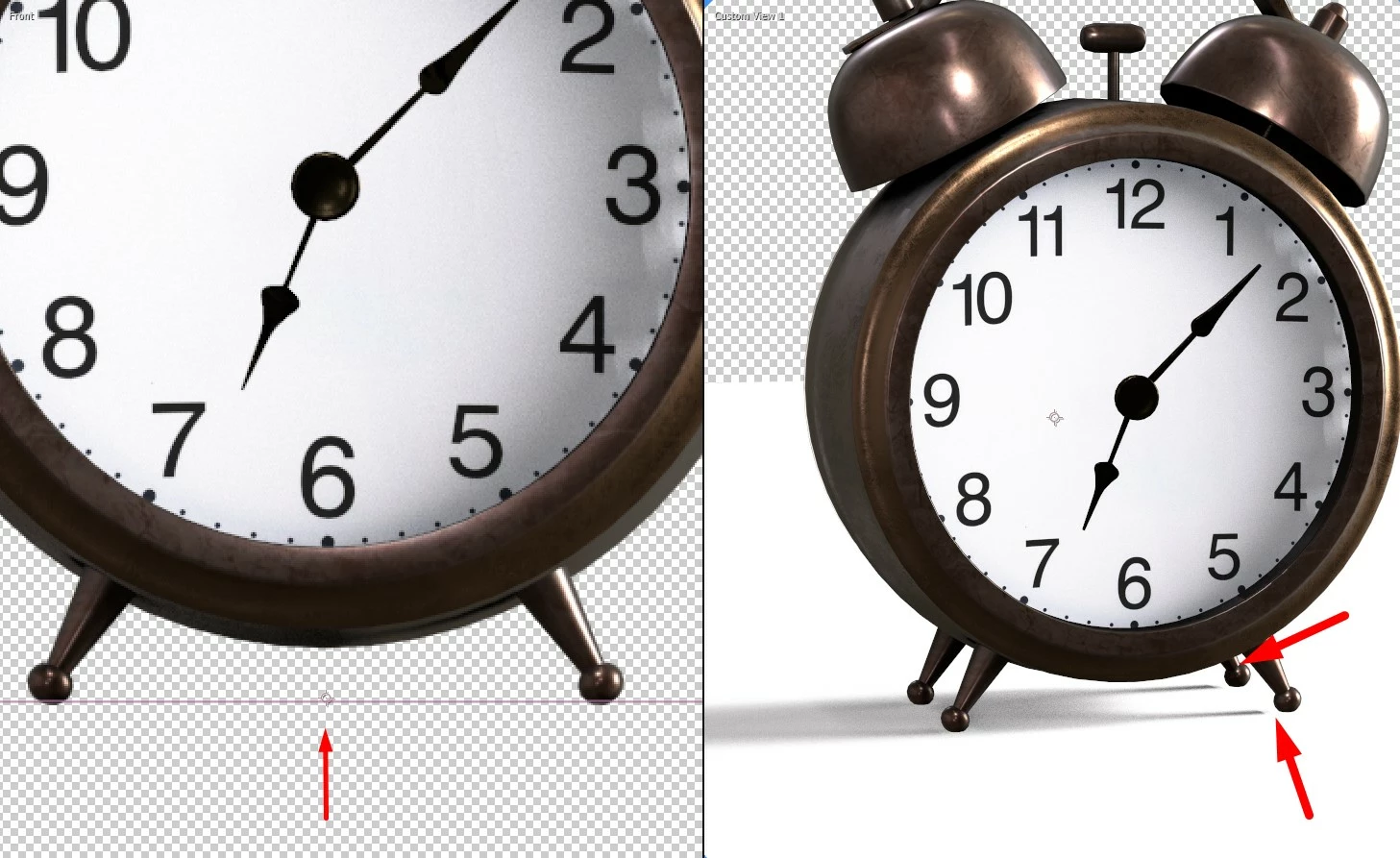
In the 3D scene. Contact shadow a little far from the object, there is some parameter that measures the distance? Another thing, I noticed is that the shadows generated are exclusive to Environment Light. Because even if I add a spot light, it only helps to illuminate and does not cast shadows on the floor like this Environment Light, is that right?
Beste Antwort von Robin.Yeh

Hi there @PulseMotion 


Sorry you're running into this. It looks like the contact shadows are missing because the shadow resolution is too low. You can try bumping up the resolution by going to the Composition Renderer dropdown (located at the bottom of your comp viewer), make sure the "Advanced 3D" renderer is selected, and go to "Renderer Options...". This should open up a dialog. Then under Shadows Resolution, select the "Double" setting and see if it improves your contact shadows.
Currently only environment lights support shadows for the Advanced 3D Renderer. Parallel, Spot, and Point lights do not have the functionality to cast shadows.

Thanks,
Robin, After Effects Engineering Team

1 Antwort

Robin.YehAntwort
Adobe Employee
April 10, 2025

Hi there @PulseMotion 


Sorry you're running into this. It looks like the contact shadows are missing because the shadow resolution is too low. You can try bumping up the resolution by going to the Composition Renderer dropdown (located at the bottom of your comp viewer), make sure the "Advanced 3D" renderer is selected, and go to "Renderer Options...". This should open up a dialog. Then under Shadows Resolution, select the "Double" setting and see if it improves your contact shadows.
Currently only environment lights support shadows for the Advanced 3D Renderer. Parallel, Spot, and Point lights do not have the functionality to cast shadows.

Thanks,
Robin, After Effects Engineering Team

PulseMotion
Participating Frequently
April 10, 2025

It worked, thank you very much 😄