

matheosct
Participant
December 12, 2022
Question

Content-Aware Fill analyzing takes too much time

  • December 12, 2022
  • 2 replies
  • 961 views

I want to fill the background of a composition with a picture in it but it takes too much time to AE analyze. I have a AMD Ryzen 5 2600 and a RTX 3060 while my pc at work is a GTX 550 and analyze faster than my home pc. What can I do to improve this process?
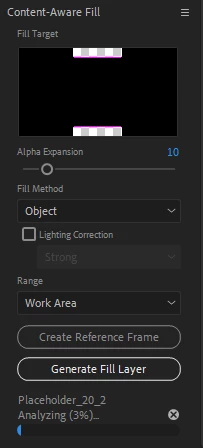


This topic has been closed for replies.

2 replies

Mylenium
Legend
December 12, 2022

Regardless, this is not an example I would consider particular suitable for CAF. You could still just duplicate the layer, move it into place and mask it with some feathered edges. I really think you're going about this the wrong way and use the wrong methodology.


Mylenium 

matheosct
matheosctAuthor
Participant
December 12, 2022

Yes, I know, that was what I used to do. But the main point here is why my home pc can't stand analyzing the composition faster than my work pc since I have a better machine.

Community Expert
December 13, 2022

Content-Aware Fill is not the right tool for images. It needs footage, preferably with a frame-based production format, not an MP4. It is even better if you pre-compose any trimmed footage layer moving all attributes to the new comp and trimming the pre-comp to the layer length. You run CAF on the nested pre-comp in the main comp, not on the original footage. 


CAF also likes detail and does not respond well if there are not some closely adjacent frames that do not contain the object you are trying to replace. An aerial shot of a car moving down a highway is a good example. There are frames before and after the car moves past its position in the current frame that doesn't have a car in the way, so pixels can be chosen to fill the hole made by the mask. Without access to those pixels, you will have to create a PSD layer and create the fill manually. 


Processing speed depends on system resources, what is running in the background, and number of pixels you are trying to replace. 

Mylenium
Legend
December 12, 2022

Without seeing the image and such we can't really tell you much, but based on your preview image using CAF on a black placeholder graphic probably doesn't make a lot of sense. The algorithm will simply analyze forever since there are no real patterns to match. That's not how this works and what it's meant for. You could cover up those holes with simple solids. Anything outside that will require more info.


Mylenium 

matheosct
matheosctAuthor
Participant
December 12, 2022

It's not a black placeholder, it's a photo. And I can't use simples solids because it has shadows and textures.