
Inspiring
May 26, 2022
Answered

Content aware fill not working. Filling does not occur.

  • May 26, 2022
  • 3 replies
  • 14644 views

I created a simple video - a black rectangle moves on a white background. And after reviewing a lot of instructions, I did everything step by step. It doesn't give anything. The site is still transparent. What am I doing wrong?

Correct answer NikVladi

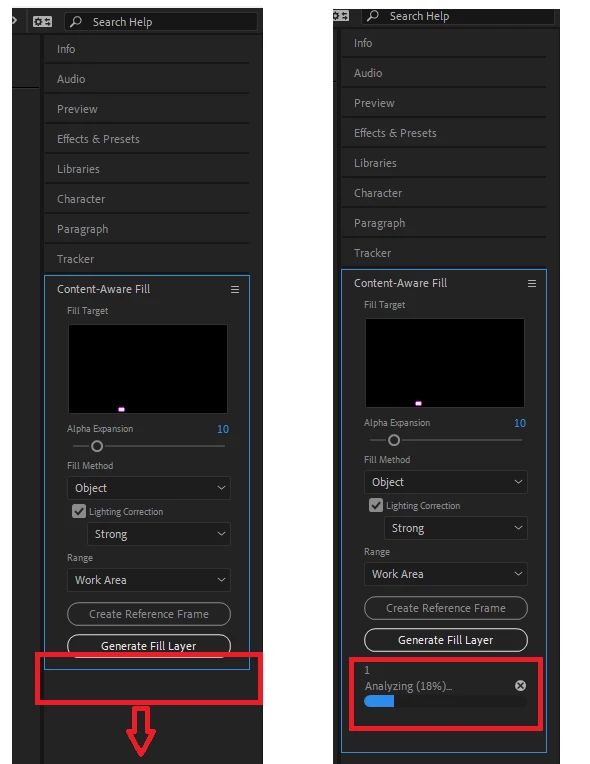
It turned out that everything worked well, it was just hidden. It was necessary to stretch the working field. It was definitely an idiot's idea.
 

3 replies

Participant
August 1, 2023

I had exactly the same problem and was SO frustrated 😄 .. thank god for your post.

Participating Frequently
December 25, 2024

Yes, just my two cents, it's pure sh*t ofc in Adobe excremnt (f*uking sh**ty) style of doing everything, every thing
I am working on director's treatments and extensively using Adobe products like Photoshop, After Effects, Media Encoder, to do some simple GIFs, I hate it, the frame of mind is "ok, I got this I need to somehow make it work' 
I sincerely hope this software company just croakes and dies a slow and well deserved painful death, 

Participating Frequently
December 26, 2024

Every time I am using Adobe product it's like taking a leap back in time, it's like ok, let's sell this 1990s fu**ing sh*it to these  f*uking suckers for a few more years

NikVladiAuthorCorrect answer
Inspiring
May 26, 2022

It turned out that everything worked well, it was just hidden. It was necessary to stretch the working field. It was definitely an idiot's idea.


Inspiring
February 25, 2023

Thanks @NikVladi, I closed down 3 rendering attempts, because I (too) couldn't see the rendering bar in action. Your post helped me find it. 🙂

Community Expert
May 26, 2022

I did not see you select Surface. That is the appropriate fill method for that kind of shot. I did not see you wait for the process to complete. It takes a while. Nothing shows up until the process is complete.