Participant
March 10, 2018
Answered

Converting a render to keyframes

  • March 10, 2018
  • 1 reply
  • 418 views

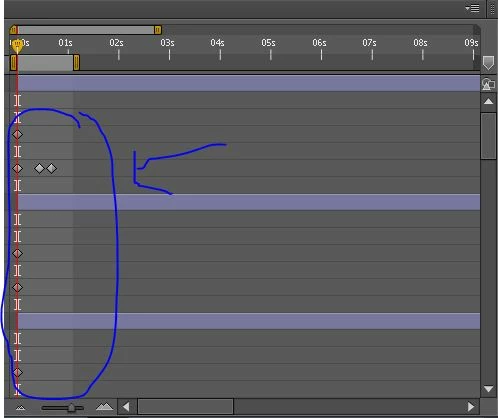
Hello , I want to ask if I can convert a render like in this picture

to keyframes like in this picture

Because I have an animation in this render who takes a long time to do it again and I don't wanna waste my time to doing the same animation again ( I hope that you can understand my Question)

Thank you

    This topic has been closed for replies.
    Correct answer P.M.B

    bouchaib  wrote

    How I can convert the render of my first animation to keyframes without repeating the same work because it takes a lot of time

    Unfortunately there's no way to do this.  However in the location where your project is saved there should be a folder called: Adobe After Effects Auto-Save   If you have a version of the project in there that saved before you deleted the animation and saved then you can open that and have your animation back (or at least maybe some of it).  As soon as you open this project (if you find it) you should rename it and save it outside the auto-save folder.

    For future reference when doing something like what you did, rather than deleting the animation and then saving.  First save the project under a new name (like "animation version02")  then make the new animation in that project.  That way you'll have a separate project for each version of the animation.

    By the way the settings for auto-save are under Preferences > Auto-Save.  There you set the frequency and location of your auto saves.

    1 reply

    Roei Tzoref
    Legend
    March 10, 2018

    Do you mean you wish to read the keyframes from a rendered video? Not really. Perhaps there's a workaround if you better explain what you have there and why do you need to do this. you can play with time to some degree with a rendered footage If that's what you are after But this recommendation all depends on your exact workflow .

    Participant
    March 10, 2018

    I will explain to you with details , ok ?

    So , I worked an animation of character (First animation) Then I rendred that animation and they gave me like in the first picture , but I want to do another animation for the character so I removed the keyframes of the first animation then I closed the project , after I opened the project again but in this Time I want to do the animation of the character like the first animation But it takes a lot of time to do it , so I am asking How I can convert the render of my first animation to keyframes without repeating the same work because it takes a lot of time , I hope that you can understand this explanation , and thank you

    P.M.B
    P.M.BCorrect answer
    Legend
    March 10, 2018

    bouchaib  wrote

    How I can convert the render of my first animation to keyframes without repeating the same work because it takes a lot of time

    Unfortunately there's no way to do this.  However in the location where your project is saved there should be a folder called: Adobe After Effects Auto-Save   If you have a version of the project in there that saved before you deleted the animation and saved then you can open that and have your animation back (or at least maybe some of it).  As soon as you open this project (if you find it) you should rename it and save it outside the auto-save folder.

    For future reference when doing something like what you did, rather than deleting the animation and then saving.  First save the project under a new name (like "animation version02")  then make the new animation in that project.  That way you'll have a separate project for each version of the animation.

    By the way the settings for auto-save are under Preferences > Auto-Save.  There you set the frequency and location of your auto saves.

    ~Gutterfish