Exit
  • Global community
    • Language:
      • Deutsch
      • English
      • Español
      • Français
      • Português
  • 日本語コミュニティ
  • 한국 커뮤니티
0

Create a new Composition & Timeline

Mentor ,
Mar 13, 2022 Mar 13, 2022

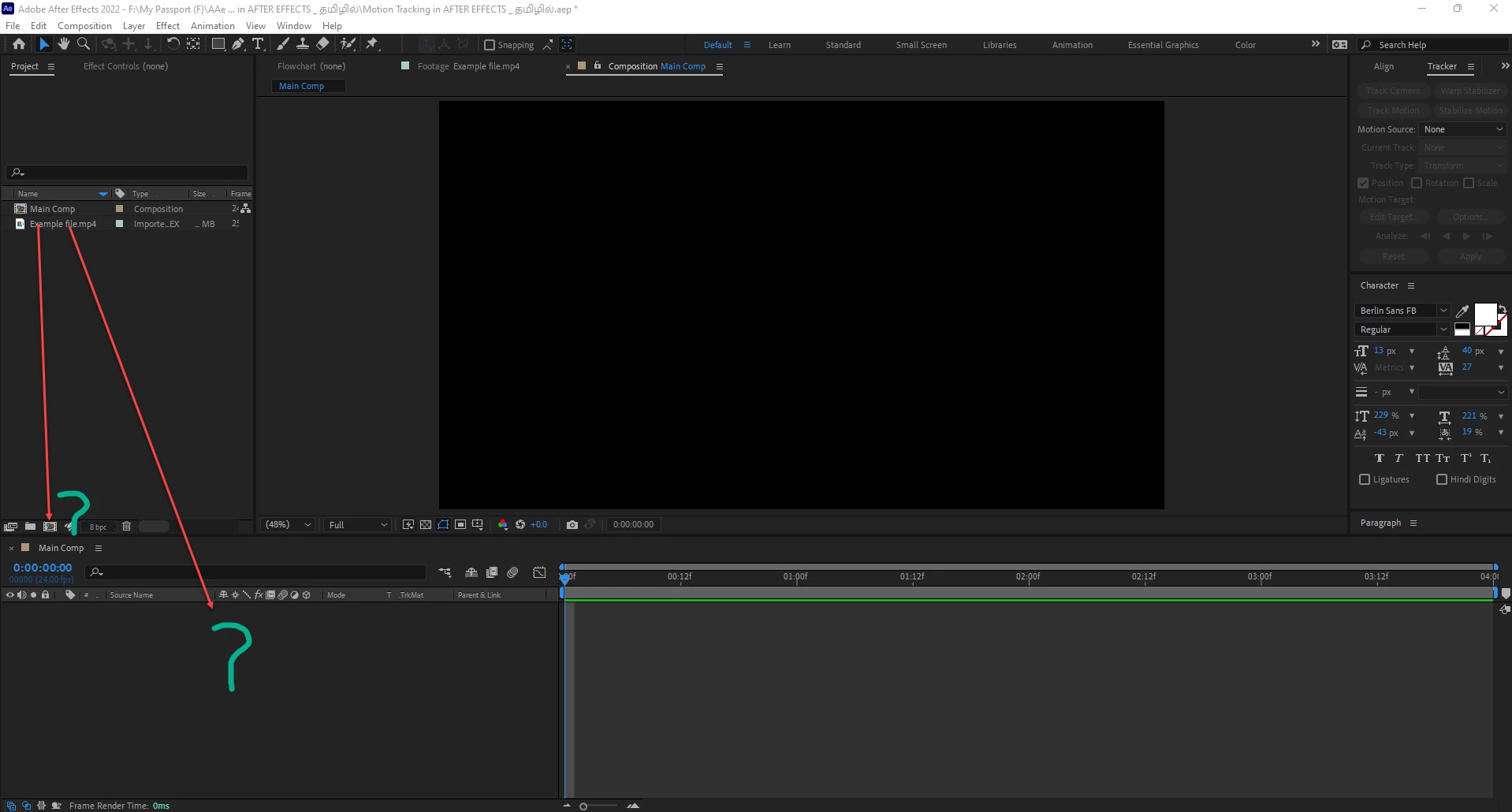
This is to confirm. Dragging the video into Create a new Composition will show original video time duration and Dragging the same video into Timeline will show Composition setting time duration only. Which can be less than original video time duration. 


DV.png


TOPICS
FAQ
1.2K
Translate
Report
Community guidelines
Be kind and respectful, give credit to the original source of content, and search for duplicates before posting. Learn more
community guidelines

correct answers 3 Correct answers

Community Expert , Mar 13, 2022 Mar 13, 2022

After dragging the footage you should get a new composition including the footage as a layer (not empty composition)

Translate
Valorous Hero , Mar 13, 2022 Mar 13, 2022

This is how AE works. Unlike video editing apps where the timeline duration extends to the length of newly added footage, AE's Timeline duration is fixed from the time you create the composition and stays in this duration until you manually go to the Composition Settings Dialog to change its duration. HTH

Translate
Community Expert , Mar 14, 2022 Mar 14, 2022

Dragging a video onto the New Comp button creates a new Composition that matches the settings (dimensions, frame rate, duration, etc.) of the video clip. Any settings the footage doesn't have is inherited from the last comp settings you created or edited. This is true if you drag an audio or image file onto this button as well.

Dragging a file into the empty timeline panel or right–clicking a file in the Project panel and choosing New Comp from Selection will have the same result.

Dragging a vid

...
Translate
Community Expert ,
Mar 13, 2022 Mar 13, 2022

After dragging the footage you should get a new composition including the footage as a layer (not empty composition)

Translate
Report
Community guidelines
Be kind and respectful, give credit to the original source of content, and search for duplicates before posting. Learn more
community guidelines
Mentor ,
Mar 13, 2022 Mar 13, 2022

Thanks. It is explaning another issue but not  the above issue which I am looking for.

Translate
Report
Community guidelines
Be kind and respectful, give credit to the original source of content, and search for duplicates before posting. Learn more
community guidelines
Valorous Hero ,
Mar 13, 2022 Mar 13, 2022

This is how AE works. Unlike video editing apps where the timeline duration extends to the length of newly added footage, AE's Timeline duration is fixed from the time you create the composition and stays in this duration until you manually go to the Composition Settings Dialog to change its duration. HTH

Very Advanced After Effects Training | Adaptive & Responsive Toolkits | Intelligent Design Assets (IDAs) | MoGraph Design System DEV
Translate
Report
Community guidelines
Be kind and respectful, give credit to the original source of content, and search for duplicates before posting. Learn more
community guidelines
Mentor ,
Mar 13, 2022 Mar 13, 2022

It is confusing because dragging a video into Create a new Composition shows original time duration of the video in the timeline. But at the same time dragging the video straight away into timeline shows Composition Setting time duration of the video.   


Create a new Composition.png


2.png

Translate
Report
Community guidelines
Be kind and respectful, give credit to the original source of content, and search for duplicates before posting. Learn more
community guidelines
Community Expert ,
Mar 14, 2022 Mar 14, 2022

Dragging a video onto the New Comp button creates a new Composition that matches the settings (dimensions, frame rate, duration, etc.) of the video clip. Any settings the footage doesn't have is inherited from the last comp settings you created or edited. This is true if you drag an audio or image file onto this button as well.

Dragging a file into the empty timeline panel or right–clicking a file in the Project panel and choosing New Comp from Selection will have the same result.

Dragging a video into an existing comp will simply add that video as a new layer in the composition. None of the comp settings would change.


----------------------------------------------------
Adobe Certified Expert Video Specialist
Editor—Animator—Educator—Author
Adobe Community Expert
Adobe Certified Professional
INSTAGRAM: @thepixelsmith
Translate
Report
Community guidelines
Be kind and respectful, give credit to the original source of content, and search for duplicates before posting. Learn more
community guidelines
Mentor ,
Apr 24, 2022 Apr 24, 2022

Thanks  for the help for all

Translate
Report
Community guidelines
Be kind and respectful, give credit to the original source of content, and search for duplicates before posting. Learn more
community guidelines
Community Expert ,
Apr 24, 2022 Apr 24, 2022
LATEST

We're glad we could be of help.


----------------------------------------------------
Adobe Certified Expert Video Specialist
Editor—Animator—Educator—Author
Adobe Community Expert
Adobe Certified Professional
INSTAGRAM: @thepixelsmith
Translate
Report
Community guidelines
Be kind and respectful, give credit to the original source of content, and search for duplicates before posting. Learn more
community guidelines