


Exit
  • Global community
    • Language:
      • Deutsch
      • English
      • Español
      • Français
      • Português
  • 日本語コミュニティ
  • 한국 커뮤니티
0

Create null from path distorts shape

Community Beginner ,
Jan 05, 2023 Jan 05, 2023

I'm trying to create null from paths (extended) for points and handles on a shape I drew in After Effects but whenever I do it I get my shape distorted and stretched downwards.
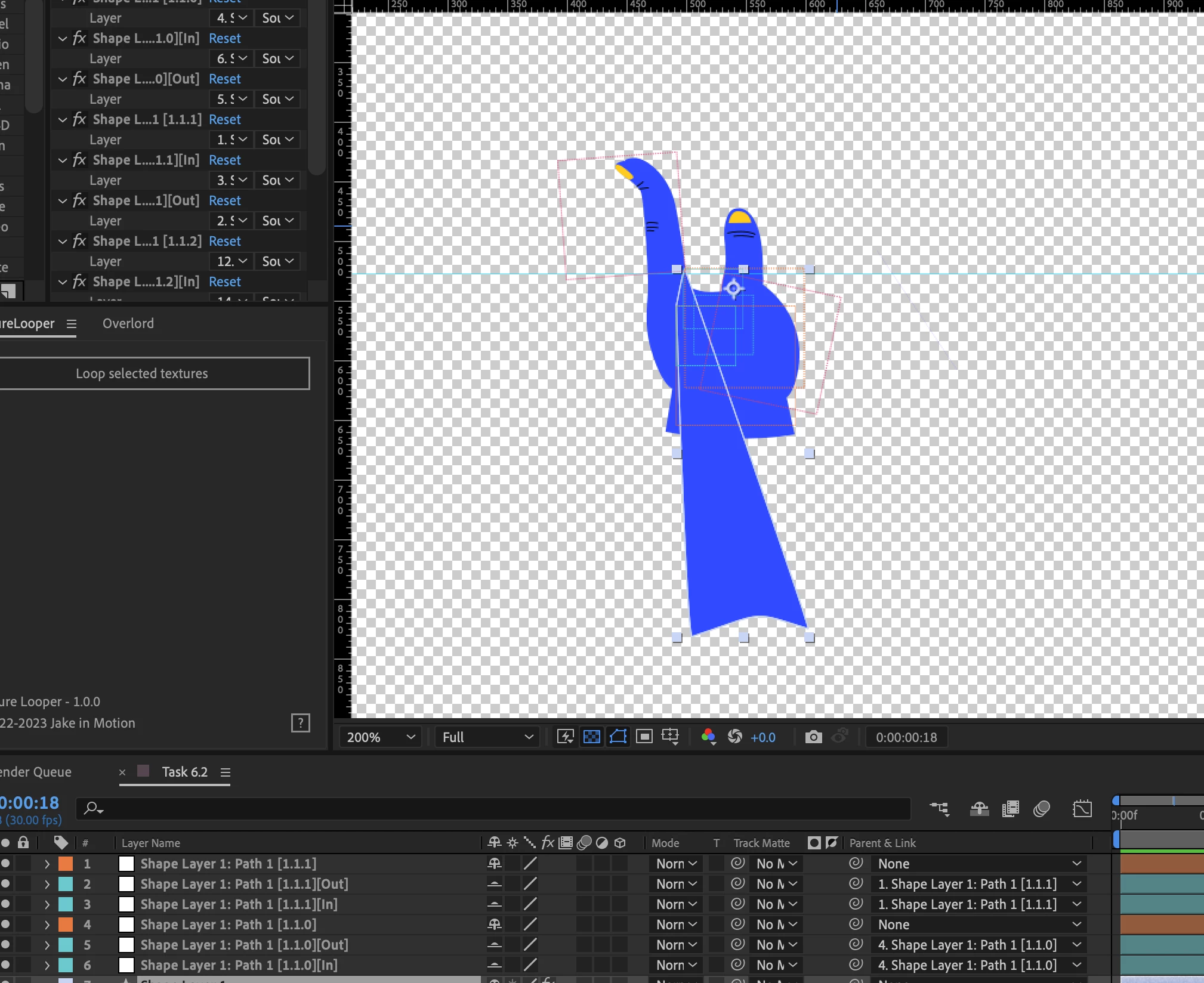
 

image-2.png


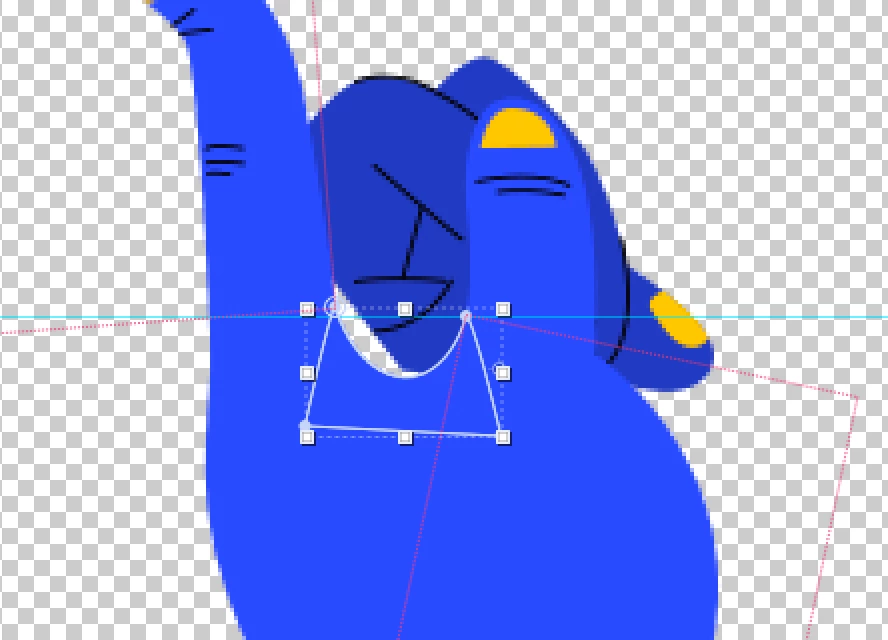
This is the regular shape without distortion:
 

shape.png


I did try resetting shape properties and it's worth mentioning this is the same with the regular create null script.

TOPICS
Error or problem , Scripting
1.0K
Translate
Report
Community guidelines
Be kind and respectful, give credit to the original source of content, and search for duplicates before posting. Learn more
community guidelines

correct answers 1 Correct answer

Community Beginner , Jan 05, 2023 Jan 05, 2023

Nevermind, my bad. Looking back at the image it is the curve that's at the bottom. But yes, regular script did the same. Anyway, thanks again for the answer!

Translate
LEGEND ,
Jan 05, 2023 Jan 05, 2023

You have parenting in there and no doubt that simply affects the coordinates. The default code doesn't really account for this, especially if stuff is already an imated. You may need to unparent everything again, reset the transforms and delete the keyframes and try again.


Mylenium

Translate
Report
Community guidelines
Be kind and respectful, give credit to the original source of content, and search for duplicates before posting. Learn more
community guidelines
Community Beginner ,
Jan 05, 2023 Jan 05, 2023

There is no parenting on the shape, the nulls you see parented are the nulls I created with the script that get automatically parented. 

Translate
Report
Community guidelines
Be kind and respectful, give credit to the original source of content, and search for duplicates before posting. Learn more
community guidelines
Community Expert ,
Jan 05, 2023 Jan 05, 2023

I think if your shape (and shape layer) has transforms, attaching the handles to nulls will generate some deformation. It's not clear if that's what's happening in your case though because you mention the behavior is the same with the original version of the script (which doesn't have the handles option).

Translate
Report
Community guidelines
Be kind and respectful, give credit to the original source of content, and search for duplicates before posting. Learn more
community guidelines
Community Beginner ,
Jan 05, 2023 Jan 05, 2023

I made sure there weren't any transforms on the layer and regardless, the distortion happens on the points without the handles. I ended up using Crazy Shapes as an alternative. Ultimately, I don't think there actually is a fix for this at this point ,  just some weird glitch that happened for whatever reason. I do appreciate the answer though, thank you!

Translate
Report
Community guidelines
Be kind and respectful, give credit to the original source of content, and search for duplicates before posting. Learn more
community guidelines
Community Beginner ,
Jan 05, 2023 Jan 05, 2023
LATEST

Nevermind, my bad. Looking back at the image it is the curve that's at the bottom. But yes, regular script did the same. Anyway, thanks again for the answer!

Translate
Report
Community guidelines
Be kind and respectful, give credit to the original source of content, and search for duplicates before posting. Learn more
community guidelines