
Creating a seamless loop using fractal noise
HI there,
I am on the latest and greatest AE and have troubles getting my fractal noise animation to loop perfectly.
I pretty much followed every video on how to do this I found on the web...
What I have: 30s composition at 30fps
Here is what I tried:
1) Keyframe approach:
- Set first and last keyframe of the Evolution property. 1st: 0 evolutions. Last: 8x +0.0 evolution
- Having Evolution Cycle checked and set to "1"
- Followed instructions to move out the last frame by one frame (didn't help)

2) Expression approach:
- Added the following expression to the evolution property: time*100
while having Evolution Cycle checked and set to "1"
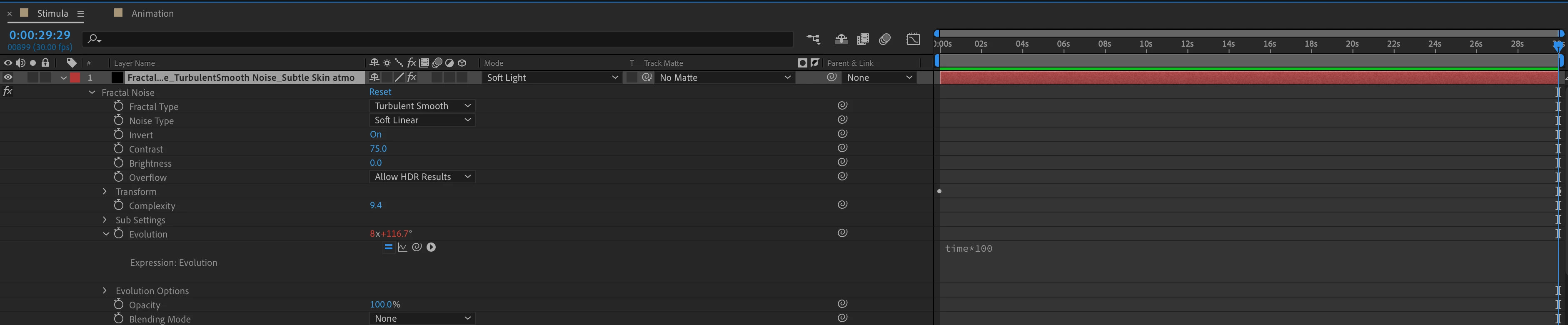
3) Have the following expression on the Evolution property:
loopTime = 1;
speedMultiplier = 0.1;
revolutions = (time / loopTime) * speedMultiplier; revolutions * 360;
and having Evolution Cycle checked and set to "1"
Also tried unchecking Evolution Cycle.
Note: The fractal noise effect exists on the main timeline and is not nested.
Please advise and even better if you have a few minutes to do a quick video recording of the steps, that would be immensly appreciated! THANK YOU!


 AdChoices