
Inspiring
June 5, 2014
Question

Creating text layers with predictable character properties

  • June 5, 2014
  • 1 reply
  • 1032 views

I'm trying to create a text layer programmatically, and I ran into the following problem:

Not all character properties can be set with scripting. In particular, the ones marked with blue in the lower area of the character property window are not accessible:
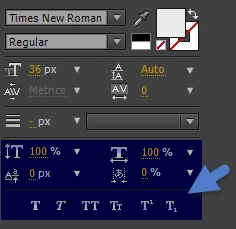
However, it gets worse: New text created uses the currently selected character properties. In other words, if the user has selected small caps, that's what will be created.

To know what I'm creating, I will have to

  1. either find a way to access the missing character properties,
  2. or find a way to at least reset them, presumably by calling the last command show in the following screenshot:
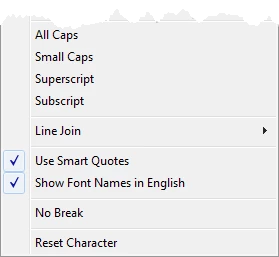
I tried to find this command with app.findMenuCommandId("Reset Character"), but to no avail.

Does anyone have any further ideas?

(EDIT: I now also had a brief look at the SDK (for AEGPs). I might be overlooking something (I only just compiled and deployed some of the examples for the first time), but it looks as if with the SDK even less access to character properties is possible: AEGP_TEXTDOCUMENTSUITE1 has only two functions, a getter and a setter for a string, and that's it. Replacing the text literal is all the sample Text_Twiddler does, so maybe that's why. Not that I was keen on writing C, but if I don't have a choice... So if I'm missing something here, please point this out too.)

This topic has been closed for replies.

1 reply

Legend
June 10, 2014

TextDocument object on pg. 182 of the After Effects Scripting Guide, located here: After Effects Developer Center | Adobe Developer Connection

The sample code they provide shows some of the text attributes, a lot, but not every attribute has been provided to the user via ExtendScript.

––––––– From the guide......

new TextDocument(docText)

app.project.item(index).layer(index).property("Source Text").value

Description

The TextDocument object stores a value for a TextLayer's Source Text property. Create it with the constructor, passing the string to be encapsulated.

Examples

This sets a value of some source text and displays an alert showing the new value:

var myTextDocument = new TextDocument("Happy Cake");

myTextLayer.property("Source Text").setValue(myTextDocument);

alert(myTextLayer.property("Source Text").value);

This sets keyframe values for text that show different words over time:

var textProp = myTextLayer.property("Source Text");

textProp.setValueAtTime(0, new TextDocument("Happy"));

textProp.setValueAtTime(.33, new TextDocument("cake"));

textProp.setValueAtTime(.66, new TextDocument("is"));

textProp.setValueAtTime(1, new TextDocument("yummy!"));

This sets various character and paragraph settings for some text:

var textProp = myTextLayer.property("Source Text");

var textDocument = textProp.value;

myString = "Happy holidays!"; textDocument.resetCharStyle(); textDocument.fontSize = 60;

textDocument.fillColor = [1, 0, 0];

textDocument.strokeColor = [0, 1, 0];

textDocument.strokeWidth = 2;

textDocument.font = "TimesNewRomanPSMT";

textDocument.strokeOverFill = true;

textDocument.applyStroke = true;

textDocument.applyFill = true;

textDocument.text = myString;

textDocument.justification = ParagraphJustification.CENTER_JUSTIFY;

textDocument.tracking = 50;

textProp.setValue(textDocument);

I tried to find this command with app.findMenuCommandId("Reset Character"), but to no avail.

app.findMenuCommandID() method applies only to the primary app dropdowns from what I have seen, and not the contextual popups for the panels unfortunately.

jth42Author
Inspiring
June 10, 2014

I know the scripting guide and I used the bit you quoted. You can't access the bits I highlighted in blue in my screenshot with it.

Legend
June 10, 2014
You can't access the bits I highlighted in blue in my screenshot with it.

Correct, Adobe has not given ExtendScript full access to all text properties yet unfortunately. Filling out feature requests are our only recourse for such missing items in the API.

Adobe - Feature Request/Bug Report Form