
Known Participant
May 4, 2010
Answered

CS5 Color Finesse Serial Number caution

  • May 4, 2010
  • 2 replies
  • 29990 views

Adobe supplied me with the wrong serial number for Color Finesse 3 in CS5.

I started a case with Tech Support but after exchanging emails this weekend then an hour and a half phone conversation with 2 reps today, they were unable to assist me. In fact neither representative knew what Color Finesse is.

I contacted Synthetic Aperture via their web forum and they said I'd been given a PC serial number that won't work on a Mac.

At noon today the Adobe tech said they'd call back within 2 hours with a solution, its now been 5 hours and no call. I'm not impressed.

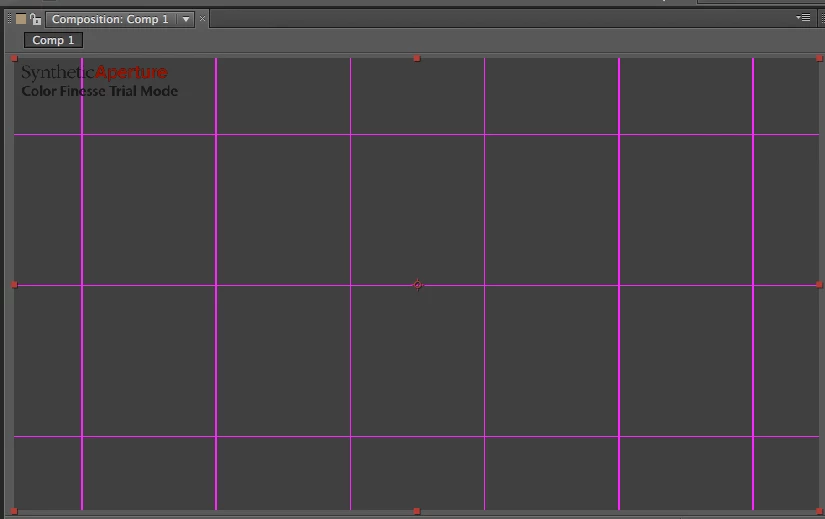
In case anyone else has this problem the PC serial numbers begin with CFLEP and the Mac ones CFLEM. I tried changing the letter prefix and it seemed to work, however while it got me through the Synthetic Aperture registration process, I now have the dreaded pink grid on layers that have CF applied, indicating it is unregistered... Synthetic Aperture says I have to reinstall After Effects again. Oh joy ;/
    This topic has been closed for replies.
    Correct answer Bob Currier

    You'll need to also delete the Color Finesse prefs.

    That's the file "~/Library/Preferences/Color Finesse 3 UI Preferences.plist". Just drag it to the trash, restart AE and apply Color Finesse to a layer and you'll be prompted for the serial number.

    I just tested the whole process out here using the CS5 DVDs and it works fine. Sorry for forgetting that step.

    Bob Currier

    Synthetic Aperture

    2 replies

    andi_urra
    Known Participant
    May 24, 2010

    Hi, I have the same problem (entered the wrong serial, getting the grid, and would like to reenter the correct one). Only I am on a PC. The path as stated above (~\library ...) does not exist here. And I could not locate a .plist file with Color Finesse UI Prefs anywhere on my system.

    How can I solve that problem? Does such a file exist on the PC version? Where is it and what is its name?

    Kind regards,

    Andreas

    AllDayDev2
    Community Manager
    Community Manager
    May 24, 2010

    andi_urra -

    The equivalent on the PC is stored in the registry in the following location:

    HKEY_CURRENT_USER\Software\Synthetic Aperture\Color Finesse 3

    If you're not familiar, you can go to Start (or Start > Run on Windows XP), type regedit, and press Enter to open the registry.

    If you delete the Color Finesse 3 key, then start After Effects and apply CF, you will again be prompted to enter your serial number.

    andi_urra
    Known Participant
    May 24, 2010

    Hi Carey, hi Bob,

    thank you VERY MUCH! That solved the problem.

    One remark for everybody who runs into the same problem:

    1. I actually had the issue with Color Finesse 2 (I use both CS4 and CS5). This results in two groups in the Registry:

    HKEY_CURRENT_USER\Software\Synthetic Aperture\Color Finesse 2

    and

    HKEY_CURRENT_USER\Software\Synthetic Aperture\Color Finesse 3

    However, Carey's instructions apply to both versions identically.

    2. As he stated, you have to really delete the whole key, i.e. group, for the concerning Color Finesse version. I first tried to manipulate only the entry for the Serial (HKEY_CURRENT_USER\Software\Synthetic Aperture\Color Finesse 2\Plug-in\Settings\Registered Serial Number) by reentering my serial there. That did not help. I then deleted it. But even deleting all three entrys starting with "Registered" did not bring up the serial dialogue in AE. Only deleting the complete "Color Finesse 2" key helped.

    Thanks again and best wishes,

    Andreas

    Known Participant
    May 4, 2010

    I uninstalled and re-intstalled.

    I guess the CF registration info is installed outside the Adobe Preferences, I deleted the Adobe Prefs and did an Adobe Uninstall checking the delete preferences option as well. No joy.

    What next?? There's no option to enter a valid registration once I get the correct SN.

    Bob Currier
    Bob CurrierCorrect answer
    Participating Frequently
    May 4, 2010

    You'll need to also delete the Color Finesse prefs.

    That's the file "~/Library/Preferences/Color Finesse 3 UI Preferences.plist". Just drag it to the trash, restart AE and apply Color Finesse to a layer and you'll be prompted for the serial number.

    I just tested the whole process out here using the CS5 DVDs and it works fine. Sorry for forgetting that step.

    Bob Currier

    Synthetic Aperture

    Known Participant
    May 4, 2010

    Bob;

    Many many thanks. It works.

    Still waiting for a real SN though...

    Synthetic Aperture has terrific tech support.