
Exit
  • Global community
    • Language:
      • Deutsch
      • English
      • Español
      • Français
      • Português
  • 日本語コミュニティ
  • 한국 커뮤니티
0

CUDA acceleration problem

Community Beginner ,
Oct 18, 2018 Oct 18, 2018

Hello all.

Im using ae 2018. My CPU is bad and loading slowly preview. How can i fix it?

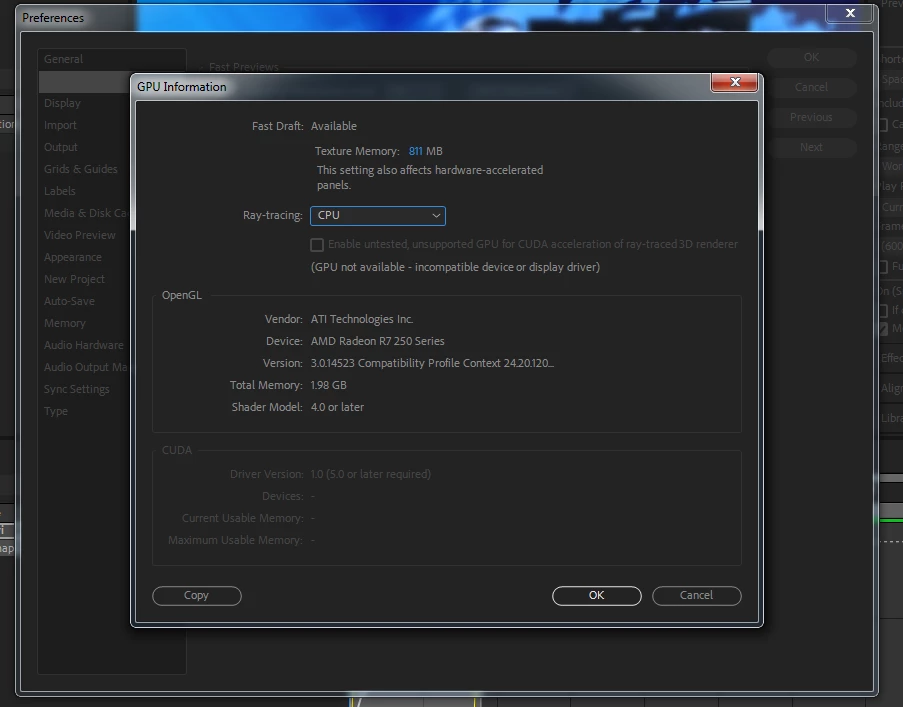
Would solve problem if i enable GPU CUDA acceleration?? and how can i do it?

screenshot of my GPU (btw its not good but maybe solve the problem)
Untitled.png

613
Translate
Report
Community guidelines
Be kind and respectful, give credit to the original source of content, and search for duplicates before posting. Learn more
community guidelines
Community Expert ,
Oct 18, 2018 Oct 18, 2018

CUDA Acceleration only works with a few NVIDIA GPU's. Make sure you do not install any CUDA drivers. They will foul everything up very badly. You have an ATI GPU and that does not support CUDA at all.

There is one other thing to think about. CUDA acceleration only applies to Ray-traced rendering and that feature is deprecated because of changes NVIDIA made to their architecture. Adobe has not worked on any updates for that rendering engine for several versions and you should not be counting on it for your projects. Ray-traced rendering was always extremely limiting. No effects and a bunch of other unsupported features are listed when you enable that rendering engine. There are a lot better ways to Extrude and Bend layers. The C4D rendering engine is a lot faster than even CUDA accelerated rendering, and C4D Lite gives you a bunch of options that you never had with Ray-traced rendering and it renders faster. Personally, I have never used Ray-traced rendering for a job for a client because it was and is way too finicky and problematic. The only reason it is still an option is so you can open old projects that were authored with that system.

Translate
Report
Community guidelines
Be kind and respectful, give credit to the original source of content, and search for duplicates before posting. Learn more
community guidelines
New Here ,
Nov 23, 2018 Nov 23, 2018
LATEST

Hi Rick

Imac 27", Late 2013, 3.4 Ghz Core i5

Mac OS 10.12.6

NVIVIA Geforce GTX 775M

AE 2014 or 2019

I am working on a 2D project, multi layer.  Very heavy.

I read your answer uphere and I went on C4D website.  I just found a website where they sell a 3D animation program (Cinema 4D).

I did not find a driver called C$D that i could add to my Mac.

Now, the questions are :

1-would you know which Cuda driver is the one that could fit in my set up?  How to find it?

2-Does this C4D is a driver that I could add to my Mac OS 12.5.6? (Sierra)

2-Do you know any ather driver that could fit my set up and accelarate the rendering?  where?

Thank you very much

Simon

Translate
Report
Community guidelines
Be kind and respectful, give credit to the original source of content, and search for duplicates before posting. Learn more
community guidelines