
Participating Frequently
February 28, 2021
Question

Dark to Light Colour Change

  • February 28, 2021
  • 2 replies
  • 201 views

Hi, I want to change the colour of the carpet in the shot here from dark blue to light pink.
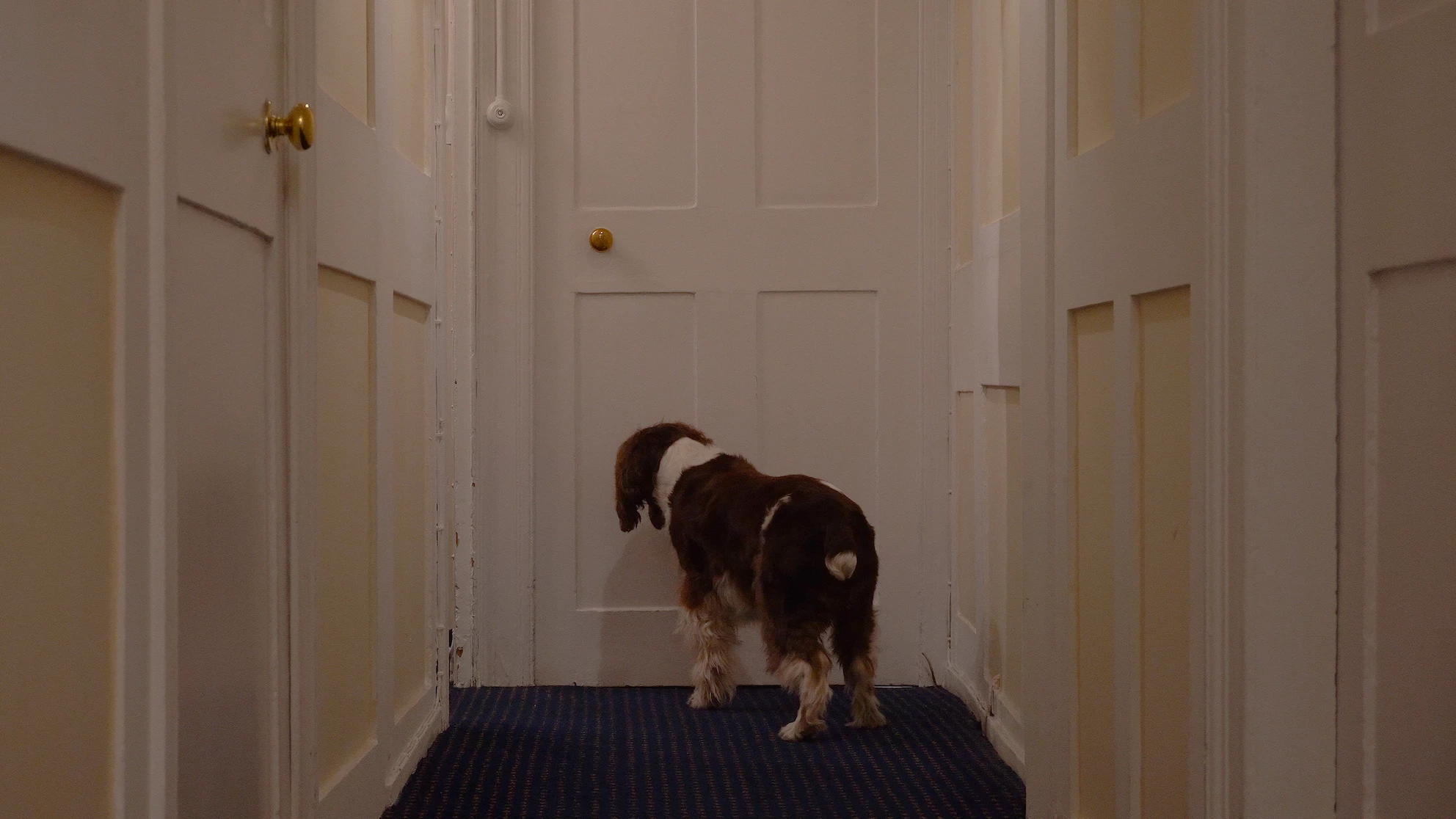


In Premier Pro, I was able to change it with HSL Secondary. However, there was so much noise in the result that I was forced to increase the blur to the point where it was creating a very obvious pink glow that leaked onto the dog's white fur.


I've been advised to use compositing in After Effects to achieve the colour change without the compromise of the glow but I have no idea how to go about that.


Any help would be appreciated.


Thanks,


Ryan

This topic has been closed for replies.

2 replies

Community Expert
March 1, 2021

The most efficient workflow depends entirely on the shot. If there is camera movement you may have to motion track or motion stabilize the shot to cut down on the keyframes you have to add for the mattes. You will need to create a garbage matte to hide the walls. You will need to rotoscope or Rotobrush the dog's feet to create a matte for them. You will need to combine the mattes to form a single matte to poke a hole in the footage layer, then you will need to add color correction to the bottom footage layer to change the color of the carpet. As a final touch, you may need to use some additional matte tools to clean up the edges and do your final color correction.


Here's the workflow:

  1. Create several duplicates of the footage and insert at least 2 white solids or shape layers to use as mattes
  2. Create a garbage matte as the top layer
  3. Try Rotobrush on the dog's feet by opening a copy of the footage in the Layer Panel and creating a garbage mask above the edge of the carpet
  4. Apply Rotobrush and Refine Edge and Freeze your roto work in the Layer Panel
  5. Use the Roto Brush layer as an Alpha matte for another white layer
  6. Pre-compose all layers you will use as the luma track matte
  7. Set up the luma track matte for a copy of the footage
  8. Add color correction to the bottom layer of the footage and finalize color correction for the comp

You may need to do some more masking. You may need to do some more color correction, but this is the basic idea. Create a matte using as few keyframes as possible, poke a hole in the layer to reveal your correction. For some composites, it is best to reverse the order of the final composite and change the luma matte to an inverted luma matte, and put the color correction on the top layer. It all depends on how you want to handle the blended edges and light wrap. 


I hope this helps. This is not a project you would want to do using a single layer or even just a duplicate of the original footage.

Jose Panadero
Community Expert
Community Expert
February 28, 2021

You have a couple of effects inside AE to do this:


- Effect > Colocr Correction > Change Color

- Effect > Color Correction > Change to color


In both cases you must select the color you watn to changeand use the hue and tolerance values to get the desired color.


Also, you can use the Lumetri Color Effect and create a HSL secondary selection to isolate blue color.