

Oliver Olice
Participating Frequently
November 28, 2019
Question

Depth of Field in After effects cc 2019 not working with Cinema 4D Renderer option enabled

  • November 28, 2019
  • 2 replies
  • 5203 views

Hi, I've been building a scene in After effect using 2d layers in a 3d space. 


I wanted to extrude a few shapes so I switched the renderer over from Classic 3d to Cinema 4d. As soon as I did this the Depth of Field stopped woking. 


Is this usual behaviour or am I missing something?


Or 


Is there another workaround still using After effects to create my animations and adding the DoF another way? 


Thank you so much in advance! 
 

This topic has been closed for replies.

2 replies

John_FX1
Participating Frequently
November 28, 2019

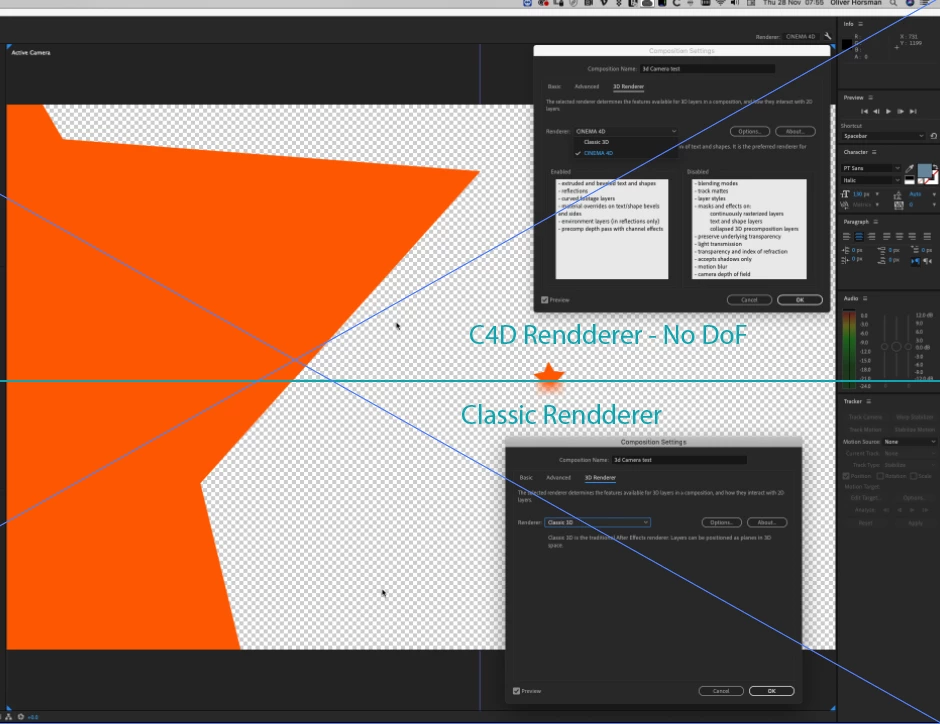
Unfortunatelly the Cinema 4D Renderes doesn't support Depth of Field or Motion Blur.

The older syster (3D Raytraced Renderer, which is still available on the CC2019 version of After Effects and all prior versions going back to CS6 does, but this is a slower system.)

So here's an alternative:

Create your Extruded 3D shape / text using the Cinema 4D Renderer.

PreComp the Scene.

Now we can make a depth matte to apply depth of field to:

Create a Solid layer, add a Gradient Ramp effect (ie Black to White going Left to Right)

On the PreComp add a 'Camera Lens Blur' and in the Effects Controls, set the Blur Map to the Solid Layer with your ramp on, make sure you select 'Effects & Masks' in the options so the effect looks at the Solid Layer after the Ramp effect has been applies. This will use the ramp as a depth matte creating a very effective depth of field.

You can create a black and white depth matte using any method, not only the ramp, (you can even draw one in photoshop or use a light with a short fall off to create one). The Camera Lens Blur uses this to increase blur values and you can play with the settings and animate the Focal Distance for moving results.


Hope that helps, have fun;)


Screen grab below...

Soho Editors - John
Oliver Olice
Participating Frequently
November 28, 2019

Thanks for getting back,


Such a shame it doesn't support Depth of field with the cinema renderer. 


Thank you so much for this example!


However,  the scenes I'm creating are going to be fairly complicated with multiple planes, do you know if there is a way of getting a black to white depth map from this workflow? I could then use this go post the depth of field blur. 


Thanks again 🙂


Oliver Olice
Participating Frequently
November 28, 2019

https://www.maxon.net/en/try/


Thanks, John 


You have been super helpful. 


I guess I'm going to have to jump into Cinema for this one!


I'll let you know if I find a workaround in AE.


Cheers

Oli

OussK
Community Expert
Community Expert
November 28, 2019

Depth of field not work on cinema 4d render,

Oliver Olice
Participating Frequently
November 28, 2019

Thanks, I was sure I read that list. 🙂