Participant
June 25, 2021
Answered

Draft 3d and Shape mask

  • June 25, 2021
  • 2 replies
  • 601 views

Hello All,


I am facing an inssue with the shape mask since a few days.

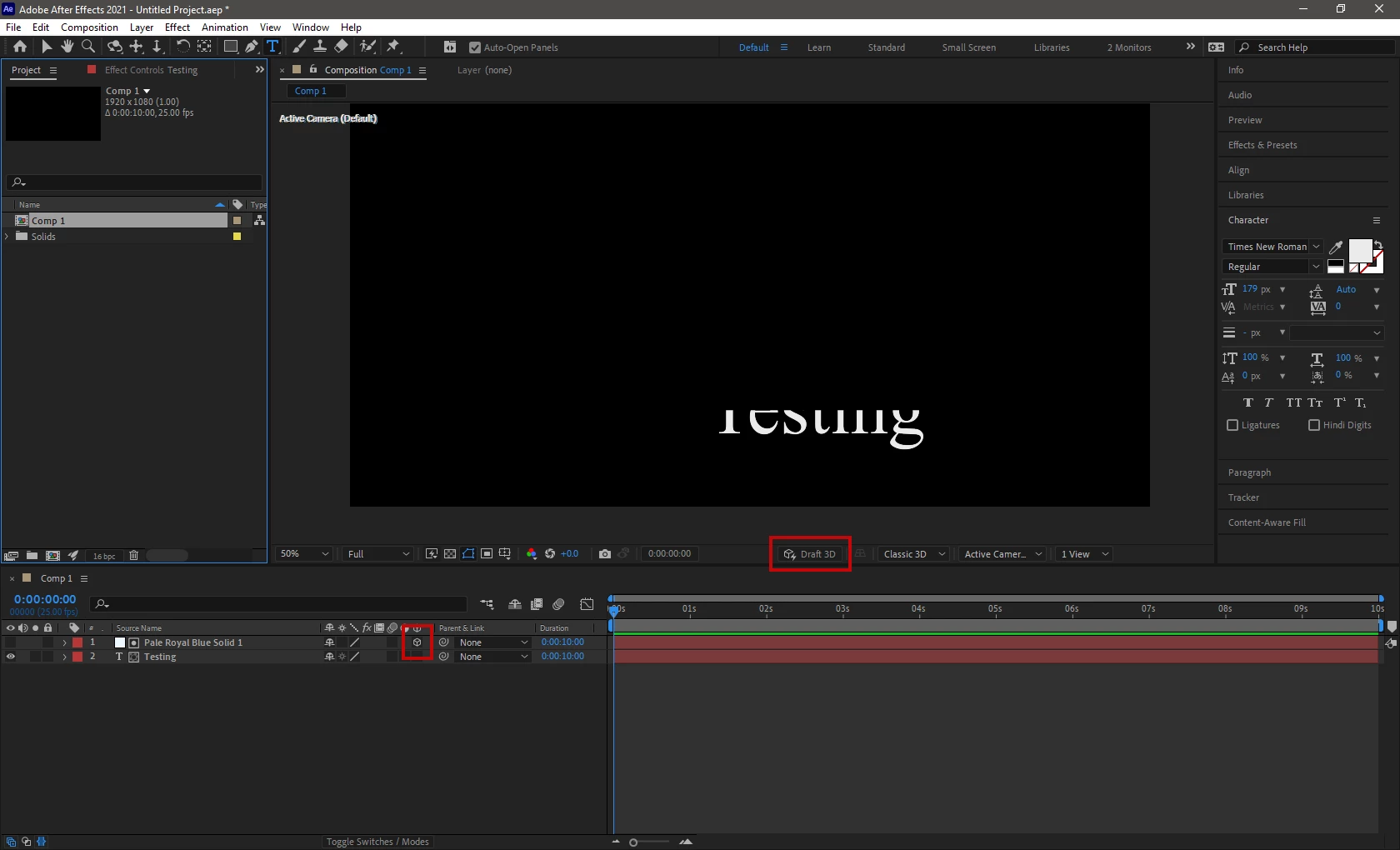
It is not getting applied since a few days, also the draft 3d button is missing in my timeline.


I need help on this, will be greatful if anyone could help/


Aditya

This topic has been closed for replies.
Correct answer Ali Jaber

Turn on the 3D layer switch for any layer and turn off the Draft 3D button:
 

2 replies

Community Expert
June 25, 2021

You can also reset the view by simply clicking on the Fast Previews icon at the bottom of the Composition and selecting Off (Final Quality) or Adaptive Adaptive Resolution. You don't have to change, all you have to do is select one of them to turn off Draft 3D. There is no need to temporarily make a layer 3D.

Ali JaberCommunity ExpertCorrect answer
Community Expert
June 25, 2021

Turn on the 3D layer switch for any layer and turn off the Draft 3D button:


Participant
June 25, 2021

Hi Ali,


Thank you for your prompt reply.

I still do not see the draft 3d on/off button on the timeline even after I switch a layer into 3d.


Attcahed is the screenshot for your reference.


Regards,

Aditya
