Participant
February 16, 2014
Answered

Easy Ease on mac

  • February 16, 2014
  • 5 replies
  • 72945 views

How do I get easy ease to work on After Effects?  I am using a mac.  I tried things in the system preferences and keyboard shortcuts but I am not able to do it.  Please provide clear instructions, thanks.

Correct answer danielking.studio

Hi,

I know this was years ago but I just had the same issue.

You need to select 'USE F1, F2, etc. keys as standard function keys' in the keyboard section of system preferences.
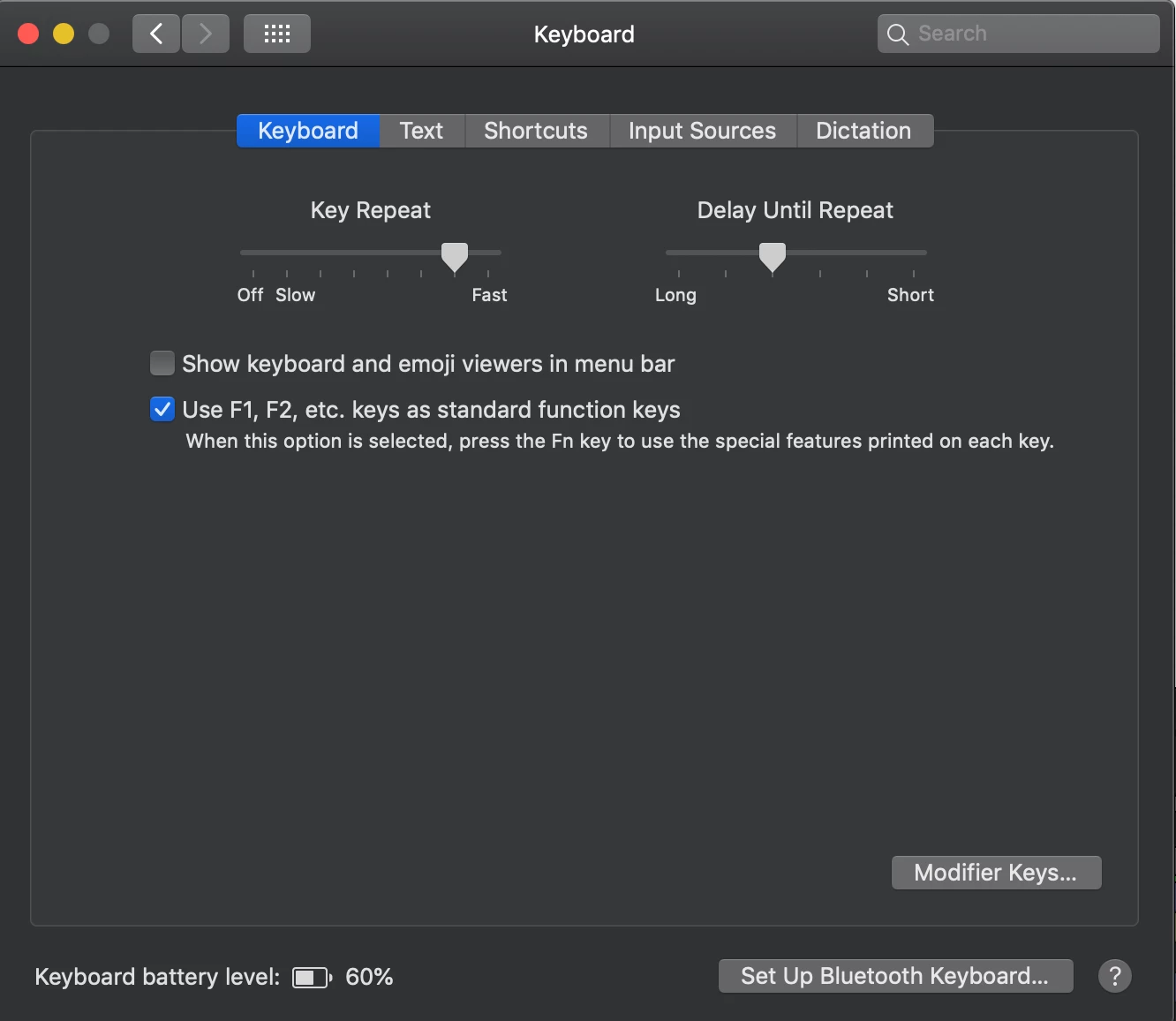
5 replies

Participant
June 21, 2019

With desired keyframes selected, use F9 for a shortcut to Easy Ease. On a Mac, you may need to hold down the function key (fn) whilst clicking the F9 key.

If you want to tweak them further once you've created the ease, go to the graph editor and move the bezier handles until the ease is to your liking.

danielking.studio
danielking.studioCorrect answer
Participant
December 21, 2018

Hi,

I know this was years ago but I just had the same issue.

You need to select 'USE F1, F2, etc. keys as standard function keys' in the keyboard section of system preferences.

Participant
September 24, 2020

Thanks a lot ! it just work perfectly for me

Participant
May 26, 2015

Alright, what you have to do is highlight whatever keyframes you want to easy ease. After you highlight them, right click them and select keyframe interpolation. Once you see that menu select keyframe type and choose Bezier. Bezier is the equivalent to easy ease.

Community Expert
February 16, 2014

Right click on a keyframe, go to Keyframe Assistant, click easy ease. The keyframes must be yellow.

Select a keyframe in the timeline and press F9

If F9 does not work check your System Preferences>Keyboard and make sure you don't have F9 assigned to another shortcut.

Also check After Effects>Preferences>General and make sure Use System Shortcut keys is selected.

If none of that works tell us or show us how your system shortcuts are set up. Just using the defaults should do it.

Participant
February 16, 2014

Hey koaliekyle99,

You can do this several ways,

Right-click the keyframe, Keyframe Assistant --> Easy Ease

Up top in the menus go to Animation --> Keyframe Assistant --> Easy Ease

Or just press F9. If you have a keyboard without the numPad, press Fn+F9

Hope that helps!

Participant
February 16, 2014

Trying to go up top in the menus go to Animation --> Keyframe Assistant --> Easy Ease, same thing happens when right-clicking the keyframe.

Then I tried to press F9 and fn+F9 with these settings but nothing happened...

Community Expert
February 16, 2014

Did this ever work? If it did, what changed? What version and point number of AE?

Something is fouled up with your installation. The first thing to try is to close AE and then hold down Cmnd/Ctrl + Alt/Option + Shift and Start AE by clicking the app in the Applications folder or the Dock. You will have the option of deleting the Preferences file. Take it.

If that doesn't solve the problem check for updates.

If that does not work then uninstall AE using the Uninstall After Effects app in the Application/Adobe After Effects folder.

If that doesn't work, run the Adobe Cleaner tool (Google will take you right there) and re-install again.