
Participant
December 23, 2019
Answered

Editing and aplying text properties on expressions

  • December 23, 2019
  • 1 reply
  • 440 views

Hi, I'm very thrilled about the expression's new features regarding font styles etc.


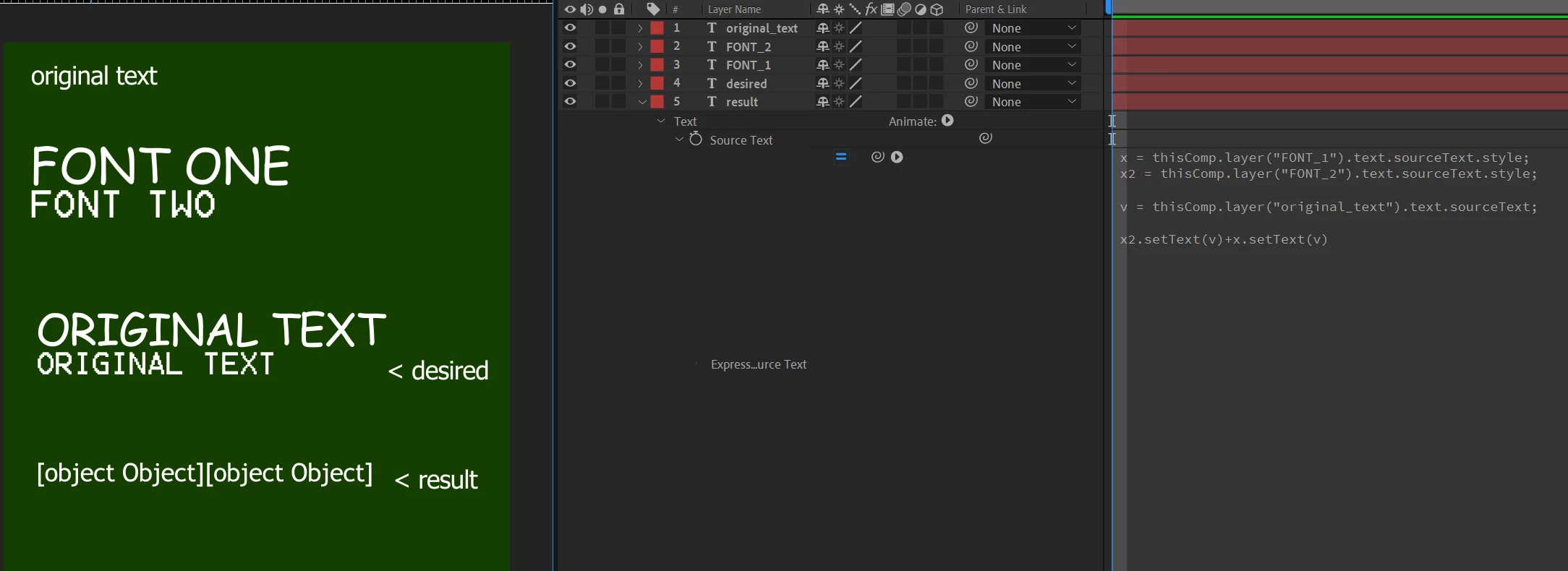
I just faced a problem. I'm trying to mix font properties in just one layer but it doesn't work.

Maybe there's a workaround.


I guess this image explains it all.


Code:


x = thisComp.layer("FONT_1").text.sourceText.style;
x2 = thisComp.layer("FONT_2").text.sourceText.style;

v = thisComp.layer("original_text").text.sourceText;

x2.setText(v)+x.setText(v)


This topic has been closed for replies.
Correct answer Kyle Hamrick

I'm also fond of the new text expression access, but currently you still can't use them to mix styles within a single line of text, unfortunately. The workaround is to create multiple instances of the text and use text animators, masking, etc. to determine the visibility of them at different points. If this is a feature you'd like to see continued development on (I would!), make sure to submit it to the UserVoice page: https://adobe-video.uservoice.com/

1 reply

Kyle Hamrick
Community Expert
Kyle HamrickCommunity ExpertCorrect answer
Community Expert
December 23, 2019

I'm also fond of the new text expression access, but currently you still can't use them to mix styles within a single line of text, unfortunately. The workaround is to create multiple instances of the text and use text animators, masking, etc. to determine the visibility of them at different points. If this is a feature you'd like to see continued development on (I would!), make sure to submit it to the UserVoice page: https://adobe-video.uservoice.com/

jajaelAuthor
Participant
December 26, 2019

Thanks for the reply. That's the workaround I did before the update. Now I'm managing to make multiple text layers instead.

I'll submit it.