
Exit
  • Global community
    • Language:
      • Deutsch
      • English
      • Español
      • Français
      • Português
  • 日本語コミュニティ
  • 한국 커뮤니티
0

Effect Control Panel & Effects

Mentor ,
May 02, 2022 May 02, 2022

I drag and drop Quiver effect in 12 MYSTERY. But Effect Control panel of the MYSTERY did not show that effect. What is the reason?. But the effect is there (shaking). Two videos are attached. 
TOPICS
FAQ
1.8K
Translate
Report
Community guidelines
Be kind and respectful, give credit to the original source of content, and search for duplicates before posting. Learn more
community guidelines

correct answers 2 Correct answers

Community Expert , May 02, 2022 May 02, 2022

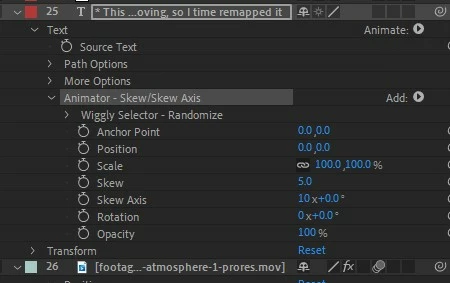
The text animation presets rarely involved additional effects, so they don't appear in the Effects Controls panel.  Instead, expand the text layer on the timeline and you'll an Animator section.  In there are wiggle controls and other settings.

Translate
Community Expert , May 02, 2022 May 02, 2022

Expand the text layer and delete the animator effect. 

quiver.jpg

Translate
Community Expert ,
May 02, 2022 May 02, 2022

The text animation presets rarely involved additional effects, so they don't appear in the Effects Controls panel.  Instead, expand the text layer on the timeline and you'll an Animator section.  In there are wiggle controls and other settings.

Translate
Report
Community guidelines
Be kind and respectful, give credit to the original source of content, and search for duplicates before posting. Learn more
community guidelines
Mentor ,
May 02, 2022 May 02, 2022

That mean you say when it comes to text animation, timeline animator section is more preferable than the selection in Effects & Presets.    

Translate
Report
Community guidelines
Be kind and respectful, give credit to the original source of content, and search for duplicates before posting. Learn more
community guidelines
Community Expert ,
May 02, 2022 May 02, 2022

No - it's all about the right tools for the right job.  Text can be animated in lots of different ways using the text animator, but fortunately you can also apply regular effects to text layers too.

Translate
Report
Community guidelines
Be kind and respectful, give credit to the original source of content, and search for duplicates before posting. Learn more
community guidelines
Mentor ,
May 02, 2022 May 02, 2022

In the composition panel from the text shake only you can say Quiver effect is added. If you want to remove this effect what can you do?

Translate
Report
Community guidelines
Be kind and respectful, give credit to the original source of content, and search for duplicates before posting. Learn more
community guidelines
Community Expert ,
May 02, 2022 May 02, 2022

Expand the text layer and delete the animator effect. 

quiver.jpg

Translate
Report
Community guidelines
Be kind and respectful, give credit to the original source of content, and search for duplicates before posting. Learn more
community guidelines
Mentor ,
May 02, 2022 May 02, 2022

Which effect similar to  Quiver effect?


1.jpg

Translate
Report
Community guidelines
Be kind and respectful, give credit to the original source of content, and search for duplicates before posting. Learn more
community guidelines
Community Expert ,
May 02, 2022 May 02, 2022

I'm not sure, but I'd guess if you add a position animator, then click on the Add option, in selector there's a wiggly option

text animator.jpg

Translate
Report
Community guidelines
Be kind and respectful, give credit to the original source of content, and search for duplicates before posting. Learn more
community guidelines
Mentor ,
May 02, 2022 May 02, 2022
LATEST

Thanks for the help.

Translate
Report
Community guidelines
Be kind and respectful, give credit to the original source of content, and search for duplicates before posting. Learn more
community guidelines