
Participant
July 8, 2020
Answered

Effect effect 2020 not responding

  • July 8, 2020
  • 2 replies
  • 2449 views

Hello, just a little help here.. 

Each time I open up After Effect 2020 it comes up with the screenshot below and crashes. I have tried uninstalling it, refreshing it and tried solving the issue through youtube guidance but nothing realable seems to come up. What should I do?


-Many thanks 
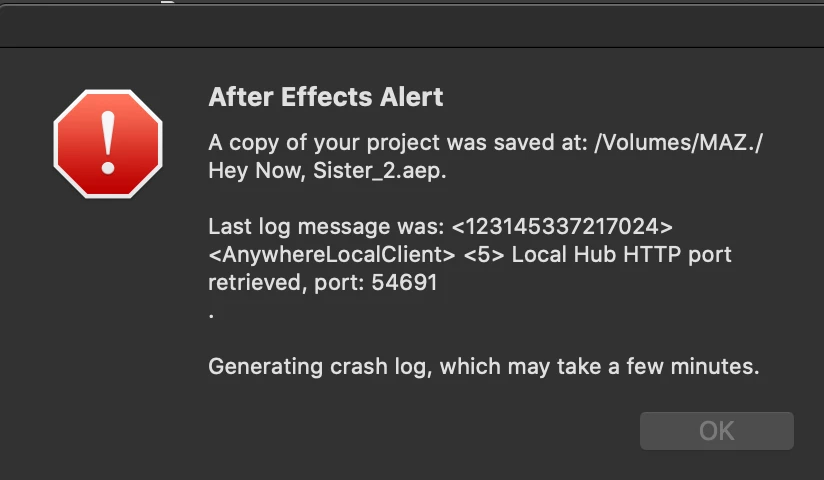
 

System info:

Mac0S Catalina

10.15.5 (19F101)


This topic has been closed for replies.
Correct answer nishu_kush

Thanks for getting back. How do you open After Effects - by double-clicking a project file or clicking on its icon? Please try the following steps:

  1. Reset the preferences of After Effects. Here's how: https://community.adobe.com/t5/after-effects/faq-how-to-reset-trash-preferences-in-after-effects/td-p/10634342?page=1
  2. Open After Effects by clicking its icon and see if After Effects works.
  3. If it works, create a new project and import your existing project in it.

Let us know how it goes.


Thanks,

Nishu

2 replies

Community Expert
July 9, 2020

Try uninstalling with Creative Cloud Cleaner Tool.

Byron.
nishu_kush
Community Manager
Community Manager
July 9, 2020

Hi Mazzie,


Sorry for your issue. I see that After Effects is crashing when you try to launch it.

Does it crash every time you launch it or when you try to open a project? Also, does it show any crash report? If so, please share.

Looking forward to your response.


Thanks,

Nishu

MW2020zAuthor
Participant
July 14, 2020

Hi Nishu,

Aplogies for the late response. I updated my Mac, restarted my computer and it started working however today it has return to the same erorr. 

It is crashing each time I lanuch the software. and occasionally when i open a project it crashes immediately. 

And yes a crash reports appear everytime..

(Shown below) 


Many thanks 

-Mazzie

nishu_kush
Community Manager
nishu_kushCommunity ManagerCorrect answer
Community Manager
July 16, 2020

Thanks for getting back. How do you open After Effects - by double-clicking a project file or clicking on its icon? Please try the following steps:

  1. Reset the preferences of After Effects. Here's how: https://community.adobe.com/t5/after-effects/faq-how-to-reset-trash-preferences-in-after-effects/td-p/10634342?page=1
  2. Open After Effects by clicking its icon and see if After Effects works.
  3. If it works, create a new project and import your existing project in it.

Let us know how it goes.


Thanks,

Nishu