This topic has been closed for replies.

3 replies

ShiveringCactus
Community Expert
Community Expert
August 11, 2022

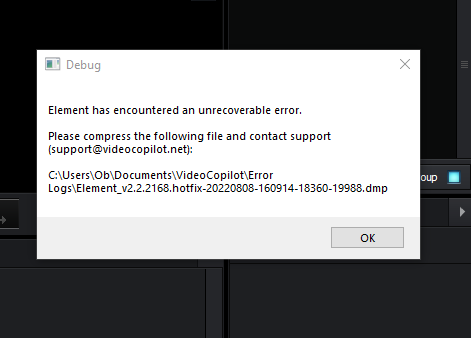
Video Copilot's support have always been great for me.  It's definetly worth reaching out to them.  As the others have said, it's also worth makign sure your graphics card drivers are up to date, and it is probably worth uninstalling Element then reinstalling it from the latest versions available on Video Copilot's website.

OkAdA-ArtAuthor
Participant
August 23, 2022

I have updated my drivers but still the problem keep appearing

Mylenium
Legend
August 10, 2022

Without any system info, especially about what graphics hardware and driver version you use we can't tell you much. The error pretty much means what it says - your GPU is either not compatible, does not have enough performance or has an incompatible or outdated driver. At least the latter can easily be fixed by updating the driver. Anything else will require proper info.


Mylenium

OkAdA-ArtAuthor
Participant
August 11, 2022

Machine name: DESKTOP-4L9D6L6

Operating System: Windows 10 Pro 64-bit (10.0, Build 19044) (19041.vb_release.191206-1406)
System Model: Latitude E5550
Processor: Intel(R) Core(TM) i5-5200U CPU @ 2.20GHz (4 CPUs), ~2.2GHz
Memory: 12GB RAM

DirectX Version: DirectX 12

Windows 10

Kartika Rawat
Community Manager
Community Manager
August 10, 2022

Hi there! 

Sorry about the trouble. Which version of AE are you using? Could you share your system details (OS, CPU, RAM, GPU)? 

Have you already contacted the plugin manufacturer? 


Let us know.

Thanks,

Kartika