Participant
September 29, 2019
Answered

Element 3d Texture map is black!

  • September 29, 2019
  • 6 replies
  • 12801 views

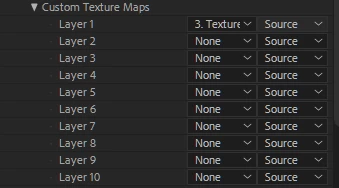
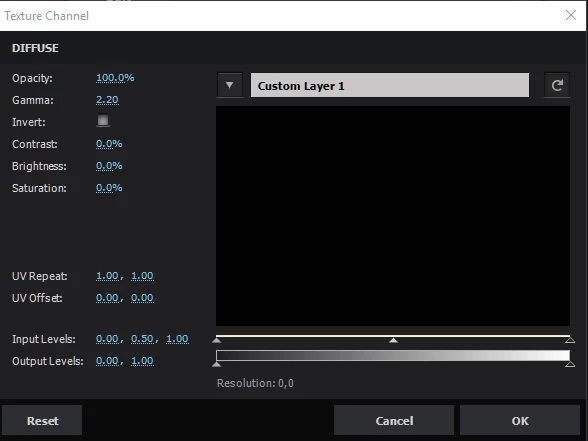
When I try to put an custom (precomposed) texture map and load it in element 3d scene setup. And I choose the custom layer 1 texture it always shows an black screen whatever I try?


See screenshots for more info!
 

    This topic has been closed for replies.
    Correct answer Joost van der Hoeven

    Please contact support of the vendor. Video Copilot in this case. The email adderss is on this page: https://www.videocopilot.net/support/category/plugins/#element-3d-v1 

    6 replies

    Joost van der Hoeven
    Community Expert
    Joost van der HoevenCommunity ExpertCorrect answer
    Community Expert
    March 26, 2022

    Please contact support of the vendor. Video Copilot in this case. The email adderss is on this page: https://www.videocopilot.net/support/category/plugins/#element-3d-v1 

    Participant
    March 23, 2022

    have you found a solution?


    ShiveringCactus
    Community Expert
    Community Expert
    June 30, 2021

    How big are your custom images.  When Andrew Kramer released his Ultimate Earth tutorial, my card couldn't handle the 6k textures.  I resized them in photoshop down to 2k and problem solved.


    Edit to add:

    I also remembered that Andrew pointed out in one of his tutorials that custom layers are 'live' in the sense they consume processing power.  If you can use a file image instead of one in the comp then this might help too.

    Participant
    March 23, 2022

    I have a same problem
    My images 1920x1080, all drivers installed
    And i cant understand what is wrong

    ShiveringCactus
    Community Expert
    Community Expert
    March 23, 2022

    How much RAM does your GPU have ?  Can you see mph is much AE is using for itself?  Maybe try switching AE's project settings to software only.  It is also possible Element has crashed.  You'll need to restart your computer to see if that resolves it.

    Participant
    June 28, 2021

    Did you find any fix mine was wroking all fine when i was using after effects 2019 but after I installed after effects 2021 and i just copied the plugins to the 2021 folder and then this started happening i reinstalled elements i even reinstalled after effects 2019 and installed elements on it but still the problem continued if u got any fix then can u plz plz let me know i am stuck very badly.

    Kyle Hamrick
    Community Expert
    Community Expert
    September 29, 2019

    +1 for confirming your video card drivers are up to date. Element is touchy about that.

    I'd recommend directing further questions on Element to Video Copilot support - you'll find more info and support there since it's their product. If you can't get an answer from the site, I'd recommend emailing them - they've always been very responsive any time I've run into issues!

    Mylenium
    Legend
    September 29, 2019

    Without any info on your system, the properties of the composition and how it is used on the model this is of no use to anyone. Start by updating your graphics drivers and check the various GPU features in AE and the plug-in itself. E3D is highly dependent on hardware acceleration and conflicts in this department can easily impair its functionality.


    Mylenium

    Participant
    October 18, 2019

    Comp settings- 1280x720 29,97fps


    CPU-I5-3570K OC to 4.2ghz

    RAM-16GB DDR3

    GPU-GTX 1660 6GB OC


    so specs shouldn't be the problem here...

    Already updated everything and i still have the same problem