
Exit
  • Global community
    • Language:
      • Deutsch
      • English
      • Español
      • Français
      • Português
  • 日本語コミュニティ
  • 한국 커뮤니티
2

Erreur script

Community Beginner ,
Mar 23, 2024 Mar 23, 2024

Bonjour,

J'ai créé un script avec Chat GPT pour ajouter une propriété Réduire les tracés (TrimPath), mais cela ne fonctionne pas.

J'obtiens un message : Erreur script AE.jpg
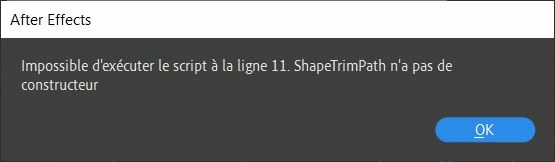
 

Voici le code :

// Check if a shape layer is selected
if (app.project.activeItem instanceof CompItem && app.project.activeItem.selectedLayers.length > 0) {
    var selectedLayer = app.project.activeItem.selectedLayers[0];
    
    // Check if the selected layer is a shape layer
    if (selectedLayer instanceof ShapeLayer) {
        // Create a new shape
        var newShape = new Shape();
        
        // Create a trim path
        var trimPath = new ShapeTrimPath();
        
        // Add trim path to the shape
        newShape.property("ADBE Root Vectors Group").addProperty("ADBE Vector Shape - Group").addProperty(trimPath);
        
        // Add the shape to the layer
        selectedLayer.property("ADBE Root Vectors Group").addProperty(newShape);
        
        alert("Trim Paths property added to the selected shape layer.");
    } else {
        alert("Please select a shape layer.");
    }
} else {
    alert("Please select a composition and a shape layer.");
}


La ligne 11 correspondrait à : var trimPath = new ShapeTrimPath();


Comme je ne connais rien à ce langage, je ne vois pas enquoi consiste l'erreur.

Quelle serait la bonne syntaxe ?

Merci.

TOPICS
Error or problem , Expressions , Scripting
544
Translate
Report
Community guidelines
Be kind and respectful, give credit to the original source of content, and search for duplicates before posting. Learn more
community guidelines

correct answers 1 Correct answer

Community Beginner , Mar 24, 2024 Mar 24, 2024

Parfait !

Je vais gagner beaucoup de temps.

Merci beaucoup.

Translate
Advocate ,
Mar 23, 2024 Mar 23, 2024

Pour ajouter une propriété trim path à un calque de forme, il faut faire comme ça:


var proj = app.project;
var thisComp = proj.activeItem;

if (thisComp instanceof CompItem && thisComp.selectedLayers.length > 0) {
  var selectedLayer = thisComp.selectedLayers[0];
  if (selectedLayer instanceof ShapeLayer) {
    var shapeGroup = selectedLayer.property("ADBE Root Vectors Group");
// ajout trim path
    shapeGroup.addProperty("ADBE Vector Filter - Trim");
// ajout d'images clés sur la propriété Fin
    shapeGroup.property("ADBE Vector Filter - Trim").property("ADBE Vector Trim End").setValueAtTime(0, 0);
    shapeGroup.property("ADBE Vector Filter - Trim").property("ADBE Vector Trim End").setValueAtTime(thisComp.duration, 0);
  }
}


Translate
Report
Community guidelines
Be kind and respectful, give credit to the original source of content, and search for duplicates before posting. Learn more
community guidelines
Community Beginner ,
Mar 24, 2024 Mar 24, 2024

Super ! Cela fonctionne, mais cela créé le Trim path au niveau du calque entier.
Selon les projets, j'ai des calques principaux avec environ 50 à 100 formes par calque.

J'aimerai que le script s'applique à la seule forme sélectionnée dans le calque actif.

Merci.


Translate
Report
Community guidelines
Be kind and respectful, give credit to the original source of content, and search for duplicates before posting. Learn more
community guidelines
Advocate ,
Mar 24, 2024 Mar 24, 2024

Là, tu peux sélectionner un ou plusieurs groupes :

var proj = app.project;
var thisComp = proj.activeItem;

if (thisComp instanceof CompItem && thisComp.selectedLayers.length > 0) {
  var selectedLayer = thisComp.selectedLayers[0];
  var selectedProperties = selectedLayer.selectedProperties;
  if (selectedLayer instanceof ShapeLayer) {
    app.beginUndoGroup("Undo");
    for (var i = 0; i < selectedProperties.length; i++) {
      var shapeGroup = selectedProperties[i]("ADBE Vectors Group");
      // ajout trim path
      shapeGroup.addProperty("ADBE Vector Filter - Trim");
      // ajout d'images clés sur la propriété Fin
      shapeGroup.property("ADBE Vector Filter - Trim").property("ADBE Vector Trim End").setValueAtTime(0, 0);
      shapeGroup.property("ADBE Vector Filter - Trim").property("ADBE Vector Trim End").setValueAtTime(thisComp.duration, 0);
    }
    app.endUndoGroup();
  }
}


Translate
Report
Community guidelines
Be kind and respectful, give credit to the original source of content, and search for duplicates before posting. Learn more
community guidelines
Community Beginner ,
Mar 24, 2024 Mar 24, 2024
LATEST

Parfait !

Je vais gagner beaucoup de temps.

Merci beaucoup.

Translate
Report
Community guidelines
Be kind and respectful, give credit to the original source of content, and search for duplicates before posting. Learn more
community guidelines