


Petr Holusa
Inspiring
Sep 25, 2021 11:13 AM UTC
Question

Error 9997 Can't open OpenEXR files

Hi,


Not sure what this suppose to mean. I have collected project from my working original project. After checking collected package I got this message. 
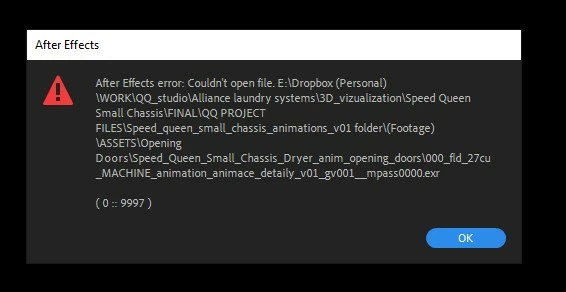
 

12 replies

Participant
Apr 21, 2024 2:52 PM UTC

It's the length of the file path, reducing the length of the path will fix this. Running it on Dropbox/hard drive/network drive will still work. Not sure the exact max length AE will read, but I'd try reducing the length of your folders and file names

Translate
danielcreates
Participant
Sep 29, 2024 10:06 AM UTC

@jacks42063454 You are a Brilliant one man !

Translate
shotas88231586
Participant
Jul 5, 2023 8:17 PM UTC

The same error occurred when exporting the EXR. There is another commonality, and that is that I was also managing my project files in Dropbox.


I found that when I exported the EXR on Dropbox, the error occurred quite often.


The solution was to export to local storage that is not Dropbox, and so far no errors have occurred.


By the way, I have not seen any errors except for exporting EXR.
For example, exporting Tiffs and pngs is not a problem.
No error occurs when reading EXR files on Dropbox.


The error occurs only when exporting EXR to Dropbox.

Translate
Petr Holusa
Inspiring
Jul 10, 2023 8:34 AM UTC

Interesting. I use dropbox especially for backup for ongoing project. Good to know. Thank you.

Translate
Participant
Mar 22, 2023 2:55 PM UTC

ToolfarmJP is correct this is a file permission issue. It looks like you are using dropbox on an external drive. I ha s spoken to Adobe at great lebgth about this and they unfortunately dont support external hardrives. I would reccomend resetting the file permissions on the drive although that didnt work for me. If you copy the files to your desktop they sjould work, if you need them on the external drive then I would copy them back on and it should the problem it. Hopefully Adobe will start supporting external drives but as of a couple of months ago they ahve no intention to. 

Translate
joell99130248
Participant
Apr 23, 2024 11:54 PM UTC
quote

unfortunately dont support external hardrives.


By @Tom_Watson_MotionDesigner

What?  There's no way this is true.

Translate
ToolfarmJP
Community Expert
Community Expert
Sep 28, 2021 12:54 AM UTC

I guess two possible causes. One is the permission of the folder. You check everyone can open it. The other is the exr file is corrupted. You check the file can be opened by other applications like Photoshop.


Translate
Petr Holusa
Inspiring
Oct 4, 2021 7:40 AM UTC

Thanks for reply. I noticed that AE somehow doesn't like the file NAME from C4D/Redshift. I checked fith some file name checker and it said it has to be renamed which was surprising. So I batch renamed the files and it works. Even win explorer said my files has long names but I don't think so.

Translate
Participant
Jan 12, 2022 11:29 AM UTC

I have changed the names but still have the same problem. Any advice ?

Translate
