


Participant
February 7, 2020
Question

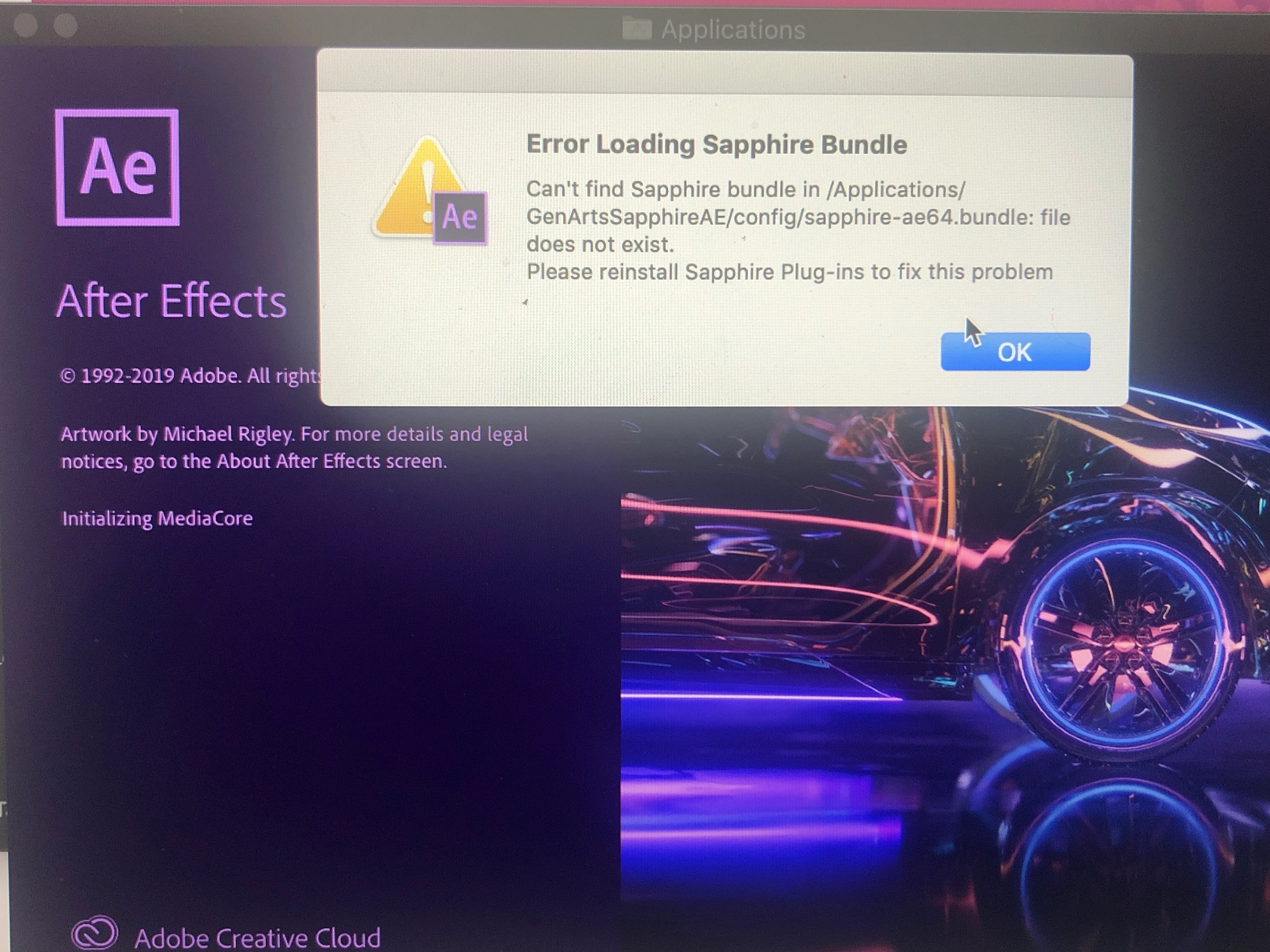
Error loading sapphire bundle
  • February 7, 2020
  • 8 replies
  • 17443 views

I recently made the horrible mistake to try and download the infamous sapphire plugin for free and the app kept crashing before it even opened. So I deleted everything I downloaded and also deleted the app 3 times. Now I get this pop up before even being able to open the application. I've tried everything. Plz help!!!!

8 replies

Participant
August 14, 2022

Please help ! I did deleted all the sapphire folder and even bcc from my Mac and everywhere and it still pops up and I don't even have something related to it to delete and it still shows up and I use macOS and i use 2020 ver of ae ! Please someone help


December 24, 2022

Hey! I figured it out after all day of being on the stupid computer, lol. So, download the Sapphire bundle file from Boris FX. After you downloaded the file, open it and download the package. Then, once that's downloaded, you should find a file within one of the sapphire folders that says uninstall boris. Click on that and uninstall it. Quit AE and it should be just fine!

Participant
January 12, 2023

IT WORKEDD!!!!! THANK YOU SOOOOO MUCH 

Participant
July 22, 2022

all you should do , its reinstall sapphire plugin again and then don't delete the folder instead

open the folder and click the uninstall icon


Participant
March 31, 2022

whenever i try downloading the sapphire plug-in it said the same thing does anyone how to remove it? for mac pls

Participant
July 22, 2022

check my comment


Participant
March 25, 2021

I got the issue ! (on mac)

you have to go to "Macintosh HD"

then "Application Support"/ "Adobe" / "Common" / "plug-ins" and delete all the sapphire folders

then you can open Adobe After Effects.


If you're on Windows I think you have to search the MediaCore folder in the "Support Files" and delete the Sapphire folders.


Hope I helped you !


Participant
January 29, 2022

This worked!! Thanks!!

Participant
March 21, 2021

I cant get in to it, im crying because i wiped everything out and reinstalled it 5 times and i dont know how to fix it 😭😭

Please someone help me 😭

Participant
January 22, 2021

I had the same issue. This is how I fixed it:

I searched for "Sapphire" in my Finder and filtered (click on the plus sign in the upper right corner) it by folders. Many sapphire folders showed up and I dragged them all in the trash. After that I emptied the trash so that all folders were gone. I opened After Effects again and now I no longer have the issue.

Participant
May 20, 2021

THANK YOU SO MUCH!!!

Participant
December 3, 2020

i have the same issue has anyone found a solution

Szalam
Community Expert
Community Expert
December 3, 2020

Wipe everything and reinstall, but this time do it without pirated software.

Participant
December 4, 2020

i've deleted the application and reinstalled it a few times but every time the same notification pops up and i can't open after effects... i deleted the software off my computer but i just assumed deleting after effects wiped it.... is there a better way to do this?

Mylenium
Legend
February 7, 2020

Apparently you didn't delete something, so double check all the relevant AE plug-in folders.


Mylenium

Participant
October 6, 2020

i cant even restart my mac anymore. i cant force quit ae. i cant open ae. i cant do anything. im so mad right now what is this. i even downloaded ae again and it still shows the same message. i hate sapphire plugins so much. thank u for freaking ruining my mac.

Participant
November 11, 2020

i have the same problem !!! did you find a way to fix this ? please help me