Participating Frequently
January 19, 2023
Answered

Error message Unable to set clip. GDI Status: GenericError while previewing the Timeline
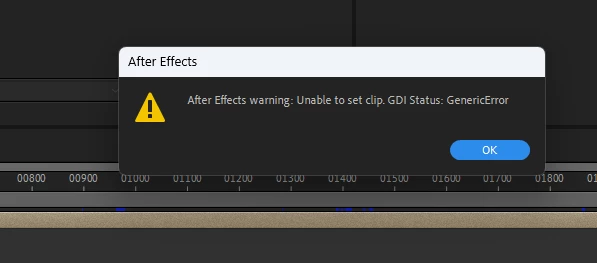
  • January 19, 2023
  • 3 replies
  • 11053 views

Unstable releases- I am seriously considering not updating to new versions at least until 2 revisions.

This topic has been closed for replies.
Correct answer oOo Tomy oOo

Hi,

I find a solution who work for me.

It was an audio problem.

Go to your audio setting in Edit-> Preferences ->Audio Hardware and change your "Default Output".


3 replies

Participating Frequently
September 18, 2024

I experience the same issue from time to time. I know the solution to the problem, but I am unable to save the file when this error pops up as my preview is on loop, and after closing it, it immediately pops up again. How can I save my file?

Participating Frequently
September 18, 2024

Mine stopped prompting eventually when I had just spammed the 'OK' button enough times. Hope that helps despite it being a silly solution...

Participating Frequently
September 18, 2024

Also it seemed that a certaing element in the timeline triggered the loop. Maybe try and make sure the composition isn't still trying to play back that bit. Click to move the playhead or try and press space to stop it before the next prompt, maybe that works.

oOo Tomy oOo
oOo Tomy oOoCorrect answer
Participant
February 27, 2023

Hi,

I find a solution who work for me.

It was an audio problem.

Go to your audio setting in Edit-> Preferences ->Audio Hardware and change your "Default Output".


Participating Frequently
June 15, 2023

This is the correct answer. Happens everytime i switch headphone jack on my PC. Thank you Tomy!

oOo Tomy oOo
Participant
June 15, 2023

You're welcome!

Ishan Y
Community Manager
Community Manager
January 23, 2023

Hey Raj,

Welcome to the community, and sorry for the issue. Could you let us know what action triggers this error message? Let us know your current After Effects version (Here's how to check). We're here to help.


Thanks,

Ishan

Participating Frequently
January 26, 2023

Hi, it appears while playing the timeline(spacebar) and keeps on appearing instantly when closing it. The only way I found to escape this is to force close the app in the task manager. Here is the version.


Participating Frequently
February 24, 2023

Thanks for sharing the info. The application checks to make sure that you have 10 GB free above what is set in Preferences > Media & Disk Cache. That shouldn't affect performance if you clear the cache before the disk gets close to full. Do you still see the error message? 


Based on the cache status in the images that I shared above, there is 116GB left to reach the set cache size of 750 GB. The warning message shows up every time when I start the application.