glaustin
Inspiring
August 15, 2017
Answered

Essential Graphic Templates Without Audio Track

  • August 15, 2017
  • 2 replies
  • 1681 views

Hi Guys

I'm not sure if this question is for here or the Premiere Pro board.

I have created several templates in Ae for use in my Pr projects. Overall I have had fun creating them and found it is possible to customise them all as I should like. The one issue I have is whether there is a way to create these templates without an audio track? Every time I drop a template onto a Pr timeline, it brings in the audio track as well. Is it possible to create/ save the template in a way that dispenses with the audio track?

Regards,

Graham

This topic has been closed for replies.
Correct answer David Arbor

No, that's just how Premiere works. You can file a feature request to change this behavior; this a small, but annoying grip a lot of people have had over the years: Feature Request/Bug Report Form

If you don't wan to bring in the audio track you have two choices:

1) Double-click your template to open it in the Source monitor and only drag the video (filmstrip icon below the video—see attached)

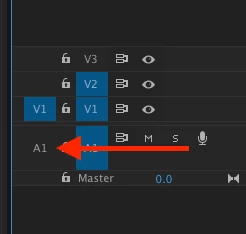
2) Don't patch your audio tracks in the timeline's track header after you select your template in the Project panel. These are the A1, A2, etc. icons on the left side of the header that determine what tracks (if any) your audio and video will be routed/patched to. See attached.

2 replies

Kevin-Monahan
Community Manager
Community Manager
September 29, 2017

Graham, I believe this is fixed in the upcoming version. I'll test it for you as soon as I can.

Thanks,

Kevin

Kevin Monahan - Sr. Community and Engagement Strategist – Adobe Pro Video and Audio
glaustin
glaustinAuthor
Inspiring
October 4, 2017

Many thanks, Kevin. That great to hear. Dragging the template onto the timeline, with a track for non-existant audio, can banjax existing audio if not careful.

David ArborCorrect answer
Inspiring
August 15, 2017

No, that's just how Premiere works. You can file a feature request to change this behavior; this a small, but annoying grip a lot of people have had over the years: Feature Request/Bug Report Form

If you don't wan to bring in the audio track you have two choices:

1) Double-click your template to open it in the Source monitor and only drag the video (filmstrip icon below the video—see attached)

2) Don't patch your audio tracks in the timeline's track header after you select your template in the Project panel. These are the A1, A2, etc. icons on the left side of the header that determine what tracks (if any) your audio and video will be routed/patched to. See attached.