
Export to MP4 (h264) causes pixelated edge
Hi,
I am working on an animation in AE. In the project there is one scene where a plain blue background touches a plain red shape.
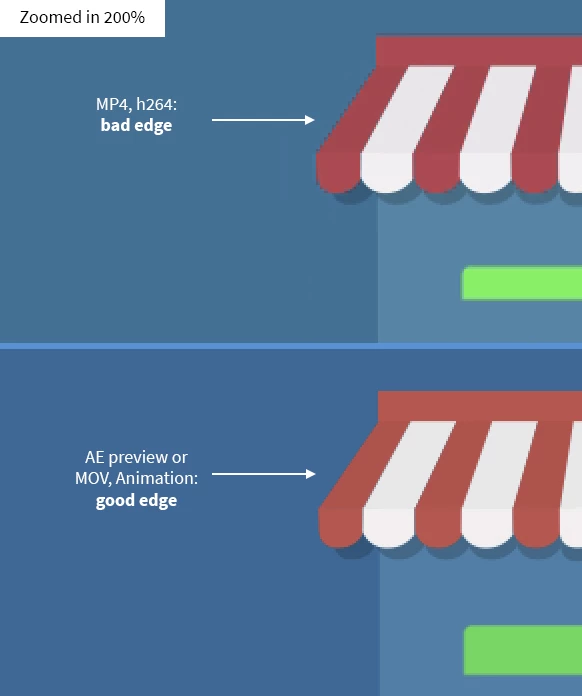
After exporting the final project to h264 via Media Encoder or AE (it doesn't make a difference which method I choose) at this particular scene the edge where blue meets red is pixelated and jagged (see images attached). And it's really just this edge. Everything else looks fine. The preview in AE itself looks fine, too. No pixelated edge. Also increasing the bitrate doesn't affect the result. I also checked and unchecked settings like "Use maximum render quality" and "Render at Maximum Depth" with no visible change. So I tested almost every option in the h264 video settings with no success.
But exporting to a different format like Quicktime MOV with Animation codec doesn't cause those pixelated edges. So my guess is that the way the h264-compression works causes those ugly edges. Maybe it's the color contrast of red and blue? I don't know. Did anybody else notice this problem? Any ideas on how to avoid this other than using another codec? Oh and, still working with AE CC 2015.2 if that matters.
There is little motion in this scene. A slow zoom in. But as i said, in AE or with Animation codec it looks fine. So this, can't be the problem.
My basic export settings are:
1920 x 1080
square pixels
frame rate: 25
field order: progressiv
PAL
Profile: Main
Level: 4.1
Any help is appreciated.
Thank you.
Daniel
 AdChoices