Participant
May 25, 2025
Answered
Exporting
- May 25, 2025
- 1 reply
- 1104 views

Or what ways other than H264.mp4 file I can export at where I get the same video result?
If you must use 20fps, you'll need to do some trial and error to confirm which formats will allow export... and then also achieve the other goals you have for these files. This is honestly less an After Effects issue than one of video codecs and file formats in general. That said:
In the Render Queue, under Output Module, you can choose other presets by clicking on the small arrow next to here it says "H.264 - Match Render Settings - 15 Mbps" in blue. Or, you can fully customize the export format settings by clicking directly on it. 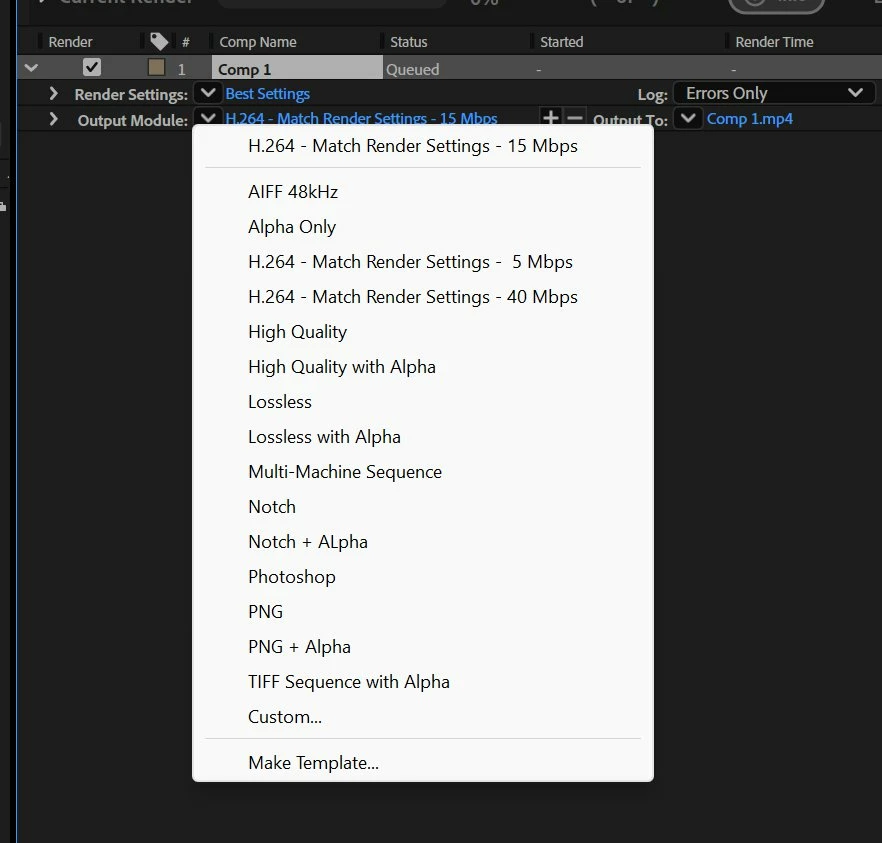
The "High Quality" preset will allow a 20fps export, for example, but this will be creating a .mov (Quicktime) file using the Apple ProRes 422 codec. This is a good *production* codec, but likely won't be playable by your phone, in browsers, by most people you might want to share this file with, or maybe even directly on your own machine without using specialized post-production apps like After Effects or Premiere Pro.
In short, these limits have reasons for existing. There are different codecs and file formats for different purposes, and most *delivery* formats - made for ease of playback on a wide range of devices - have fewer allowances for specs that are outside the norm.
If you want to continue down this road, I'd encourage you to do some research/learning about video codecs to understand what you're actually dealing with. Here's a good place to start.
If you're not interested in getting into those technical details or doing trial and error testing, I'd recommend sticking to the more-common frame rates, as suggested above.
Already have an account? Login
Enter your E-mail address. We'll send you an e-mail with instructions to reset your password.
 AdChoices