Participant
January 25, 2024
Answered

Expression object following path

  • January 25, 2024
  • 5 replies
  • 3405 views

I have always used After Effects for simple projects, but now, for a more complex project, I would like to start using some expressions to simplify the work. Specifically, I would like to understand which expression to use to instruct multiple objects to move along a path. This way, if the path is modified, the path of the objects changes accordingly. Thank you!

Correct answer Airweb_AE

A good start.


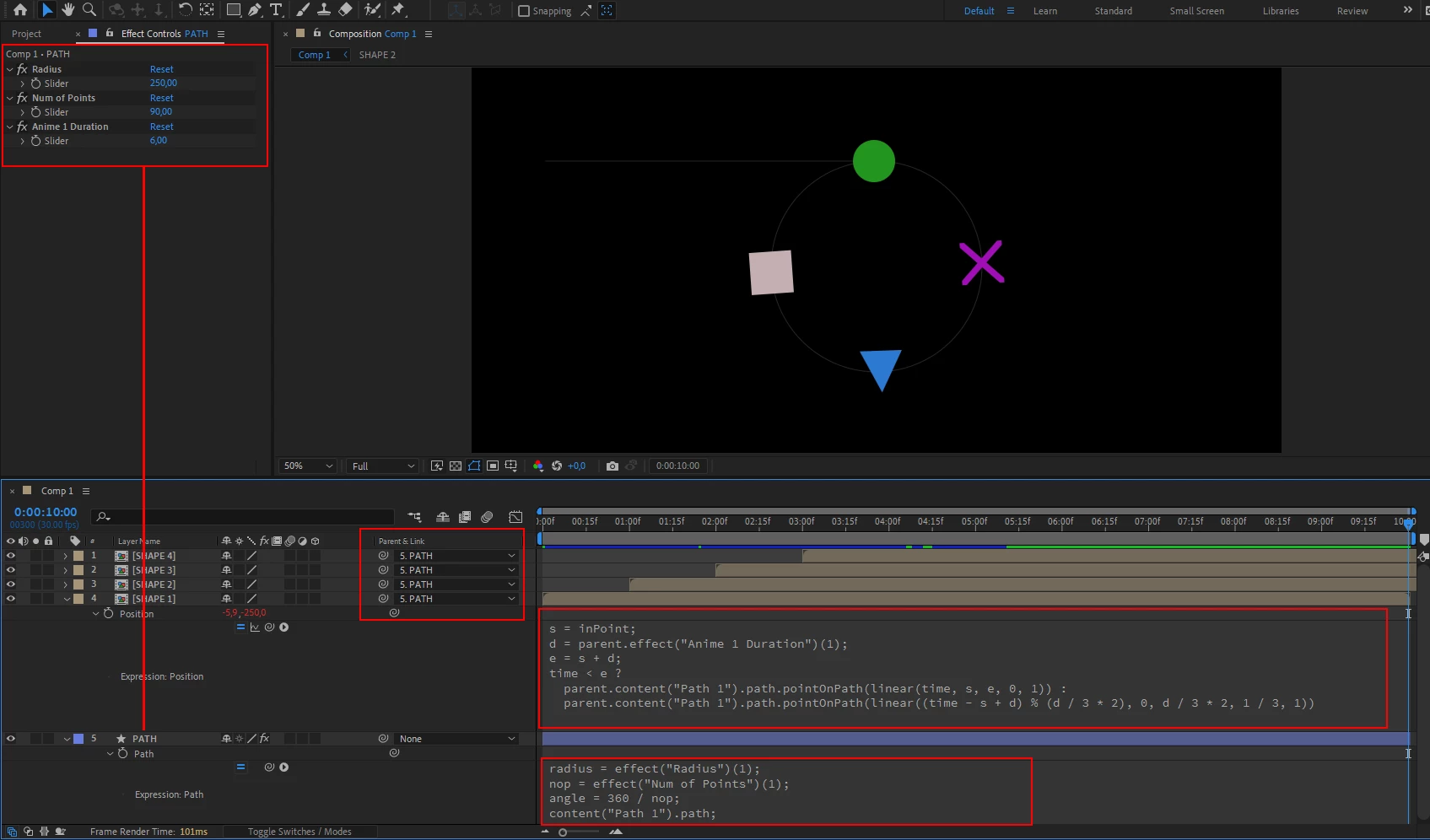
- 1 shape layer with 3 sliders (Radius, Num of Points, Anime 1 Duration)

path property expression


radius = effect("Radius")(1);
nop = effect("Num of Points")(1);
angle = 360 / nop;
content("Path 1").path;
// line length = half the perimeter of the circle
points = [
  [-radius * Math.PI, -radius],
  [0, -radius]
];

for (var i = 0; i < 360; i += angle) {
  x = Math.cos(degreesToRadians(i - 90)) * radius;
  y = Math.sin(degreesToRadians(i - 90)) * radius;
  points.push([x, y])
}

createPath(points, [], [], false)


Create your shapes/objects and parent them to the PATH layer

enable transform -> auto-orient -> orient along path

Position expression


s = inPoint;
d = parent.effect("Anime 1 Duration")(1);
e = s + d;
time < e ?
  parent.content("Path 1").path.pointOnPath(linear(time, s, e, 0, 1)) :
  parent.content("Path 1").path.pointOnPath(linear((time - s + d) % (d / 3 * 2), 0, d / 3 * 2, 1 / 3, 1))



5 replies

Participant
September 5, 2024

I have a similar issue. Here's a comp that shows how to thread a sewing machine. 
I made this manually: drew the path, pasted it into the yellow & black line segments' positions, then duped them a lot and sequenced them with Keyframe Assistant. 
I'd like to use an expression instead so that I can edit the path without having to redo a lot of steps. That's possible right?

Community Expert
September 6, 2024

Take a look at this thread Re: Continuously looping a dashed stroke.


 All it takes to create the continuously moving dashed line is a loopOut() expression on the Offset property of Dashes with the first keyframe at zero and the next at the sum of the dashes and gaps settings. Then, drag the second keyframe up or down the timeline to control the speed of the moving dashed line.

Participant
September 6, 2024

OK that's totally cool. Thanks!!!!

Community Expert
January 26, 2024

If you already have a motion path, or if you are going to copy a mask or shape layer path and use that for the motion path, and you put the first moving layer on the top of the timeline, you can just multiply a slider value by one minus the layer index and use a valueAtTime expression. 


If the top animated layer was named Circle and the Slider was named "Delay Slider," this expression should work.

ref = thisComp.layer("Circle");
dlyFrames = ref.effect("Delay Slider")("Slider");
m = index -1;
dly = framesToTime(dlyFrames * m);
p = ref.position;
newPos = p.valueAtTime(time - dly)

Add that expression to as many layers as you want to stack below the first moving layer, set the Slider to 20, and every layer will follow the original motion path twenty frames after the layer above moves. It looks something like this:

If you need something more complex, let us know. 

Airweb_AECorrect answer
Legend
January 25, 2024

A good start.


- 1 shape layer with 3 sliders (Radius, Num of Points, Anime 1 Duration)

path property expression


radius = effect("Radius")(1);
nop = effect("Num of Points")(1);
angle = 360 / nop;
content("Path 1").path;
// line length = half the perimeter of the circle
points = [
  [-radius * Math.PI, -radius],
  [0, -radius]
];

for (var i = 0; i < 360; i += angle) {
  x = Math.cos(degreesToRadians(i - 90)) * radius;
  y = Math.sin(degreesToRadians(i - 90)) * radius;
  points.push([x, y])
}

createPath(points, [], [], false)


Create your shapes/objects and parent them to the PATH layer

enable transform -> auto-orient -> orient along path

Position expression


s = inPoint;
d = parent.effect("Anime 1 Duration")(1);
e = s + d;
time < e ?
  parent.content("Path 1").path.pointOnPath(linear(time, s, e, 0, 1)) :
  parent.content("Path 1").path.pointOnPath(linear((time - s + d) % (d / 3 * 2), 0, d / 3 * 2, 1 / 3, 1))


Marco5EFEAuthor
Participant
February 2, 2024

Thank you very much!

Mylenium
Legend
January 25, 2024

I don't see how expressions would be more efficient here. You still need to copy the code and stagger the layers in time. I think you are overthinking this. Simply animating one of the layers and then duplicating it will be much quicker.


Mylenium

Dan Ebberts
Community Expert
Community Expert
January 25, 2024

Not sure exactly what you're after, but a simple example would be an object layer with a slider control and a shape layer with a path. The object will follow the path as the slider goes from 0 to 100, with a position expression like this:

L = thisComp.layer("Shape Layer 1");
p = L.content("Shape 1").content("Path 1").path;
s = effect("Slider Control")("Slider");
L.toComp(p.pointOnPath(s/100))


Participant
March 14, 2025

this expression saved my life today, Dan. Thank you very much