
Pierre Devereux
Known Participant
January 17, 2013
Question

Expression request

  • January 17, 2013
  • 1 reply
  • 2915 views

Hi Guys,

I tried to stay away from After Effects and concentrate on sound - but I have failed! I am hopelessly addicted to AE - there is no turning back!

I have a question about expressions. I have started getting my head around them, but was wondfering if one of you had some advice offhand on the following.

I have a scene set up - very simple, 3 Solids, one camera and a Null object - all 3d.

What I want to do now, without having to work out the math and angles (because I am lazy) is have the three solids duplicated, and placed at 45degrees on the "X" axis, in 3d space with the bottom edges touching the top edges of the layers below. I then want to duplicate again, and put a further 45degree on the "X" axis to create a ceiling. To end up with something almost, but not quite, entirely unlike this....
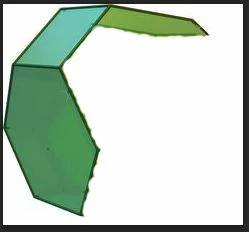
I would like to know if an expression can be used over a script that creates a specific shape, because I might like to add or remove solids depending on what I want to create.

To be honest, This is not something I need for a current project, but I am trying out a few things, and thought this would be an interresting place to start with expressions (having "wiggled" about as much as is alowed for one compositor!)

Thanks guys

Pierre

This topic has been closed for replies.

1 reply

Mylenium
Legend
January 17, 2013

Not quite sure what you are getting at. If you're planning to do Platonic primitives, you'll have to get much deeper into the math side of things. There's only so many possible solutions for any n and p (n being the number of sides, p being the number of faces) and some of them involve combinations of multiple n-gon types (there is no determinate solution for just pentagons for instance). If all you want is to create tubes, arcs and other relatively simply geometries, you might wanna check my page's 3D elements section...

http://www.myleniumstuff.com

Mylenium

Pierre Devereux
Known Participant
January 17, 2013

Hi,

Thank you. I will check out the pages now. To be honest, I dont know yet exactly what I want either!

I am trying to get out of looking into Adobe Audition, so I am making excuses to find something to do! My plan for Adobe dominance, was to create a complete closed 3D world of solid layers, placing a camera inside it, and being able to do complete 360degree pans with the camera.

If this is even possible, I am not sure, but surprisingly, I have had some degree of success while waiting for replies. It was a very manual process, and it is not 100%, but for someone new to After Effects 3D capabilities, it actually looks really exciting and possibly even usable for ourr project.

Ill check your links out and see what I can find. Thank you for the reply.

Pierre

Community Expert
January 18, 2013

Hi Rick,

Thank you for the project. It has been my first introduction to using sliders. It took me a while to figure out what the heck was going on, and a few false starts in attempting to re-create it. I took the project apart, and have now been able to recreate it several times. I used the process for the starfield, and it works beautifully. so much faster. I create the first loop with this, then create a few nulls, duplicate the layers and parent to the nulls. Rotate the nulls a few degrees, and by messing around with the size and angles, I can create a very smooth circle to work inside.

I also tried trapcode horizon. I have not used it before, but I do have the trial versions. I did not make many changes, but used the picture I have. My only issue with horizon, is that the picture on the sides of the comp view, seem to stretch in and this destroys the illusion of being in space. Is this the way horizon works, or are there settings to edit that get around this. If it just works this way, no hassles, Ill continue to refine my own comp. However, if horizon can be made to better present a 3D world of stars, Ill look into purchasing it.

Thanks again,

Pierre


There's another way to create a very 3D starfield all inside AE that is very convincing.  You only need 2 layers and some expressions. The trick is offset, blend modes and scale. If your starfield has an alpha channel you don't need to use blend modes.

Here's the theory. You create a starfield similar to the one you have that is about 4 X the comp size, let's say 4000 X 4000 pixels. If the star field does not contain very many unique features then it doesn't need to be much bigger than the comp. The trick to the star field is that it needs to be setup to be usable as a tile. IOW, if you were to offset the starfield 50% you would not see a seam. You create another star field that's slightly different. There are a bunch of ways to create this kind of star field inside AE with CC Ball Action or with Photoshop using nothing but noise and threshold. 

Here's the real trick, the starfield layers are 2D, they just look 3D because of the difference in scale and offset.

Now you tie the scale of both star fields to the distance from the camera using an expression so that they both scale at a ratio of the distance between the camera or the camera dolly (I almost always use a null to move and point the camera. Just as in the real world, a dolly or null, gives you more precice control).

You then tie the angle of the camera's orientation to the value of the offset. As the camera pans and tilts the background is offset. Each starfield layer has a slightly different value so they move at slightly different speeds.This is why you must have a starfield image that's seamless. As the camera moves in any direction you'll get parallax between the stars that makes them look 3D. It's basically the way they made starfields in Star Wars.

I made a starfield in the 70's by simply poking holes in a piece of black paper, putting a light behind it, then dollying into the paper slowly. I rewound the film in the camera, turned the paper upside down, then photographed similar movement a second time double exposing the film. This gave me a 3D effect of moving through space that was very convincing.

I set up this comp in just a few minutes. There's a shape layer representing a plannet. I put in a camera move with a tilt and pan so you can see the 3D effect. There are a couple of sliders to adjust the relative offset for tilt and pan. Rotation even works (rotate in Z). Simple, convincing, and with the right star field layers, beautiful. There's no complex math. Everything came right from AE's built in expression library.

Enjoy.