

kulpreet singh
Inspiring
October 3, 2017
Question

FAQ: How do I reinstall a previous version of After Effects?

  • October 3, 2017
  • 7 replies
  • 35523 views

Please read this blog before reinstalling a previous version, otherwise, you might mistakenly uninstall the current version of Premiere Pro installed on your computer.


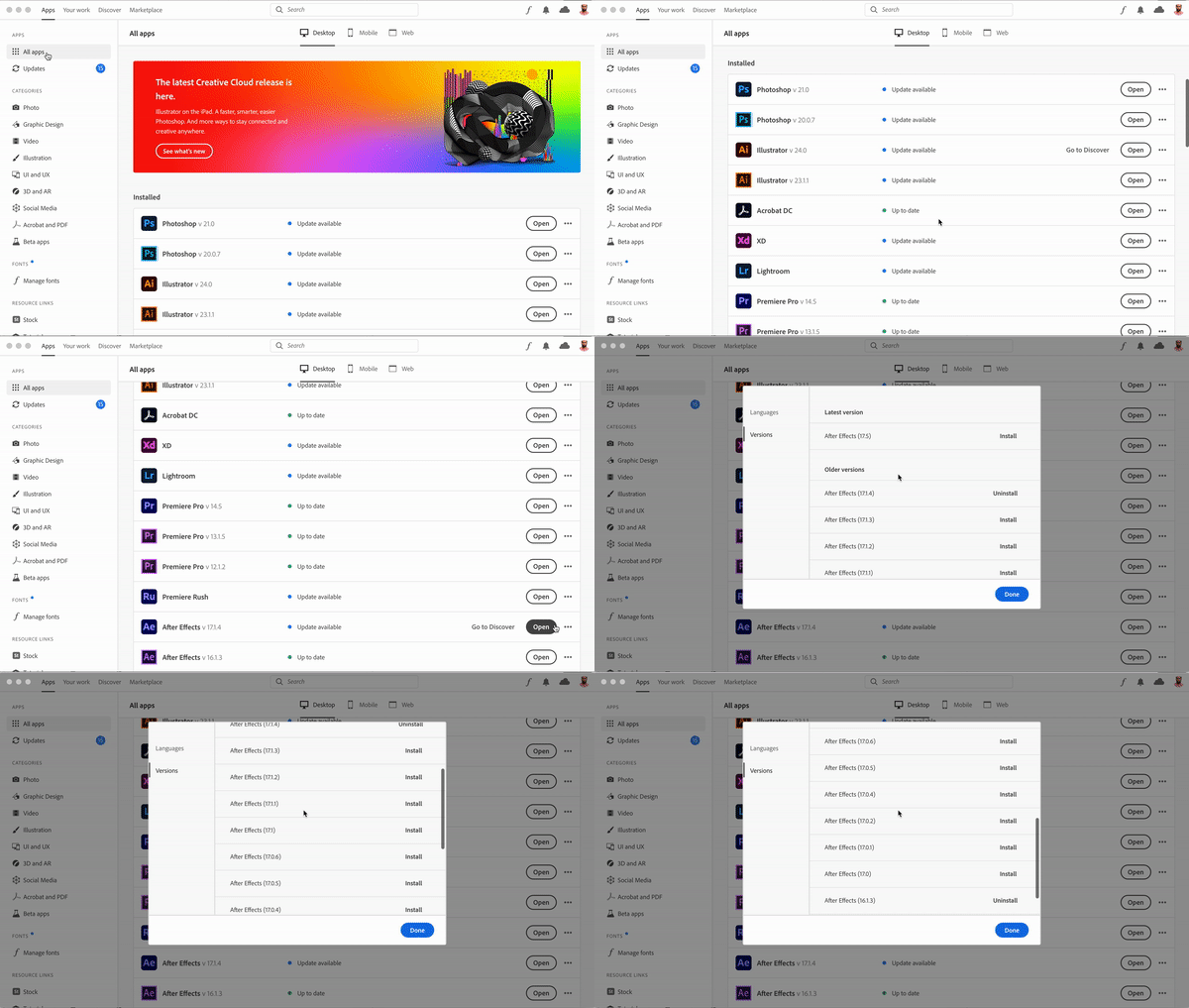
To reinstall any previous version of After Effects, follow these steps:

  1. Open the Creative Cloud desktop application.
  2. Click on the All Apps tab.
  3. Find After Effects in the list and click the three-dot menu on the right.
  4. Click Other Versions and choose the previous version of After Effects that you want to install on your computer.
 

This topic has been closed for replies.

7 replies

Participant
January 15, 2023

I just bought a m1 Mac and downloaded 2023 after effects and the option for other versions is not available! What's going on? 

Participating Frequently
October 24, 2022

CC updated itself, then auto-updated to 2023 and uninstalled the previous version on several systems.

I contacted support and was told I could only get the base installer for 2021 (18.0). We are in the middle of production using 18.4.6 and are unable to update even after installing 18.0 and turning on "Show Older Apps". I really don't understand why Adobe can't just keep a repo of the last few versions available, especially for paying customers with lots of licenses.

Participant
July 29, 2022

i want to downgrade from after effects 2021 to 2020 or 2019, (versions 17.5 or 16.1) but when i go into creative cloud > "other versions" all it goes down to is version 18.0 and when it says "looking for older versions?" i click on view more and scroll to see the later versions, after effects doesn't appear and i don't know how to get a later version of after effects. can someone please help me download version 17.5 or 16.1? 

Participant
July 18, 2022

Hello. I was having the same problem as everyone bceause when I clicked on the 3 dots the option "Other versions" didn't show up. I tried unistalling my current version of After Effects and was going to install it again. Before installing AE again, I clicked on the 3 dots again and the option "Other versions" showed up. I hope it helps.

Participating Frequently
October 6, 2021

Previous versions... to a point. How do we download versions not available in the list because we need certain plug-ins that run with certain versions? E.g I need access to AE2019 and I can't get it that I can see.

jordanc41251314
Participant
April 29, 2021

Hellow, I talked with Customer Services about the versions problems and they sent to me a link to download After effect and right now is running well on Mac OS 10.13 High Sierra After Effect 2020. And Encoder too!! 

Participant
May 1, 2021

Can you share the link?

Participant
November 27, 2021

yeah the link would be handy?


felicityb47879604
Participating Frequently
March 17, 2021

For me, the 3 dots just say "Learn More" which takes me to general info about the app. Anyone know where I can find the older versions? 

ctimpson
Participant
June 12, 2022

Realizing this is an old thread - but if you go into your settings in Creative Cloud (click on your profile icon in the corner), go to Apps, and turn on the setting that says "Show Older Apps". Should be able to click the three dots and install older versions after that 😄

Participating Frequently
July 9, 2022

Hi ctimpson, I have that option selected, but I am still unable to see any of the older apps.