
Participant
December 28, 2018
Answered

Flipping a Keyframe Chart

  • December 28, 2018
  • 1 reply
  • 7293 views

I need to flip my keyframes for opacity.

I am using the graph to align the keyframes and I need to flip them all to exactly their opposite values.

So all the ones on 100 percent opacity need to go to 0, 90 to 10 etc.

The reason it has to be flipped precisely is because it is coordinated with other animations.

I am quite new to after effects.

I would appreciate any help, thanks.
This topic has been closed for replies.
Correct answer Roei Tzoref

not such a feature in Ae in a native way.

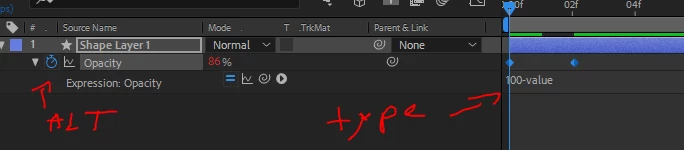
you can do this with an expression, but it will apply to all the keyframes in that property.
type: 100-value in the expression text field.

if you need certain keyframes to do that, you can do this manually or create/find a script that does this.

1 reply

Inspiring
December 28, 2018

This is very easy to do with the command "Time-Reverse Keyframes." You can select your keyframes, right-click on one of them, mouse down to "Keyframe Assistant," and choose "Time-Reverse Keyframes."

This command doesn't have a keyboard shortcut assigned to it by default, but you can add your own by going to the Keyboard Shortcut Editor (Edit>Keyboard Shortcuts), searching for "Time-Reverse" and applying one. I use Cmd/Ctrl+Shift+R.

Participant
December 28, 2018

Appreciate the help mate but as far as I am aware that is only changing the x values so its putting the end to the start etc. (I think)

I need the Y values themselves flipped and the X to stay the same, do you know of any way to do this?

I am unsure if flipped is the right word.

Like for everywhere it is at 90 percent opacity. I need it to be 10 on the same x point.

For everywhere it is at 14% I need 86%. With x point remaining the same.

Appreciate the help.

Roei Tzoref
Roei TzorefCorrect answer
Legend
December 28, 2018

not such a feature in Ae in a native way.

you can do this with an expression, but it will apply to all the keyframes in that property.
type: 100-value in the expression text field.

if you need certain keyframes to do that, you can do this manually or create/find a script that does this.