
Participant
April 28, 2020
Question

Font size defaults to 1px in Essential Graphics (AE mogrt > PrPro) 2020

  • April 28, 2020
  • 1 reply
  • 2238 views

I hope this isn't a newbie oversight, but I created a simple lower third in After Effects and exported an mogrt allowing source text editing and font size adjustment. When I use this mogrt in Premiere Pro, the font sizes for both text layers default to 1 pixel (which is, for all practical purposes, invisible). Should these assume the size at which they were exported? If not, is there a way to set a default?


Expoting from After Effects:
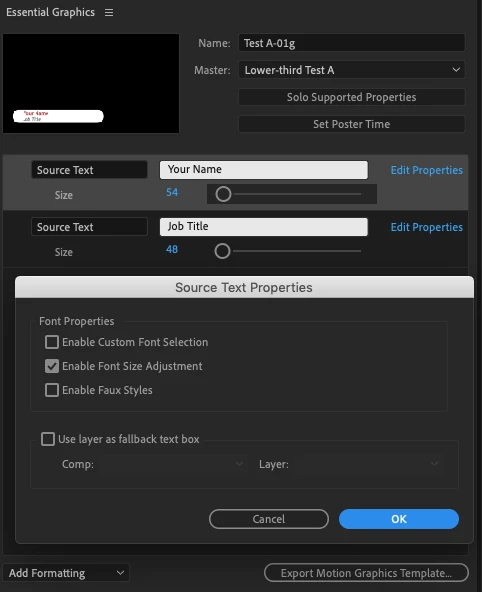
 

Editing in Premiere Pro:


As a side note, I've had some success adding a slider and whipping it to the scale of the text, but this seems like a roundabout solution given that the font size adjustment is just a checkbox away in the text properties. Also, from a cat-herding—I mean, production—standpoint, it's easier to get people to think in terms of "52 pixels" rather than "108% of 48 pixels."

Thanks for any help.


After Effects 2020 v17.0.2 build 26

Premiere Pro 2020 v14.0.0 build 572

MacBook Pro 2017 / Mojave 10.14.6

This topic has been closed for replies.

1 reply

Community Expert
April 29, 2020

Make sure you set the font size to the one you want in AE before you save your MOGRT.

alexnbnjAuthor
Participant
April 29, 2020

Hi Rick, and thank you for your quick reply.

In trying to balance clarity and brevity I may not have been clear. But my screenshots were intended to indicate (without showing the full step-by-step process) that I had set the two lines of text in the AE file to 54 and 48 before exporting the mogrt, yet when I brought that template into Premiere Pro it rendered the text at 1px and 1px.

If PrPro respects the font size in mogrt files exported from AE for others, then maybe there's something wrong with my installation.

Your suggestion makes perfect sense, except it's not working for me... curious to hear if this works for others on MacOS or Windows / CC 2020 or earlier versions.

Thanks,

–Alex

alexnbnjAuthor
Participant
May 4, 2020

I tried your AEP in 17.0.6 (AE 2020) saved a MOGRT, opened it in Premiere Pro 2020 and there is nothing wrong with the font sizes. 

The MOGRT is not very useful because you can't change the duration of the layer or the positon - but both of those are pretty easy to fix.


The only thing I can think of is that you are not running the latest build of Premiere Pro. Verify that there are no updates and let us know if that solves the problem. 


Hi Rick and thank you for checking the sample mogrt I sent.  I agree, mine was not much of a lower-third, but I was trying to keep things pretty basic for troubleshooting purposes. (Well, that, and while I'm pretty comfortable in PrPro, I had only dabbled in AE a few years back so I'm kind of starting from scratch.)

For what it's worth, I'm glad to see that the font sizes in my sample worked for you, so on that score, at least, I wasn't doing anything wrong, or missing a step. As you suggest, that calls into question my installation of PrPro. I'm running PrPro 2020 v14.0.0 build 572 on a MacBook Pro (2017) with Mojave 10.14.6.

I'm signed into Creative Cloud and I'm seeing no updates available for AE or PrPro. I tried this file with two of my colleagues and they had the same result (which is not much of a test, since we're all on similar machines with software under the same Enterprise license).

One other thing I'm wondering... if PrPro is up to date on my machine, could it be an issue of font management? It occurs to me that my company used to use Suitcase and now it appears that we have neither Suitcase nor Adobe fonts. I tried installing the font you had used in the four line sample you had sent, and even though I was logged into CC, the Adobe Fonts page for FatFrank told me to subscribe to Creative Cloud to activate. Should I check with our licensing folks? Or is there an update to PrPro that I'm not seeing?

Thanks for your help,

–Alex