

RonaldCz
Inspiring
January 8, 2023
Answered

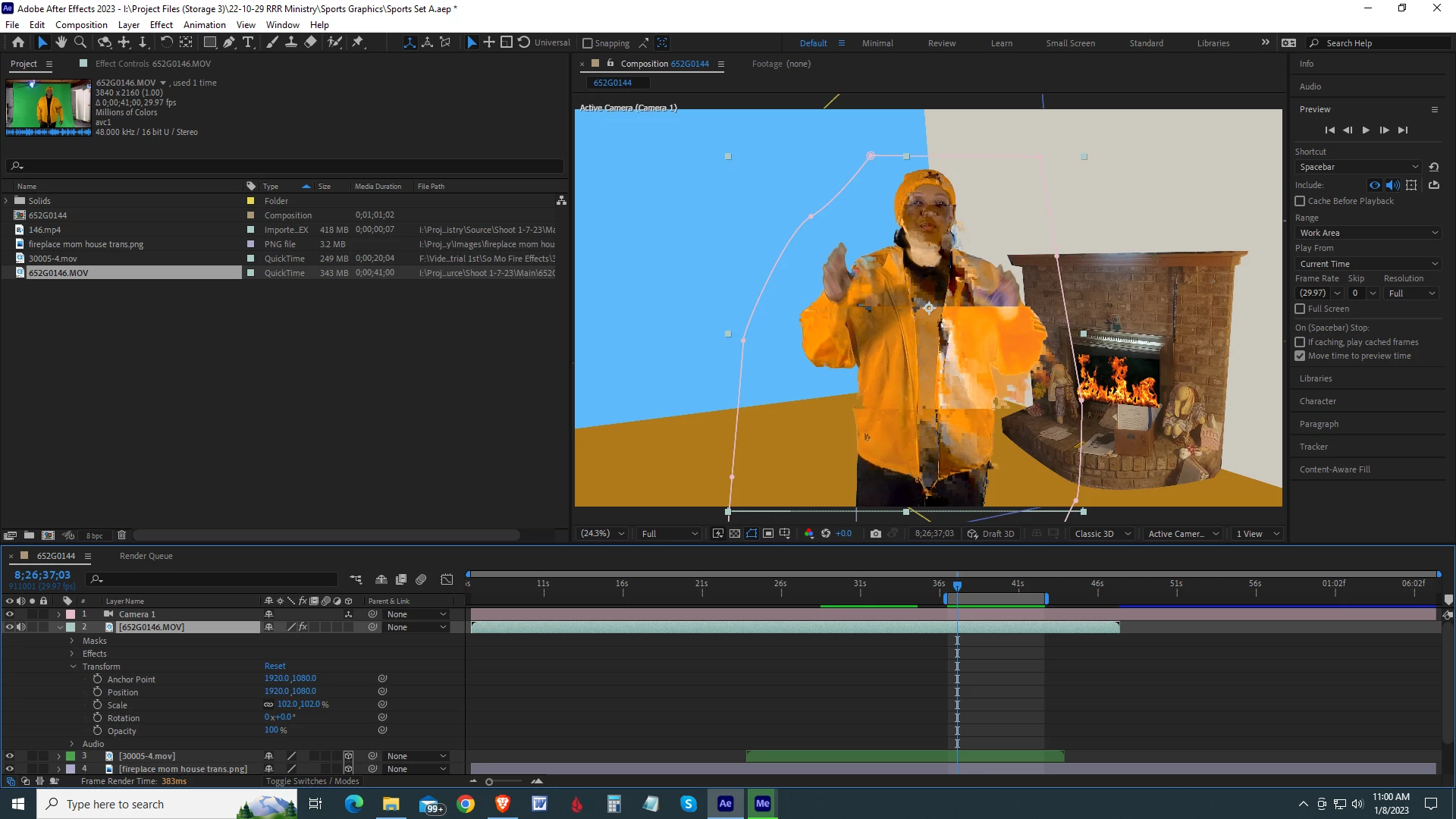
Glitches in Quick time file on timeline

  • January 8, 2023
  • 1 reply
  • 310 views

I loaded in a Quick Time file from my JVC Camera and used the keylight, levels and mask effect. Every project I have glitches in the play back and when I send to media encoder the file seems fine. 

I cleaned out the datebase and Cache. 
When I am  doing playback for client I would like the time line to play clean. 


This topic has been closed for replies.
Correct answer RonaldCz

Yes, That did the trick, Thanks!

1 reply

Mylenium
Legend
January 8, 2023

Turn off hardware accelerated footage decoding in the preferences under Import and see if it improves matters.


Mylenium 

RonaldCz
RonaldCzAuthorCorrect answer
Inspiring
January 8, 2023

Yes, That did the trick, Thanks!

Windows 10 64-bitGigabyte Z490 AORUS Ultra IntelLGA 1200 ATX MotherboardIntel I9-10900K CPU@3.70GHzRAM 16GBNVIDIA GeForce RTX 2070 Super& NVIDIA GeForce GTX 1650