
Inspiring
April 14, 2021
Answered

GPU Effects Error

  • April 14, 2021
  • 3 replies
  • 2265 views

I started a project on Monday, and everything was working fine. Then on Tuesday I have opened the same project and started getting the "GPU effects error". At this point, I can't even use AE anymore.
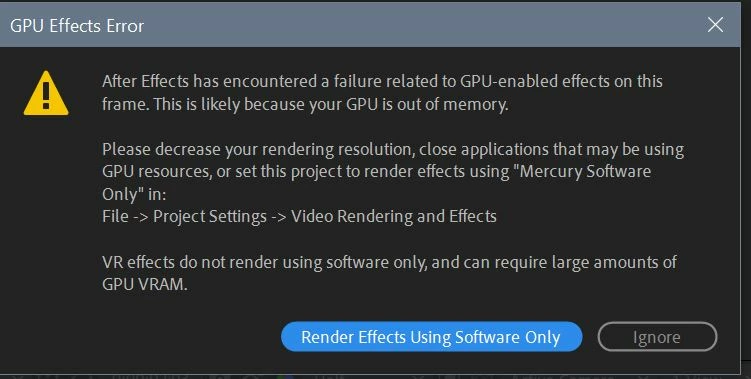
So the problem is not the hardware, like the weak GPU (I have 2xQuadro p4000 cards).

I should mention that after finishing work in After Effects on Monday night, I have installed Octane for c4d demo. It doesn't make much sense that Octane should cause this problem, but that's the only thing I can think of. 

I have tried uninstalling and reinstalling drivers, tried different versions of After Effects, I got rid of Octane of course, but the problem is still there. 

Any ideas how to fix this?

This topic has been closed for replies.
Correct answer Marko K

As it turns out, this GPU Error probably has nothing to do with the Octane installation, it was most likely caused by Keylight 1.2 (4K footage with Keylight applied on multiple layers). Once the "GPU effects error" would pop up, it wouldn't go away regardless of turning off the effect, or reducing preview settings. It would stay with the file somehow, even after purging all Caches and Memory, which made the troubleshooting more difficult.


The solution was in turning off Mercury GPU acceleration in Project Settings, saving, and re-opening. Just turning off GPU acceleration didn't work, it would just give me a "Keylight out of memory error". Here are the steps that I went through to fix each file:


  1. Go to Edit/Preferences/Display, and set "Hardware Accelerate Composition, Layer, and Footage Panels" to off
  2. In Project Settings, under Video Renderings and Effects, select: Mercury Software Only
  3. Save project and close it.
  4. Purge All Memory and Disk Cache under Edit/Purge
  5. Quit AE


Next time the project opens hopefully it will preview without any problems.

3 replies

Marko KAuthorCorrect answer
Inspiring
April 21, 2021

As it turns out, this GPU Error probably has nothing to do with the Octane installation, it was most likely caused by Keylight 1.2 (4K footage with Keylight applied on multiple layers). Once the "GPU effects error" would pop up, it wouldn't go away regardless of turning off the effect, or reducing preview settings. It would stay with the file somehow, even after purging all Caches and Memory, which made the troubleshooting more difficult.


The solution was in turning off Mercury GPU acceleration in Project Settings, saving, and re-opening. Just turning off GPU acceleration didn't work, it would just give me a "Keylight out of memory error". Here are the steps that I went through to fix each file:


  1. Go to Edit/Preferences/Display, and set "Hardware Accelerate Composition, Layer, and Footage Panels" to off
  2. In Project Settings, under Video Renderings and Effects, select: Mercury Software Only
  3. Save project and close it.
  4. Purge All Memory and Disk Cache under Edit/Purge
  5. Quit AE


Next time the project opens hopefully it will preview without any problems.

Known Participant
July 8, 2021

GPU Support in AE is less than satisfactory in my opinion. at this point it is really misguiding to label the product suitable for professionals.

Mylenium
Legend
April 15, 2021

Without actualk crash info and other technical details nobody can tell you much. Chances are that installing Octane replaced a system DLL and you're missing that, but who's to say? As a start you could at least try and completely force-remove your graphics driver via device manager, then reboot. Maybe reinstalling after that will yield soem improvement.


Mylenium

Marko KAuthor
Inspiring
April 15, 2021

Actually After Effects is not crashing, it is just giving me the error message, so there is no crash info. What other technical details can I make available? Please let me know and I'll try to get it for you.


I have actually removed the driver through the device manager, but upon reboot nvidia driver automatically reinstalled itself. I will check if there is a way to prevent that, and give it a try again. Thanks for suggestion.

P.M.B
Legend
April 15, 2021

You can't use After Effects anymore?  What happens when you choose one of the two options you're offered?

~Gutterfish
Marko KAuthor
Inspiring
April 15, 2021

I am able to start After Effects and open the files, but it can't really preview anything, instead it starts giving me a GPU error after a few frames, if any. So it is not offering me any options, it just doesn't work.