
ralphm55625938
Participating Frequently
January 10, 2020
Frage

green screen

  • January 10, 2020
  • 1 Antwort
  • 695 Ansichten


Hi,


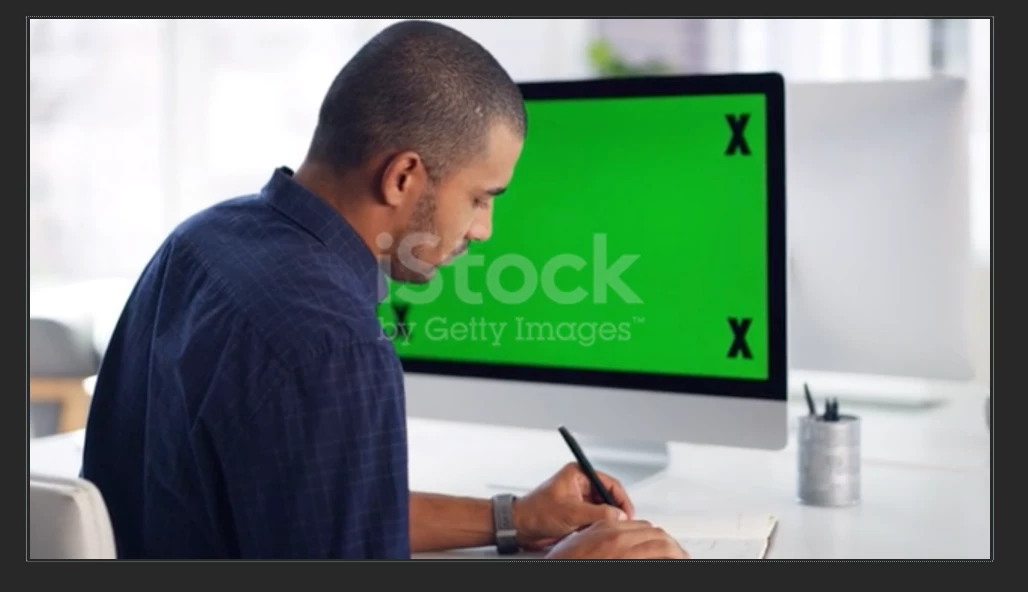
i try to insert a capture (or motion) into this green screen, but i can't, even with mocha, because the man hidde two corners of the green screen. I just can't track the screen.


Can somebody explain me how to insert a picture or a video (a composition, whatever) into this green screen please ?


Do i need to use rotopencil ?

Dieses Thema wurde für Antworten geschlossen.

1 Antwort

Community Expert
January 10, 2020

You don't need anything but Mocha. You adjust the surface so that the rectangle matches the screen by just guessing where the top and bottom left corners of the screen are, verify that the track looks good in Mocha bu inserting an image or something like the grid, then you apply Corner Pin to the replacement layer below the footage instead of above, then use Keylight to cut a hole in the top layer. You'll have to animate some masks to hold out the X's that were added to the screen. If you ever need to shoot something like this, tracking markers are completely unnecessary and the greenscreen actually makes it more difficult to do a believable composite.


Here's what the Mocha Screen and the Comp would look like:

There are dozens of tutorials, good ones, on the Borris FX site for Mocha and Mocha AE that detail this workflow. If there were no tracking markers on the screen there would be no need for the Outside Mask in Keylight. I've tried to show you everything you need to do.


Boris FX Mocha YouTube Chanel

Stick with the Boris FX tutorials because there are a lot more incomplete and misleading tutorials presented by enthusiasts on YouTube than there are good ones by professionals. Vet Your trainers. 

Here's a good intro by Evan Abrams:

ralphm55625938
Participating Frequently
January 13, 2020

Thank you Rick,

your explications are very clear, but i even have difficulties to use mocha. I must confess i'm beginer in after effects, AND french, that's certainly why i still have difficulties to do it.


I've already seen the boris's vidéo, especially this one, and there's a lot of questions still in my mind. But i have a vidéo to deliver next monday, so i will have to learn how to do it

Community Expert
January 14, 2020

Yes, i've read it and understood it after wirting my post. But even i've made a mask animated, sometimes it appears.


here's my result. Lot of thing are going wrong : the blur of the keylight, and my animated mask that don't hide the marks....


You just have to fix the mask keyframes. It takes some care.