
Inspiring
July 2, 2013
Answered

Hardware accelerated views have been disabled because they are not compatible with remote desktop

  • July 2, 2013
  • 10 replies
  • 31723 views

Just started getting this error after updating to CC and latest NVIDIA drivers:
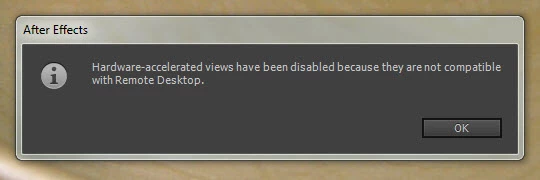
I don't run Remote Desktop. After this message appears, the checkbox in my preferences is disabled:
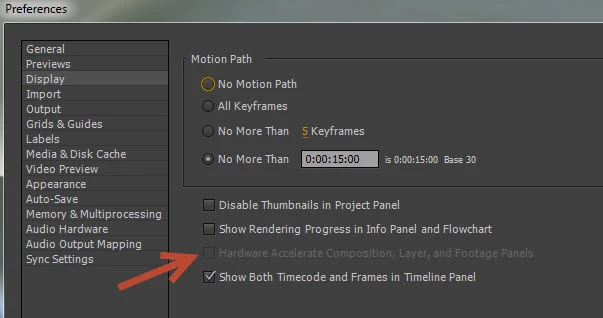
If I reboot my computer, the checkbox is again enabled, but then the error message about the remote Desktop appears, not right away, but after several minutes.

Details:

Windows 7 Pro

Intel i7 CPU X980 @ 3.3GHz

24GB RAM

GeForce GTX 680, Driver 320.49

AE CC 12.0.0.404

Thanks for any help.

    This topic has been closed for replies.
    Correct answer Roei Tzoref

    Yup, getting this bug still.

    Hold on. this thread up until your recent response did not have the option to try the new update which came out yesterday. Ae 14.1 is supposed to resolve this issue. January 2017 Update to After Effects CC Is Now Available | Creative Cloud blog by Adobe

    please make sure your are using 14.1 and see if this works and report back.

    10 replies

    Participant
    October 11, 2017

    14.2 update and I still get this error message when trying to render.

    windows 10 pro

    Participant
    January 23, 2017

    I'm am still having this issue and all my products are updated to 14.1. I tried restarting and reconnecting but still having no playback.

    My build:

    windows 10 pro; using Remote Desktop

    intel i7-7700k 4.20ghz

    ram: 32gb

    evga  Nividia geforce gtx 1070

    PoMaf
    Known Participant
    January 23, 2017

    Hi austinh42392785, if you are actually using Remote Desktop it might not be a bug or error for you; what you're trying to accomplish might actually just not be supported by After Effects through Remote Desktop. At least for my use case, I wasn't using Remote Desktop but still getting the notification - now they cleared that up. I'm not using Remote Desktop -> I'm no longer receiving a message about Remote Desktop not working.

    Everybody's use case is different - if you can use AE without Remote Desktop, do you still get the info pop up?

    PoMaf
    Known Participant
    January 19, 2017

    what do you know, this is an error/bug that gets called out by name in the latest update AE 14.1. Installing it now, lets hope the update resolves it!

    Participant
    January 19, 2017

    Yup, getting this bug still.

    Adobe, this is ridiculous. When a bug like this has been in effect for 5 years, and you've made no effort to fix it, despite releasing multiple versions of the program, you're not doing your job.

    We pay to use this software, do your jobs and make it work. This is unacceptable. They get away with it because they're the industry standard and it's ridiculous.

    Roei Tzoref
    Roei TzorefCorrect answer
    Legend
    January 19, 2017

    Yup, getting this bug still.

    Hold on. this thread up until your recent response did not have the option to try the new update which came out yesterday. Ae 14.1 is supposed to resolve this issue. January 2017 Update to After Effects CC Is Now Available | Creative Cloud blog by Adobe

    please make sure your are using 14.1 and see if this works and report back.

    JTruxon
    Participant
    January 13, 2017

    January 2017, the bug is alive and well.

    Participant
    November 3, 2016

    Just installed Nov 2 2016 update. Never seen this error before today. Just got it after Win+L locking my machine.

    Participant
    November 9, 2016

    Yup, just updated my AE this morning, I go to lunch and lock my computer and got this error message when I got back.

    Participating Frequently
    December 6, 2016

    ...and mine has just started doing this after recent update to 2017.0. Never done it before, and nothing else on win 10 pc is different as far as I know.

    To 'fix' as stated above: Close and re-open AE, then go Edit > preferences > display and I can tick the hardware check box again... until my PC auto locks due to inaction (corporate policy that I have no control over) Then I have to do it again. Maybe I just need to keep on working so it doesn't lock.

    Known Participant
    August 25, 2016

    Three years after the original post, I'm still having this problem.

    Windows 10 Anniversary Update. AE 2015.3. Computer never sleeps but display goes to sleep after 20 min.

    Szalam
    Community Expert
    Community Expert
    August 25, 2016

    I had this pop up yesterday too, but it doesn't usually happen on my system. I haven't figured out what was different this time. Did you have any GPU-accelerated effects in your project or did you have your comp set to use the ray-traced renderer instead of the classic renderer? Does this happen all the time for you?

    If we can't figure it out, we should all file bug reports about this so Adobe knows about it and can fix it. (Bug report form here - give as much info as you can.)

    Known Participant
    August 25, 2016

    I dont have any of the standard AE gpu accelerated effects in the comp, but do have Optical Flares. No AE Raytracing. I'm only using AE to update an old project. Fusion has been much faster and generally more stable. After opening AE again after having not used it for a while, the decision to move to Fusion appears to have been a good one.

    Ae_Kyeong
    Participant
    May 6, 2016

    I am getting this message with latest after effects version. Has this been resolved?

    Szalam
    Community Expert
    Community Expert
    May 6, 2016

    Does it happen when you lock your machine? Does the workaround in this thread solve it for you? What OS version are you using? What is the exact version number of AE that you're using?

    Ae_Kyeong
    Participant
    May 7, 2016

    Windows 10, AE cc 2015.2 (just updated two days ago, but problem was occuring before the update), gtx 970, i7, 32 gb.

    I'm not sure I'm understanding that there was a fix for this in this thread. I shouldn't allow my computer sleep when using AE?

    Inspiring
    September 22, 2014

    im put my workstation in sleep mode and woke it up to the same message? my first day try the cc trial?

    Participating Frequently
    July 29, 2013

    I have the exact same error as the post above.

    • Windows 7 Professional (64 bit)
    • AMD Athlon II X4 635 @ 2.9 GHz
    • 16 GB RAM
    • GeForce GTX 670, driver 320.49
    • After Effects CC 12.0.0.404

    Thanks, in advance.

    TaverinoAuthor
    Inspiring
    July 29, 2013

    Yep, the problem remains for me, too. My NVIDIA driver is now 326.19.

    Can anyone help?

    Inspiring
    September 2, 2014

    Thanks, caiblack!

    I can confirm that Win+L to lock the system is what is causing the problem. At least I'm glad to finally know the cause! I should probably submit a bug report to Adobe since I also rely on locking my PC.


    This is happening to me, over a year later (CC 2014.0).  It makes hardware acceleration unusable.  Do developers at Adobe never lock their systems?