Participant
January 16, 2019
Answered

Help morphing shapes of a very complex multi-shape?

  • January 16, 2019
  • 1 reply
  • 2007 views

HI!

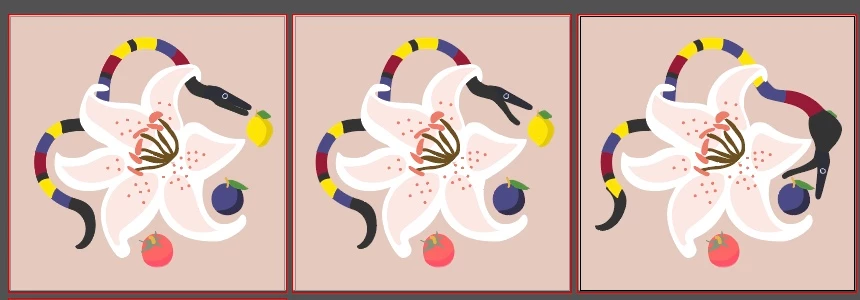
I am having a hard time wrapping my head around the steps in after effects to animate my vector object (from AI).

- The snake is multiple shapes

- I know I can easily animate it a long a path if I make it one straight object and create a path for it to slither along on , but how do I morph the shapes when it eats the different fruit?

Ive thought of making different vectors for each major phase of the animation then pasting them in as a mask but the complexity of the shapes is whats stopping me? I'm a beginner trying to self learn animation so any help would be greatly appreciated!

This topic has been closed for replies.
Correct answer sorinadesigns

Rick! thanks so much for responding.

So I followed your advice with the plugin (I don't have a budget but I found a free alternative, omino snake). I have the snake moving a long a path but the tricky thing is how to transform the shape while using the plugin? When it eats the lemon the round shape has to stay where the lemon currently is while the snake continues slithering.

Ive considered

a. Adding an effect like bulging at a specific time but none of my effects are translating while the plugin is being used!

         1. So my plan of using time remapping for the jaw/eyes/tounge wont work as well

b. thats all I got!

When you said a lot of careful work, what did you think would get the snake to transform in shape?

Thanks in advance,

Sorina

1 reply

Community Expert
January 17, 2019

If you have a little budget think about BAO Boa - aescripts.

Just redraw the snake as a straight horizontal graphic and use a mask path to wind the snake through the layers.

There is no automated or easy way to distort the existing snake drawings and seamlessly morph one into another as they move around the object, it just takes a lot of careful work. 

sorinadesignsAuthorCorrect answer
Participant
January 22, 2019

Rick! thanks so much for responding.

So I followed your advice with the plugin (I don't have a budget but I found a free alternative, omino snake). I have the snake moving a long a path but the tricky thing is how to transform the shape while using the plugin? When it eats the lemon the round shape has to stay where the lemon currently is while the snake continues slithering.

Ive considered

a. Adding an effect like bulging at a specific time but none of my effects are translating while the plugin is being used!

         1. So my plan of using time remapping for the jaw/eyes/tounge wont work as well

b. thats all I got!

When you said a lot of careful work, what did you think would get the snake to transform in shape?

Thanks in advance,

Sorina

Community Expert
January 23, 2019

yes because of the plugin it doesn't translate any effects/transformations


That may be why it is free...