

SayedH7
Participating Frequently
September 26, 2021
Answered

HELP. Please help, Audio Import Not Working After Effects MP3
  • September 26, 2021
  • 2 replies
  • 6251 views


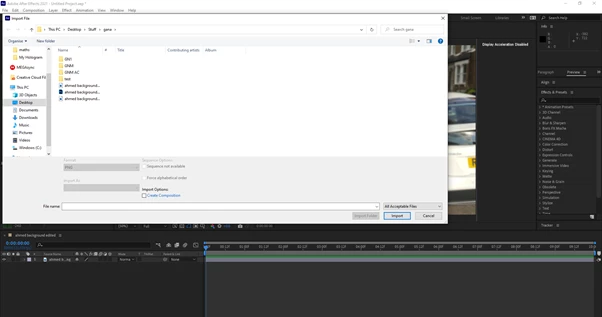
As you can see in the above picture I was trying to import an audio file. You can also see that it doesn't come up, what comes up is 2 picture files and a photoshop file. It is definetely there because when I change All Acceptable Files to All Files it pops up but when I click on it it says bad or unreadable format. After Effects can surely read MP3 so I think I'm doing something stupid. Please help.

This topic has been closed for replies.
Correct answer Rick Gerard

Try dragging the WAV file into the Project Panel. 


You may have a permissions problem on your system. You may have to use the Adobe Cleaner tool to uninstall Creative Cloud, clean your system, and re-install everything. You may have an audio driver problem. 


You have not provided any OS, System, or workflow details so we don't know anything at all about your system. We don't even know if you can import a video that has an audio track. 


Unfortunately, that's about all the ideas I have. 

2 replies

Rick GerardCommunity ExpertCorrect answer
Community Expert
September 28, 2021

Try dragging the WAV file into the Project Panel. 


You may have a permissions problem on your system. You may have to use the Adobe Cleaner tool to uninstall Creative Cloud, clean your system, and re-install everything. You may have an audio driver problem. 


You have not provided any OS, System, or workflow details so we don't know anything at all about your system. We don't even know if you can import a video that has an audio track. 


Unfortunately, that's about all the ideas I have. 

SayedH7
SayedH7Author
Participating Frequently
September 28, 2021

Thank you Rick, I reinstalled After Effects and it worked, didn't even occur to me, thank you

Community Expert
September 26, 2021

There are a bunch of different MP3 formats and compression schemes. Each of the 6 basic MP3 types has many different options. Many are not compatible with After Effects and a lot of other production software.


The standard minimum professional production audio format is 16-bit 48Khz PCM WAV or AIFF format. You can use Audition or even apps like iTunes or Media Encoder to transcode an audio file to WAV format. 

SayedH7
SayedH7Author
Participating Frequently
September 26, 2021

Hi, I did use Adobe Audition and then exported it through Adobe Media Encoder but it didn't work. What settings should I export it as? Thanks

SayedH7
SayedH7Author
Participating Frequently
September 26, 2021

I have already tried MP3, MPEG4 and WAV